
API security testing is the systematic process of identifying and remediating vulnerabilities, such as injection flaws, BOLA, and improper inventory management in publicly exposed endpoints. These risks allow attackers to bypass your backend controls entirely.
To manage these API risks effectively, you must look at API security as a balance of three moving parts:
- Regular Testing: It involves DAST/SAST to find flaws early.
- Threat Protection: It involves real-time behavioral anomalies.
- Access Control: It enforces strict OAuth/JWT and Zero-trust policies.
In this blog, we’ll explore every aspect of API testing in detail, types of API risks, top API testing tools, and best practices to avoid these risk:
Common Vulnerabilities in Different API Types
APIs connect your applications, users, and business systems. The security risks you face depend on how your APIs work, the type of data they handle, and how people use them.
A. REST APIs
REST APIs are popular because they’re flexible and easy to build. But it also means attackers often go after them.
Some common risks REST API risks include:
- Weak authentication and access controls: If your API doesn’t properly check who can access what, an attacker could simply change an ID in a request and see another user’s information.
- Unsafe input: If your API doesn’t handle user input safely, attackers can manipulate your databases or change how your application works. Mass assignment is another risk, where someone could change fields they shouldn’t—like switching their account from “user” to “admin.”
B. SOAP APIs
SOAP APIs use XML for communication, which brings its own set of security challenges if you don’t handle XML safely.XXE attacks. If your XML settings aren’t secure, attackers might access files or even internal systems..
- XML-based denial-of-service attacks: Attackers can send specially crafted XML to overload your system and consume resources.
- Weak message security: If authentication or message protection isn’t set up correctly, sensitive information could be exposed or requests could be tampered with.
C. GraphQL
It lets users request exactly the data they want, but that flexibility can also open the door to abuse.
Common GraphQL risks include:
- Excessive data exposure: Users might be able to access information they shouldn’t see.
- Complex queries: Attackers can send very large or deeply nested requests that slow down or even overwhelm your application.
- Schema exposure: If your API details are public, attackers can learn more about how your system works and plan their attacks.
D. JSON-RPC and XML-RPC APIs
Older or poorly protected RPC APIs can expose sensitive functions if you don’t have strong access controls in place. These APIs are also at risk from weak input validation, XML-based attacks, and abuse of features like XML-RPC pingback.
The main point is that API security isn’t one-size-fits-all. You need to test each API based on how it’s designed, how it’s used, and how it’s exposed to users and systems.
Types of API Security Testing
Securing APIs requires a multi-layered approach during the entire lifecycle. The following core methodologies provide comprehensive coverage, from initial source code to the final running environment.
1. SAST (Static Application Security Testing)
This proactively identifies “red flags” in your own code before the application is even deployed. It is one of the most cost-effective ways to secure an app because the earlier you catch bugs, the cheaper they are to fix.
How it works: SAST tools scan and read your source code, bytecode, or binaries without executing the program. It acts like a high-powered spell-checker for security flaws.
When to use: Use this during the Development Phase. It should run every time a developer commits code to the repository.
Pros:
- Catches bugs while the developer is still typing (the ultimate “shift left”).
- Points to the exact line of code and file where the flaw exists.
- Can scan every single line of code, even sections that aren’t currently being used.
Cons:
- Prone to “False Positives” (flagging things that aren’t actually dangerous).
- It doesn’t understand how the app behaves when it is actually running or configured.
2. SCA (Software Composition Analysis)
Most modern apps constitute other people’s code, including open-source libraries and third-party packages. SCA ensures that these building blocks are safe to use and up to date.
How it works:
- It scans your entire inventory of third-party dependencies (like npm or Maven packages).
- It identifies the versions you are using and checks them against global databases of known vulnerabilities (CVEs).
When to use: Use this continuously throughout the lifecycle. It should be part of your build process and monitored in production as new vulnerabilities are discovered daily.
Pros:
- Quickly identifies high-risk vulnerabilities in code you didn’t even write.
- Helps manage license compliance (ensuring you aren’t using “illegal” open-source code).
Cons:
- It only finds “known” vulnerabilities; it cannot find a brand-new bug in a library that hasn’t been reported yet.
- Requires constant updates to the vulnerability database to be effective.
3. IAST (Interactive Application Security Testing)
IAST provides a high-speed way to find vulnerabilities by watching the application from the inside while it is actually running.
How it works: It “rides along” inside the running application using sensors (agents) to identify vulnerabilities in real-time as the code executes. It analyzes the data flow and execution path simultaneously.
When to use: Use this during the Testing/QA Phase. It plugs into existing test suites without much extra work, providing instant feedback while you perform your normal functional tests.
Pros:
- High level of accuracy with very few false positives compared to SAST.
- Provides instant feedback to developers during functional testing.
Cons:
- Can slightly slow down the performance of the application while the sensors are active.
- It only scans the parts of the code that your functional tests actually trigger.
4. DAST (Dynamic Application Security Testing)
Dynamic Application Security Testing adopts a “black box” approach where the tester knows nothing about the internal code and attacks the running app exactly like a real hacker would.
How it works: It targets the web-exposed endpoints of the running application. It sends malicious-looking requests (like SQL injection) to see how the API responds from the outside.
When to use: Use this in a Staging or Test Environment before going live. It is the best way to see how your application holds up against an external attack surface.
Pros:
- Finds configuration mistakes (like weak passwords or open ports) that code-scanners miss.
- Doesn’t care what language the API; it only cares about the response.
Cons:
- It happens late in the cycle, making bugs more expensive to fix.
- It cannot tell you the exact line of code that is broken; it only knows the “door” was open.
5. RASP (Runtime Application Self-Protection)
RASP is your final line of defense. It lives inside your production app to watch for suspicious behavior and stop attacks as they happen.
How it works: RASP monitors the app during execution and can block an attack on the spot. It understands the app’s context, so it can tell the difference between a real user and a malicious script.
When to use: Deploy this in your Production Environment. While it involves setup before deployment, its primary job is active defense during real-world usage.
Pros:
- Excellent for catching “Zero-Day” exploits (attacks that haven’t been discovered yet).
- Provides a safety net if a vulnerability was missed during the earlier testing phases.
Cons:
- If misconfigured, it could accidentally block legitimate users.
- It requires a high level of trust in the tool, as it has the power to shut down parts of your app.
Related Article: SAST vs DAST: Differences, When to Use Each, and Different Tools
How to Perform API Security Testing
API security testing follows a structured process that evaluates authentication, authorization, data exposure, and error handling to verify secure behavior under normal and abnormal conditions.
The approach varies by role: developers focus on functionality, security engineers test for exploitable flaws, and leadership prioritizes business risk and compliance.
Phase 1: API Recon (Mapping the Attack Surface)
Before you can test an API, you need to understand what you’re dealing with. This means mapping its attack surface: endpoints, inputs, behaviors, and hidden functionality.
Start with API endpoints as they are the entry points where the API receives requests. Each endpoint maps to a resource or action.
- Example: GET /api/books returns a list of books, while GET /api/books/mystery returns a specific category.
- Goal: Find as many endpoints as possible.
Understand how APIs work. Once endpoints are identified, the next step is figuring out how to interact with them properly.
You need to follow on the following parameters:
- Input data: Required and optional parameters.
- Request types: Supported HTTP methods (GET, POST, PATCH, DELETE, etc.).
- Data formats: JSON, XML, or others.
- Authentication: API keys, tokens, OAuth, etc.
- Rate limits: How frequently requests can be sent.
- Why it matters: This helps you build valid requests—and more importantly, know where to break them.
Phase 2: Finding Hidden Documentation
Even if docs aren’t public, you can still discover them by exploring the application. Documentation isn’t always complete or accurate; real-world testing requires digging deeper.
Check for hidden directories like:
- /api
- /swagger/index.html
- /openapi.json
Trace back to base paths.
If you find a deep link like /api/swagger/v1/users/123, then check the parent folders:
- /api/swagger/v1
- /api/swagger
- /api
Where to look:
- Application traffic: Use proxy tools to watch the data flow.
- JavaScript files: These often contain hidden endpoints.
- URL patterns: Watch for patterns like /api/, /v1/, or /internal/.
- Why it matters: Automated tools help, but manual exploration often reveals what scanners miss.
Phase 3: Interacting & Manipulation
Once you identify endpoints, start sending requests and observing responses.
- Change things like HTTP methods, parameters, headers, and content types.
- Pay close attention to error messages as they often provide useful clues.
A. Testing HTTP Methods
An endpoint may support multiple actions depending on the method used. Trying different methods can expose hidden functionality.
- GET /api/tasks: Fetch tasks
- POST /api/tasks: Create a task
- DELETE /api/tasks/1: Delete a task
B. Testing Content Types
APIs may behave differently based on input format. For example, JSON may be handled securely while XML may introduce vulnerabilities like XXE. Changing the Content-Type header can:
- Trigger unexpected errors.
- Bypass validations.
- Reveal processing differences.
C. Finding Hidden Endpoints & Parameters
- Once you identify patterns, you can guess additional endpoints. If you see PUT /api/user/update, try variations like /api/user/delete or /api/user/reset.
- You can also discover hidden parameters by adding new ones to requests and observing response changes.
Phase 4: Identifying Dangerous Flaws (Mass Assignment)
This phase focuses on high-impact vulnerabilities where the API’s internal logic can be exploited to change data you shouldn’t have access to.
Mass Assignment
This happens when APIs automatically bind request data to internal objects without strict validation.
The Test Case:
- Update request: You send a standard update. PATCH /api/users/123 { “username”: “wiener”, “email”: “[email protected]” }
- Observe the response: You notice an extra field you didn’t send. { “id”: 123, “name”: “John Doe”, “isAdmin”: false }
- The Attack: Try adding that field to your request: PATCH /api/users/123 { “username”: “wiener”, “isAdmin”: true }
If the server doesn’t properly validate input, elevating the privilege risks turning a normal user into an admin.
API Security Testing Checklist: Tips And Best Practices
Here are the following most important API security testing best practices for OWASP API security risks:
1. Broken Object Level Authorization (BOLA/IDOR)
Test whether users can access or modify objects (records) belonging to other users by manipulating identifiers (IDs, UUIDs, slugs) in requests (GET, PUT, DELETE, PATCH). Try horizontal (same role) and vertical escalation.

2. Broken Authentication
Verify authentication mechanisms cannot be bypassed, replayed, or brute-forced.
Test weak or hardcoded password policies, credential stuffing, missing token expiration/revocation, insecure token storage (e.g., in localStorage), algorithm confusion (none/HS256/RS256 tricks), and session fixation.

3. Broken Object Property Level Authorization (Mass Assignment & Excessive Data Exposure)
Check if clients can read or write sensitive properties they shouldn’t access (e.g., adding isAdmin=true or seeing other users’ PII/email/SSN).
Test both responses (over-exposure) and requests (mass assignment).

4. Unrestricted Resource Consumption (Rate Limiting & DoS)
- Attempt to exhaust resources via rapid requests, large payloads, deep GraphQL queries, or infinite loops in parameters.
- Test missing or weak rate limiting, quota bypassing, and resource-intensive operations.

5. Broken Function Level Authorization
Verify that administrative or privileged endpoints cannot be accessed by regular users (horizontal/vertical privilege escalation).

6. Unrestricted Access to Sensitive Business Flows
- Test whether critical business actions (e.g., coupon redemption, order placement, voting, ticket purchase) can be automated/abused at scale.
- Attempt scripted enumeration, race conditions, or bulk operations.

7. Server-Side Request Forgery (SSRF)
- Supply attacker-controlled URLs in parameters (image URLs, webhooks, import features) and check if internal services, metadata endpoints (e.g., AWS metadata), or cloud resources can be reached.
- Test blind SSRF with out-of-band techniques.

8. Security Misconfiguration & Input/Output Handling
- Scan for missing security headers (CORS, CSP, HSTS), verbose error messages leaking stack traces/sensitive info, default credentials, unnecessary HTTP methods, outdated TLS versions, and improper input validation/sanitization.
- Test Fuzz parameters for injection (SQL/NoSQL, command, LDAP, etc.), deserialization, and schema violations.

9. Improper Assets / Inventory Management & Unsafe Consumption of APIs
- Test for shadow/deprecated APIs (via discovery tools), lack of versioning enforcement, and insecure calls to third-party APIs.
- Additionally, check if the API consumes external APIs without proper validation, certificate pinning, or output sanitization.

10. Unsafe Consumption of APIs
- Send malformed, oversized, or malicious third-party responses to verify your API properly sanitizes and validates all incoming external data before processing it.
- Test if your API enforces strict TLS validation and authentication, ensuring it never blindly trusts external endpoints or unverified third-party services.
For a deeper dive into these strategies, API Security Checklist: Expert Tips And Practices can be a helpful resource.
Top API Security Testing Tools
API security has moved way beyond just checking endpoints and it’s all about visibility. The focus has shifted to knowing exactly what’s running in your environment—and understanding the context to catch weird behavior in real time. The tools people are using right now really reflect that shift. Here are the 11 tools with quick, human-friendly summaries:
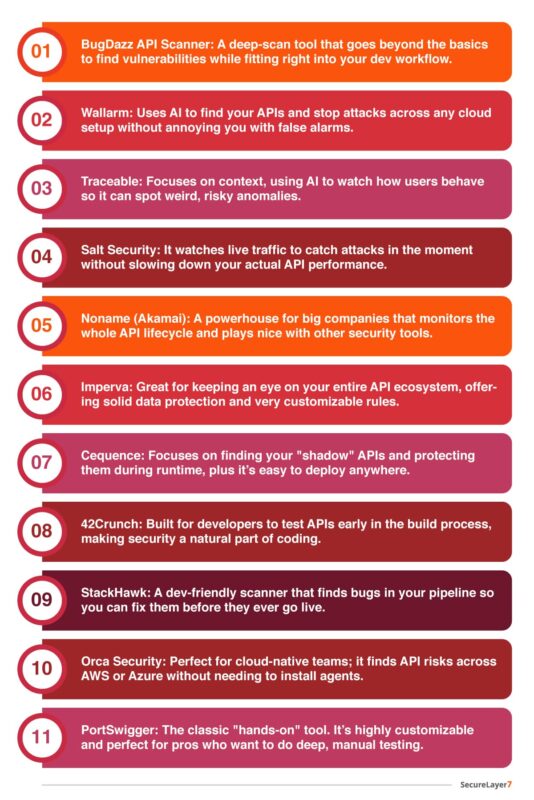
If you’re looking to explore the reviews, features, pros, and cons of these API scanners in detail, this curated list of the best API security scanners will guide you.
Final Thoughts
Modern applications rely on constant connectivity. To protect your data and workflows, your team needs to test APIs regularly and in a structured way. API testing is essential for keeping your business resilient.
By using a thorough API security assessment process, you can reduce serious risks and fix vulnerabilities before they turn into bigger problems for your business.
Looking to strengthen your security posture? SecureLayer7 helps organizations identify vulnerabilities, reduce risk, and defend against evolving cyber threats. Contact our experts to get started.
Frequently Asked Questions ( FAQs)
BOLA occurs when an API endpoint fails to verify if the user has permission to access a specific data object (such as changing an ID in a URL to view another user’s profile, often called IDOR). BFLA occurs when an API fails to restrict access to administrative or privileged functions based on user roles.
APIs are typically “data-first” and expose business logic and backend endpoints directly. Because API requests can be easily automated, manipulated, or replayed using tools like Postman or custom scripts, they require specialized security checks such as payload validation, token hygiene, and fine-grained access control.
