
AI is helping organizations boost efficiency and productivity across many business functions. But as the adoption grows, so does the risk of shadow AI. In this article, we will explain what shadow AI is, how it happens, the risks involved, and the practical steps your organization can take to manage it.
What Is Shadow AI?
Shadow AI refers to employees using AI tools, systems, or platforms to complete tasks without proper IT oversight or security review, creating security gaps. It often starts when someone in your organization uses a generative AI tool to get work done faster.
For example:
- An employee might use a public chatbot to quickly summarize a document or share a screenshot of a dashboard to fix a problem.
- They might turn to coding assistants, AI agents, browser extensions, or public chatbots.
- A product manager uses a GenAI tool to summarize a long product strategy document. As a result, the document’s contents may be processed by Anthropic’s services.
- A graphic designer uses Adobe Firefly to generate designs for the organization’s marketing campaign.
These are common examples of how employees can inadvertently introduce shadow AI risks without realizing the security implications. If this happens, your security team may not be able to adequately protect your data, applications, or access because they lack visibility into these AI tools.
Why It Matters
Shadow AI, like any other security risk, starts from your employees. What’s more worrying is that security teams have no clue which tools employees are using, what information is being shared, where it’s stored, or who can access it later.
These tools may have shadow APIs, third-party libraries, and integrations, which expand the attack surface. This makes External Attack Surface Management more challenging. These gaps can create openings for attackers.
As a result, shadow AI can lead to sensitive data exposure, compliance gaps, security blind spots, and unapproved integrations.
Various studies also confirm how serious the risk is. Ungoverned AI-related security incidents saw a sharp 43 percent increase, according to IBM’s Cost of a Data Breach Report (2026). The report also says that 68 percent of companies had no AI policy to regulate AI use.
What Causes Shadow AI
Shadow AI becomes a problem when your organization’s AI adoption grows faster than its security policies, procurement processes, or governance controls can keep up. Here’s how it typically happens.
#1. A user has a work task
The employee might need to summarize a document, analyze data, translate content, debug code, draft content, or automate a repetitive task. Even if the task is not unusual, employees often use AI to get it done faster.
#2. The user selects a tool
The employee might pick a public chatbot, browser-based AI app, coding assistant, meeting tool, or AI feature built into another SaaS application, even if the tool hasn’t gone through your organization’s usual procurement or security review process.
#3. The user enters business data
An employee might enter sensitive information into an AI platform to complete the task. This could include internal documents, customer records, marketing data, meeting notes, source code, screenshots, credentials, or other business information—often without realizing the risks.
#4. The tool processes the information
The AI application processes the information to generate an answer or complete the task. Your organization may not know how the tool handles prompts, uploaded files, or outputs. It’s often unclear how long the information is retained or what controls are in place for the account being used.
#5. Additional access
The risk grows further when an employee connects the AI tool to another application. An AI assistant might get access to email, cloud storage, documents, code repositories, calendars, or other business apps.
At this stage, the risk spreads to the connected applications too. The AI tool can now pull information from systems the employee already has access to. Because AI systems can use connected tools and take actions, giving these systems too many permissions can create serious security problems.
#6. Security teams lose visibility
With traditional SaaS apps, organizations usually have clear processes for discovering applications, approving vendors, reviewing permissions, and monitoring activity.
Shadow AI makes this harder because security teams may not know which AI tools employees are using or what information they are sending to third-party services. The risk increases further when employees connect AI apps to corporate accounts.
At that point, the AI tool may have access to business data and systems that security teams cannot easily monitor or govern.
Shadow IT vs. Shadow AI
Shadow AI is closely related to shadow IT, but they are not the same.
Shadow IT, such as shadow API, refers to applications or services employees use without going through the organization’s normal approval and security processes.
Shadow AI, on the other hand, specifically involves the use of AI tools or AI features without proper oversight.
For example, uploading a document to an unauthorized file-sharing service creates concerns about where the document is stored and who can access it.
Key Components and Risks of Shadow AI
Shadow AI can involve users, AI models, data, accounts, connected applications, permissions, vendor controls, and your organization’s monitoring systems.
When these elements operate outside the established security processes, your organization can lose control over how AI is used and where business information goes outside.
The key components of shadow AI include the following:
A. Users
Employees, contractors, developers, analysts, and business teams may use AI tools to get their work done faster. Most of the time, they’re trying to be more productive, and their intention is not to bypass security controls.
That’s why your shadow AI program shouldn’t treat every user as a security threat.
B. Data Inputs
AI tools work with the information users provide. This can include prompts, uploaded files, source code, customer information, credentials, internal notes, meeting transcripts, and business records. The type of data your employees enter into a GenAI system should be a key part of your risk assessment.
C. Permissions and Integrations
The risk isn’t just about what employees type into a prompt. It also depends on what systems the AI tool can access, what permissions it has, and what actions it can take on the user’s behalf.
Key Risks of Shadow AI
Employees might enter sensitive information, such as PII, financial records, security findings, intellectual property, proprietary code, or other confidential data.
OWASP’s Top 10 Security Risks (2025) identifies software and data integrity failures as a major security risk.
Additionally, the OWASP Top 10 LLM and GenAI Risks places sensitive information disclosure at number six.
Weak oversight is another serious risk. If an AI tool connects to a user’s work account, it may gain access to files, messages, or other resources that were never intended to be processed by an external application.
Shadow AI also makes risk management more challenging. Security and governance teams can’t manage tools they don’t know about. Without visibility, it becomes difficult to classify risks, enforce data policies, investigate incidents, or demonstrate compliance.
Shadow AI Examples and Use Cases
Shadow AI often shows up in everyday business activities. The productivity benefit is obvious. But if the AI tool isn’t approved, the same activity can expose sensitive data.
A. Software Development
Developers can use AI tools to troubleshoot errors, explain code, and generate solutions. A developer may paste proprietary source code, API details, configuration files, or internal information into an unapproved AI assistant.
This can expose your intellectual property and create additional risks if the generated code contains insecure patterns or uses outdated dependencies.
To reduce this risk, developers should always remove API keys, passwords, access tokens, private certificates, production credentials, and customer information before sharing code with any AI tool.
B. Sales and Marketing
Sales and marketing teams can use AI to create emails, presentations, campaigns, and other content. An employee may upload a prospect list, campaign strategy, or internal positioning document to an AI writing assistant.
The risk depends on the sensitivity of the information, the vendor’s data practices, and whether your organization has approved the tool.
How Can Organizations Manage Shadow AI?
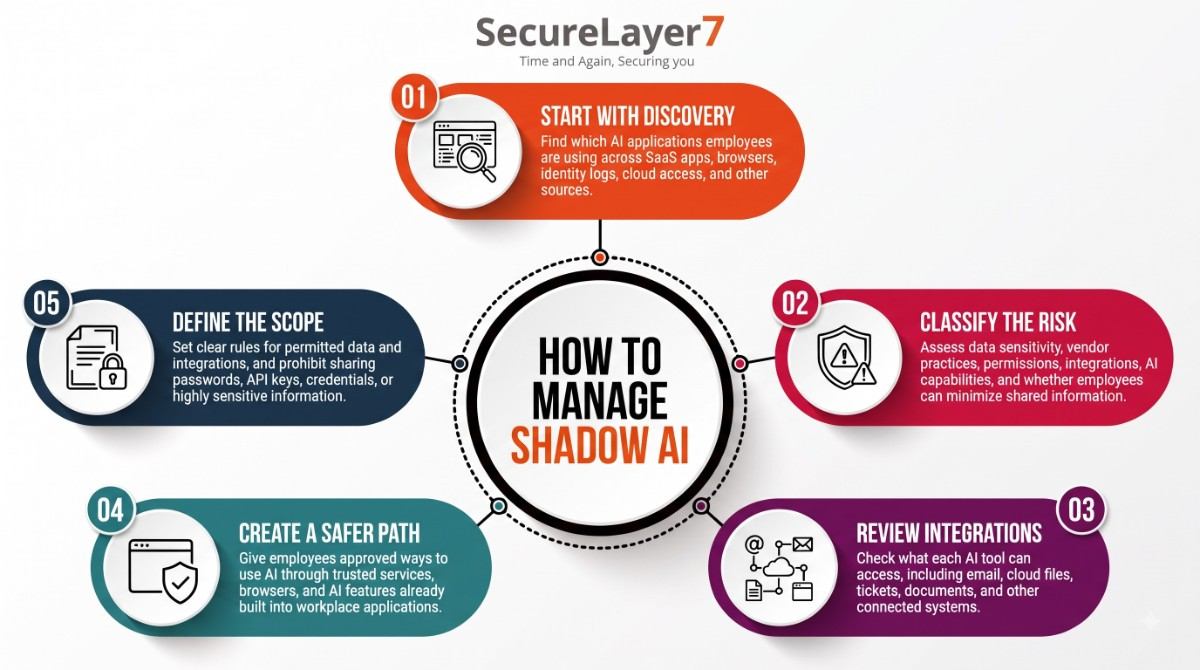
The NIST AI Risk Management Framework provides a useful model for managing AI risks. Its four functions are Govern, Map, Measure, and Manage, and NIST describes AI risk management as a continuous activity across the AI lifecycle.
- Start with discovery: Not all AI tools pose the same level of risk. Organizations should categorize them based on clear risk-classification parameters.
- Audit the enterprise environment by reviewing SaaS applications, browser extensions, identity logs, cloud access, and endpoint activities.
- Detect unapproved GenAI prompt traffic and unauthorized API calls directed to external AI models.
- Classify the risk: Consider data sensitivity, vendor practices, permissions, integrations, and the actions the AI can take.
- Evaluate the sensitivity of the data being input, such as public information, proprietary IP, customer PII, or other confidential data.
- Analyze vendor data practices, including how long information is retained, whether input data is used for model training, and what security controls are in place.
- Differentiate between simple question-and-answer chatbots and high-permission AI agents with read/write access to business applications.
- Employees do not always need to provide an entire document, repository, or customer conversation.
- Establish clear boundaries: It is essential to define a clear boundary about which information could be shared to AI systems.
- Clearly define what business information must never be shared with unapproved AI systems, such as administrative passwords, API keys, and customer databases.
- Specify which third-party integrations and application-level permissions are permitted, restricted, or prohibited.
- Create a safer path for employees: Organizations can provide approved AI services and tools that employees can access through their browsers or within existing business applications. This gives employees a productive way to use AI without bypassing security controls.
- Provision secure corporate AI services through approved browser interfaces or natively integrated enterprise SaaS tools.
- Provide employees with a productive, officially vetted way to use AI safely.
- Invest in continuous training so employees understand the difference between safe, governed AI use and insecure shadow AI practices.
- Define the scope: Set clear boundaries for how employees can use AI, including what data can be processed, which tools can be used, and which integrations are permitted
- Define what information can be processed and which integrations are allowed.
- Employees should never enter passwords, API keys, credentials, or highly sensitive information into an unapproved AI tool.
Conclusion
Let’s accept the reality: shadow AI is not going away. You cannot fully eliminate this risk. The answer is to minimize the risk by establishing proper AI governance and control policies.
You need to work towards providing secure alternatives and invest in training. It is also essential to understand that shadow AI doesn’t always mean employees are ignoring security. Often, it just means employees have found a faster way to get their work done.
Looking to strengthen your security posture? SecureLayer7 helps organizations identify vulnerabilities, reduce risk, and defend against evolving cyber threats. Contact our experts to get started.
Frequently Asked Questions ( FAQs)
It starts with visibility and establishing a clear AI policy for using AI tools. They should not outrightly ban the tool.
It requires monitoring endpoints, browser extensions, and SaaS activities. Discovery tools can help identify unsanctioned GenAI use, such as prompt traffic and API calls to external models.
