
Local File Inclusion (LFI) is a common and dangerous web application vulnerability that occurs when an application improperly handles user-supplied input while including files on the server. This flaw allows attackers to manipulate file path parameters to access sensitive local files such as configuration files, system logs, or application source code.
Because LFI vulnerabilities often exist in applications that dynamically load resources without proper validation, they remain a frequent target for attackers. Understanding how Local File Inclusion works, the risks it introduces, and the importance of secure file-handling practices is essential for developers and security teams.
Local File Inclusion (LFI) in Web Applications
Local File Inclusion (LFI) is a well-known web application vulnerability that arises when an application includes files from the server’s local filesystem based on unsensitized user input. This typically happens in dynamic applications that load pages, language files, templates, or configuration files using parameters such as URLs or form inputs.
When proper input validation is missing, attackers can manipulate these parameters to traverse directories and access unintended files. Despite being a long-standing vulnerability class, LFI continues to appear in real-world applications due to insecure coding practices and legacy design patterns.
Why LFI Remains Relevant in Modern Web Applications
Local File Inclusion (LFI) remains relevant in modern web applications because dynamic file loading is still widely used for routing, templates, localization, and configuration management. When user input influences file paths without strict validation or allowlisting, LFI vulnerabilities are easily introduced.
LFI is frequently exploited as part of chained attacks. Information exposed through LFI – such as credentials, environment variables, or internal paths – can be leveraged to escalate privileges or achieve remote code execution. SecureLayer7’s article on web shell detection investigation and mitigation explains how attackers maintain persistent access after exploiting vulnerabilities like LFI.
High-Level Impact of LFI on Application Security and Data Exposure
Local File Inclusion (LFI) has a significant impact on application security by enabling attackers to access sensitive files that should never be exposed to users. Through LFI, attackers can retrieve configuration files, credentials, source code, and system information, weaken core security controls and provide deep insight into the application’s internal architecture.
Beyond data exposure, LFI often acts as an entry point for more severe attacks. The information gained can be used to escalate privileges, bypass authentication, or achieve remote code execution when combined with other vulnerabilities.
What is Local File Inclusion (LFI)
Local File Inclusion (LFI) is a vulnerability in web applications that allows attackers to include files from the server by manipulating file paths. This can lead to unauthorized access to sensitive files, data exposure, or even remote code execution. LFI exploits occur when user input is improperly handled in file inclusion operations, posing significant security risks. Proper input validation and secure file handling are essential to prevent LFI attacks.
How LFI Occurs Due to Improper File Handling
LFI typically occurs when developers rely on user-supplied parameters to construct file paths dynamically. For example, an application might load content based on a parameter like page=home, which is internally mapped to a file on the server. If the application does not restrict or sanitize this input, an attacker can modify the parameter to traverse directories and access arbitrary files.
Common causes of improper file handling include missing input validation, lack of allowlisting for permitted files, insecure default configurations, and overreliance on user input for backend logic. These weaknesses create an opportunity for attackers to exploit file inclusion mechanisms that were originally intended for legitimate functionality.
Difference Between Intended File Access and Malicious File Inclusion
Intended file access refers to legitimate application behavior where only predefined and trusted files are loaded to support normal functionality. In this case, file inclusion is tightly controlled, limited to specific directories, and independent of arbitrary user input.
Malicious file inclusion occurs when attackers exploit weak controls to include unauthorized files. Instead of loading expected application resources, the system is tricked into accessing sensitive local files or internal components. This misuse transforms a functional feature into a security vulnerability, enabling data exposure, system reconnaissance, or further exploitation of the application environment.
How a Local File Inclusion Attack Works
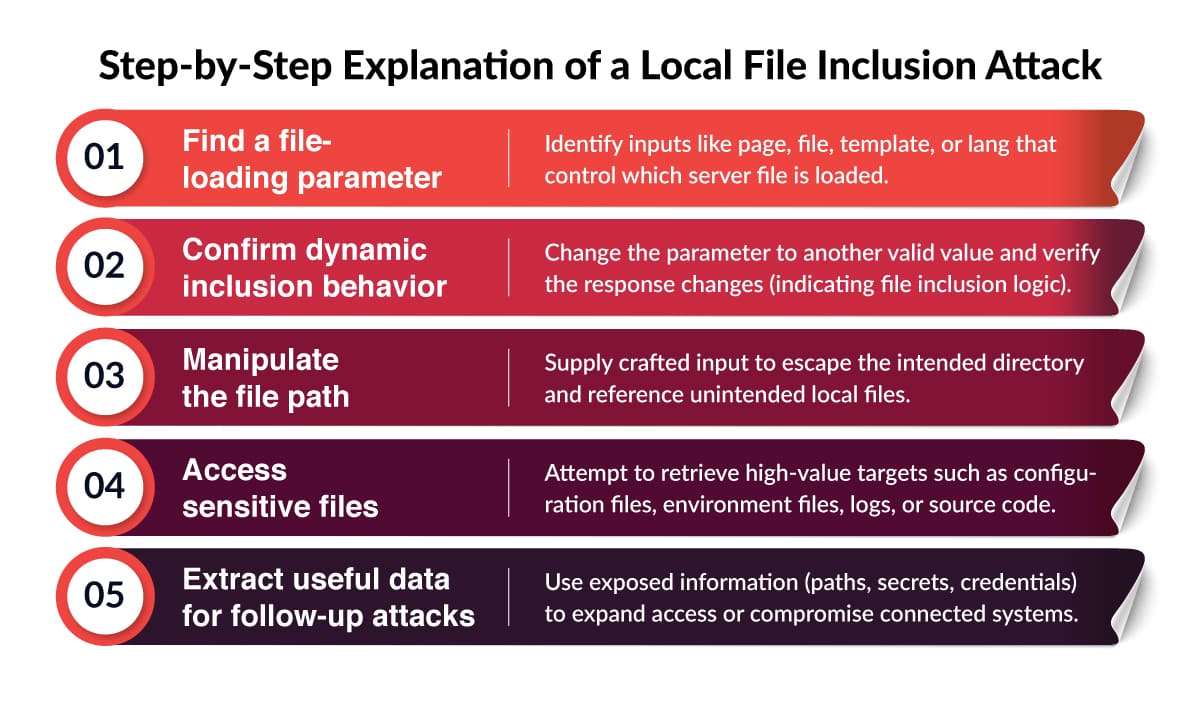
A Local File Inclusion (LFI) attack works by abusing a web application feature that loads files dynamically – such as pages, templates, or language packs – based on user input. When the application fails to validate or restrict that input, an attacker can change the file path to force the server to load unintended local files.
This is often done using directory traversal patterns (moving “up” folders) to reach sensitive locations on the server.
Step-by-Step Explanation of a Local File Inclusion Attack
Role of User-Controlled Input in File Path Manipulation
User-controlled input is the core enabler of LFI. The vulnerability appears when an application uses a request parameter directly (or with minimal checks) to build a file path for inclusion. If the input is not strictly validated, attackers can replace the expected file name with a crafted path that points somewhere else on the server.
Typical weak patterns include:
- Directly concatenating input into a file path.
- Allowing relative paths instead of fixed mappings.
- Attempting to “block” dangerous characters rather than allowlisting valid file names.
Common Application Behaviors Exploited by Attackers
Attackers usually exploit LFI in applications that have one or more of these behaviors:
- Dynamic page loading: Apps that include different content pages based on a parameter.
- Template/theme switching: Systems that load templates, skins, or themes dynamically at runtime.
- Language and localization files: Apps that load translation files and map them to server files.
- Document rendering or preview features: “View file” or “download file” functions that use user input to locate the file.
- Report/export modules: Modules that generate files and then load them for display/download, sometimes with weak path handling.
Common Causes of Local File Inclusion Vulnerabilities
Local File Inclusion (LFI) vulnerabilities usually arise from a combination of insecure coding practices and weak server configurations. While the vulnerability may appear simple on the surface, it is often introduced unintentionally during development – especially in applications that rely on dynamic file loading.
Understanding the root causes of LFI helps developers and security teams identify weak points early and implement effective safeguards.
Lack of Input Validation and Sanitization
Lack of input validation and sanitization is a common cause of Local File Inclusion (LFI) vulnerabilities. When applications accept user input to determine which files should be loaded without enforcing strict validation, attackers can manipulate that input to access unauthorized files on the server.
Many applications rely on weak filtering techniques, such as blocking specific characters or patterns, instead of using allowlists that clearly define permitted inputs. Without proper sanitization, normalization, and server-side enforcement, malicious input can bypass controls and exploit file inclusion logic, increasing the risk of LFI attacks.
Unsafe Use of Include, Require, or File-Handling Functions
LFI vulnerabilities are frequently introduced through unsafe usage of file-handling functions such as include, require, include_once, require_once, or similar mechanisms in other programming languages. These functions are powerful and convenient but become dangerous when combined with untrusted user input.
Developers may dynamically construct file paths using request parameters, assuming only valid files will be referenced. Without proper safeguards, this allows attackers to influence backend logic and force the application to include unintended local files.
Insecure Application and Server Configurations
Misconfigured applications and servers significantly contribute to Local File Inclusion vulnerabilities. Overly permissive file system permissions, exposed configuration directories, and weak isolation between application components can make exploitation easier and more damaging.
Insecure defaults – such as enabling unnecessary features, exposing debug files, or storing sensitive data in web-accessible locations – further amplify the impact of LFI attacks. When application logic flaws combine with poor server hardening, attackers can quickly escalate from simple file disclosure to broader system compromise.
Local File Inclusion vs Remote File Inclusion
Local File Inclusion (LFI) and Remote File Inclusion (RFI) are closely related web application vulnerabilities that stem from insecure file-handling logic. Both involve abusing dynamic file inclusion mechanisms, they differ significantly in how attackers exploit them and in the level of risk they pose.
SecureLayer7 discusses how file inclusion risks overlap with insecure object handling in its article on serialization and deserialization vulnerabilities.
Key Differences Between LFI and RFI
Local File Inclusion (LFI) allows attackers to access or include files that already exist on the target server’s local file system. The attack is limited to files present on the server, such as configuration files, logs, environment files, or application source code. LFI typically relies on directory traversal and improper input validation to reach these files.
Remote File Inclusion (RFI), on the other hand, occurs when an application allows attackers to include files hosted on an external server. This usually happens when remote file inclusion is enabled at the server or language level and user input is directly used to specify file locations.
Why LFI is Often a Precursor to More Severe Attacks
LFI may initially appear less severe than RFI, it frequently acts as a stepping stone to more serious attacks. By exploiting LFI, attackers can gather critical intelligence about the application environment, such as configuration details, credentials, directory structures, and software versions.
With this information, attackers can chain LFI with other vulnerabilities – such as writable log files, file upload flaws, or insecure temporary directories to escalate the attack. In many real-world cases, LFI is used to achieve remote code execution indirectly, making it just as dangerous as RFI when combined with other weaknesses.
Risk Comparison and Exploitation Scope
Risk comparison and exploitation scope highlight why Local File Inclusion (LFI) is considered a serious security vulnerability despite often appearing less severe than other attacks. While LFI may initially be limited to accessing local files, the information exposed such as credentials, configuration data, and internal paths can significantly expand an attacker’s capabilities.
In terms of exploitation scope, LFI is commonly found in modern applications and can be leveraged without authentication in many cases. When combined with other vulnerabilities, it can escalate to remote code execution or broader system compromise.
Real-World Impact of Local File Inclusion Attacks
Local File Inclusion (LFI) attacks are not just theoretical security issues – they have real-world consequences that can severely impact applications, organizations, and end users. What may begin as a simple file disclosure vulnerability can quickly escalate into full system compromise, data breaches, and long-term business damage if left unmitigated.
Exposure of Sensitive Configuration and Credential Files
Exposure of sensitive configuration and credential files is one of the most serious consequences of Local File Inclusion (LFI) vulnerabilities. Through LFI, attackers can access files that store database credentials, API keys, encryption secrets, and environment variables, which are critical to application and infrastructure security.
These credentials can be used to directly access backend systems, databases, or integrated third-party services. Even after the LFI vulnerability is fixed, compromised credentials may remain valid, increasing the risk of long-term unauthorized access and further system compromise.
Escalation to Remote Code Execution
Escalation to remote code execution is a dangerous outcome of Local File Inclusion (LFI) vulnerabilities when combined with other security weaknesses. Although LFI initially allows access to local files, attackers can exploit writable files such as logs or uploaded content and then use LFI to include and execute malicious code stored on the server.
Remote code execution is achieved, attackers gain control over the affected system, enabling them to install backdoors, manipulate or delete data, and move laterally within the infrastructure. This escalation transforms LFI from a data exposure issue into a full system compromise, significantly increasing its severity and impact.
Data Leakage and Compliance Risks
LFI attacks can result in the unauthorized exposure of sensitive user data, intellectual property, and internal documentation. This data leakage can violate data protection regulations and industry compliance requirements, such as GDPR, HIPAA, or PCI DSS, depending on the nature of the data involved.
Failure to protect sensitive information can lead to regulatory investigations, fines, mandatory breach disclosures, and increased scrutiny from auditors and customers. Compliance-related consequences often extend far beyond the initial technical impact of the vulnerability.
How to Detect Local File Inclusion Vulnerabilities
Detecting Local File Inclusion (LFI) vulnerabilities early is critical to preventing data exposure and system compromise. Effective detection typically combines manual testing techniques, automated security scanning, and continuous monitoring for suspicious behavior. Each approach plays a unique role in identifying LFI risks across development, testing, and production environments.
Manual Testing Approaches for LFI
Manual testing is one of the most reliable ways to identify Local File Inclusion vulnerabilities, especially in complex or custom-built applications. Security testers and developers start by identifying parameters that control page loading, templates, language files, or document rendering.
Manual testing helps uncover logic flaws, custom routing issues, and edge cases that automated tools may miss. It also allows testers to validate how the application behaves when unexpected input is supplied and whether defensive controls such as allowlists and path normalization are correctly enforced.
Automated Security Scanning and DAST Tools
Automated Dynamic Application Security Testing (DAST) tools play an important role in detecting LFI vulnerabilities at scale. These tools simulate real-world attacks by automatically injecting payloads into request parameters and analyzing application responses for signs of file inclusion issues.
DAST scanners are particularly useful for continuous security testing in CI/CD pipelines, helping teams identify regressions and newly introduced vulnerabilities. While automated tools may not catch every logic-based flaw, they provide broad coverage and help prioritize areas that require deeper manual review.
Indicators of LFI Exploitation Attempts
Monitoring application and server behavior can reveal early indicators of Local File Inclusion exploitation attempts. Common signs include unusual request patterns, repeated access attempts to sensitive files, abnormal file path inputs, and unexpected error messages related to file handling.
Security teams should also watch for spikes in failed requests, access to system files that are not part of normal application workflows, and anomalous activity in application logs. Proactively monitoring these indicators helps organizations detect and respond to LFI attacks before they escalate into more severe security incidents.
Preventing Local File Inclusion Attacks
Preventing Local File Inclusion (LFI) attacks requires a layered security approach that combines secure coding practices, robust application architecture, and proactive monitoring. Because LFI vulnerabilities often stem from design and configuration flaws, effective prevention focuses on eliminating unsafe file-handling patterns and reducing the application’s exposure to untrusted input.
Strict Input Validation and Allowlisting
Strict input validation is the first and most important defense against LFI attacks. Applications should never trust user-supplied input to directly determine file paths. Instead of attempting to filter out “bad” input, developers should implement allowlists that define exactly which files or identifiers are permitted.
By mapping user input to predefined file references, applications can prevent attackers from manipulating paths or accessing unauthorized files. Consistent validation across all request types – URLs, forms, headers, and APIs – is essential to ensuring that no alternative entry points remain exploitable.
Secure File-Handling and Path Management
Secure file-handling practices significantly reduce the risk of Local File Inclusion. File inclusion logic should rely on fixed directory structures and controlled path resolution mechanisms rather than dynamically constructed paths. Normalizing file paths and resolving them to absolute paths before access helps prevent directory traversal attacks.
Sensitive files should be stored outside of web-accessible directories, and file permissions should be set to the minimum level required. These measures ensure that even if an inclusion flaw exists, the potential impact is limited.
Application and Server Hardening Practices
Hardening both the application and the underlying server environment is crucial for minimizing LFI risk. This includes disabling unnecessary features, removing unused files, restricting access to configuration directories, and enforcing least-privilege permissions across the file system.
Regular security updates, dependency patching, and configuration reviews help eliminate known weaknesses that attackers may exploit in combination with LFI vulnerabilities. Strong isolation between application components further reduces the likelihood of escalation.
Local File Inclusion in Secure Development Practices
Local File Inclusion (LFI) in secure development practices highlights the need to address file-handling risks early in the software lifecycle. LFI vulnerabilities are often introduced through insecure coding patterns, weak input validation, or misconfigured environments, making them preventable with the right development discipline.
By integrating LFI awareness into design, coding, testing, and review processes, organizations can reduce exposure to file inclusion attacks and build more resilient applications from the start.
LFI Mapping to OWASP Top 10 Categories
Local File Inclusion vulnerabilities are commonly associated with multiple categories in the OWASP Top 10, making them especially critical to address. LFI often falls under Broken Access Control, Security Misconfiguration, and Injection-related weaknesses, depending on how the vulnerability manifests.
Because LFI can expose sensitive files, credentials, and internal logic and sometimes escalate to remote code execution, it is frequently treated as a high-severity finding during security assessments.
SecureLayer7’s analysis of the OWASP Top 10 security risks reinforces why vulnerabilities like LFI are considered critical.
Importance of Secure Coding and Code Reviews
Secure coding practices play a vital role in preventing Local File Inclusion vulnerabilities. Developers must be trained to avoid unsafe file inclusion patterns, enforce strict input validation, and use allowlisted file mappings instead of dynamic path construction.
Code reviews are equally important. Peer and security-focused code reviews help identify risky file-handling logic, improper use of include functions, and missing validation controls before code reaches production. Regular reviews ensure that secure design principles are consistently applied across teams and projects.
Incorporating LFI Prevention into the SDLC
Preventing LFI effectively requires integrating security controls throughout the Software Development Life Cycle (SDLC). During the design phase, teams should identify areas where dynamic file access is required and define secure patterns upfront.
During testing, both manual and automated security testing should explicitly include LFI-focused scenarios. Finally, in deployment and maintenance phases, continuous monitoring, configuration reviews, and periodic security assessments help ensure that LFI risks do not reappear over time.
Conclusion
Local File Inclusion (LFI) remains a serious security risk because it can quickly evolve from simple file exposure into credential theft, remote code execution, and full system compromise. Its persistence in modern applications – driven by dynamic file loading, legacy code, and misconfigurations – makes it a critical issue for development and security teams.
Proactive detection, secure coding, and continuous testing are essential to preventing LFI attacks. SecureLayer7 helps organizations identify and remediate LFI and other critical vulnerabilities through expert security testing and secure development practices.
Partner with SecureLayer7 to strengthen your application security posture and protect your critical systems before attackers exploit them.
How SecureLayer7 helps
Frequently Asked Questions (FAQs)
Local File Inclusion (LFI) is a web application vulnerability that allows attackers to read or execute files located on the server by manipulating file path inputs handled insecurely by the application.
In a local file inclusion attack, an attacker exploits user-controlled input – such as file or page parameters to force the application to load unintended local files, often using directory traversal techniques.
A common LFI example is when an application dynamically includes files using a URL parameter without validation, allowing attackers to access sensitive files like configuration files or system logs.
LFI involves accessing files already present on the local server, while Remote File Inclusion (RFI) allows attackers to load files from external servers. LFI is often used as a stepping stone to more advanced attacks.
LFI is dangerous because it can expose sensitive data, credentials, and configuration files, and in some cases be escalated to remote code execution through techniques like log file poisoning.

