
What is a Web Shell?
A web shell is a malicious script used by attackers to compromise a web server. Once it’s deployed on the server, they can run commands, change files, steal data, or even install more malware through simple web requests.
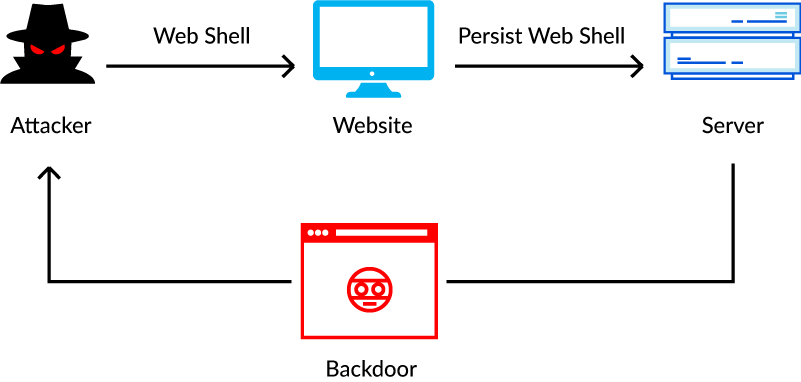
This is dangerous as attackers can keep coming back through the web shell, they don’t need to identify a new vulnerability every time.
Attackers usually plant web shells using weak spots in web applications, insecure file uploads, or by changing existing scripts on your server. Once it is installed, they can do anything with the server’s permissions in a few commands.
Most web shells are written in languages like PHP, ASP.NET, JSP, or Python. What they can do depends on how they’re built. Some let attackers run operating system commands using functions like exec or system in PHP.
Some other kinds of web shells are designed to read or change files, or access databases.
It works differently from a normal shell you access with SSH. Instead, attackers send commands through a script that’s available over the web. Since these requests use the same HTTP or HTTPS ports as regular website traffic, they can blend in and be tough to detect unless you’re monitoring closely. But just because a web shell uses standard web ports doesn’t mean it can always get past your firewalls or other security tools.
Well-known examples include China Chopper, C99, and WSO. Attackers often try to hide their web shells by making the code hard to read or by encrypting their communications, which makes detection and analysis more difficult for your team.
MITRE ATT&CK classifies web shells under T1505.003: Web Shell, a persistence technique. Attackers can use them to maintain access to a compromised server and, depending on the environment, steal credentials, exfiltrate data, or move to other systems on the network.
Your security team can spot web shells by looking for things like strange scripts in your web folders, files that have been changed without approval, odd requests to unknown URLs, or the web server suddenly running command-line tools. Checking these signs together can help you figure out if your server has been compromised.
Why Web Shells Matter
Recently, web shell attacks have been reported frequently, and they have impacted several industries. In many instances, attackers have exploited vulnerabilities in web applications and servers, taking advantage of weaknesses in Internet-facing systems. They allow hackers to bypass authentication mechanisms and can compromise PAMs, resulting in data theft, system manipulation, and lateral movement across networks.
It’s essential to note that Privilege Access Management strengthens system defenses and limits unauthorized control, and minimizes the impact of unwanted intrusions. Therefore, weakening of PAMs is not at all good for web security.
Web shells can also target a vast array of servers and evade detection because they use obfuscation and encryption. These capabilities make them extremely powerful.
How Web Shell Attacks Work (Lifecycle Model)
A web shell is a malicious script that lets an attacker interact with your compromised web server. Once it’s in place, the attacker can keep coming back, run commands, change files, and use your server as a starting point for more attacks. How much damage they can do depends on the permissions of the account they compromise, how your server is set up, and what security controls you have in place.
A typical web shell attack unfolds in four main stages.
1. Establishing Persistent Remote Access
Attackers usually install web shells by taking advantage of vulnerabilities in your internet-facing applications, uploading malicious files through insecure forms, or changing existing server scripts. Once the web shell is in place, it acts as a backdoor. This means the attacker can come back any time by sending requests to your application, without needing to exploit the original weakness again.
Some web shells are designed with authentication checks so only the attacker can use them.
Others are hidden using confusing filenames, code obfuscation, or by blending into your existing application files. Attackers often try to hide the web shell from your security scans or erase evidence of how they got in.
If your security team notices unexpected changes in web directories, strange scripts, or suspicious requests to new endpoints, it’s time to investigate. Fixing the vulnerability that let the attacker in is important, but it won’t remove a web shell that’s already on your server.
If your monitoring doesn’t catch suspicious activity across systems, attackers can stay hidden for days or even weeks. They may move from your web server to databases, identity systems, file shares, or other internal services, depending on what they can access.
2. Escalating Privileges
Attackers may attempt to expand their access by exploiting local vulnerabilities, abusing misconfigured permissions, or obtaining credentials with greater privileges. Successful privilege escalation can give them control over additional applications, sensitive data, user accounts, and system configuration.
3. Pivoting to Other Systems
A compromised web server can become a staging point for attacks against other systems. Attackers may inspect the environment, identify accessible hosts, search for credentials, and exploit trust relationships between the server and internal resources.
This activity can continue for days or weeks if monitoring fails to connect suspicious events across systems. Attackers may move from the web server to application databases, identity infrastructure, file shares, or other internal services, depending on the access available to them.
4. Botnet Recruitment and Malicious Resource Use
A web shell often acts as a doorway for more malware, which can link your system to a botnet or let it communicate with attacker-controlled command and control servers.Servers may then participate in distributed denial-of-service (DDoS) attacks, distribute malware, or support other malicious operations. In these cases, the organization suffers more than an initial application compromise: attackers may use its infrastructure to attack third parties, consume resources, disrupt services, and damage its reputation.
Web Shell Attack Lifecycle
Here is the lifecycle model of a web shell attack:
- Reconnaissance: Attackers identify a target such as vulnerable web applications, unpatched software, or misconfigured servers to carry out web shell attacks.
- Initial exploit: Once the target is identified, they try to gain initial access through various tactics like remote code execution (RCE), insecure file uploads, local/remote file inclusion (LFI/RFI), or insecure deserialization vulnerabilities.
- Deployment: Now, they deploy a malicious script (e.g., shell.php) into a web directory or inject code into existing files to establish persistent backdoor entry through HTTP(S).
- Execution: Attackers can now run arbitrary system commands using this web shell interface. They can manipulate files and probe environments.
- Privilege escalation: Next, they elevate from a standard user to an administrative user by exploiting root privileges vulnerabilities.
- Pivoting/Lateral movement: As a result, your system server gets compromised and is used as a launchpad to spread malware or carry out further activities.
- Exfiltration & secondary payloads: Finally, they steal sensitive data, deliver ransomware, install C2 malware, or use the server for botnet operations.
Types of Web Shells
There are several types of web shells programmers use, such as PHP shells, Python shells, and ASPX shells. Apart from this, there are architecture based web shells. We have explained them briefly to enhance your understanding:
Programming-Based Web Shells
PHP-based shells
As the name suggests, PHP shells are malicious code written in the PHP programming language that allows attackers to execute remote command execution on a compromised server. Among all types of web shells, PHP shells are the most common.
These shells are different from traditional command-line shells which are accessed through SSH and triggered via a web browser using a specific script or page on the vulnerable server.
With PHP shells, attackers can run operating system commands, manage files, and escalate privilege levels without direct network-level access to the target systems.
PHP is the most common language for web shells due to its ubiquity in web hosting environments and the ease with which system-level commands can be injected and executed within PHP code.
PHP shells are considered dangerous as they can convert a minor web server vulnerability into a serious stealthy backdoor entry for attackers. They grant long-term unhindered access, enable exfiltration, and allow attackers to move laterally in the system.
They even empower attackers to launch further cyber attacks, such as DDoS or malware distribution using the victim’s infrastructure. This makes them a special security concern for PHP-run sites and applications.Once planted,
PHP shells can serve as the initial foothold for privilege escalation, data theft, and network-wide compromise. Code obfuscation, encoding, and legitimate-looking filenames make discovery difficult for traditional security controls.
Let’s understand this with an example:
A minimal PHP web shell might look like this:
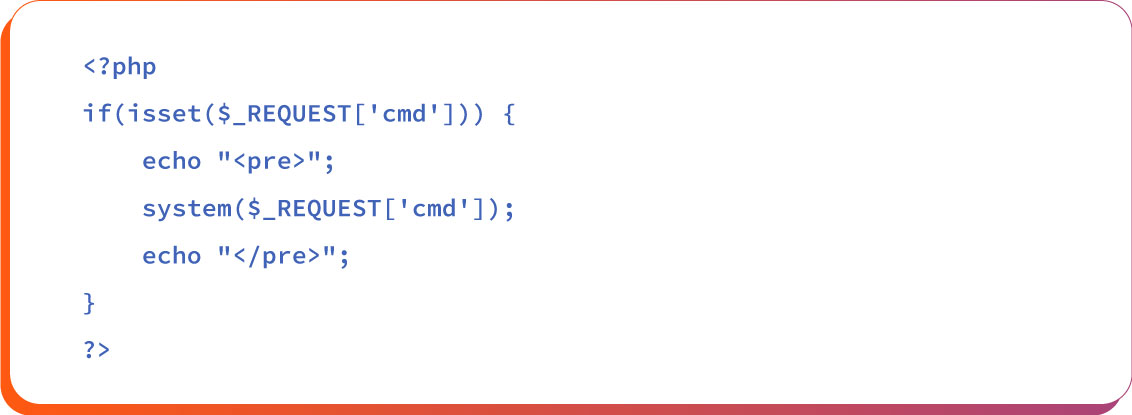
The above script, when injected into a web server, allows attackers to execute arbitrary shell commands by passing them via the cmd parameter in the URL.
Accessing the URL https://example.com/shell.php?cmd=ls lists directory contents, and ?cmd=whoami may reveal the web server’s runtime user.
However, this is just a simple example. Using more sophisticated shells like C99 or B374K allows file managers, credential harvesters, and network scanners to expand the attack surface even further.
ASPX shells
ASPX shells are types of malicious web shells written in the ASP.NET programming language, which is a server-side web application framework. Their purpose is to provide remote command execution capability to attackers on a vulnerable web server.
These shells are deployed on servers running Internet Information Services (IIS) and are executed within the .NET runtime environment.
After being installed, an ASPX shell allows an attacker to run arbitrary commands on the web server. They can manipulate files, execute PowerShell scripts, and potentially escalate privileges to fully control the server.
ASPX is particularly used in Microsoft environments. Post-integration with the .NET framework, it allows obfuscation and encryption. Advanced threat actors like Clop have used ASPX shells to maintain access after exploiting vulnerabilities in applications like Microsoft Exchange.
Python shells
Python-based shells are malicious scripts written in the Python programming language. They usually sit behind frameworks like Flask or Django. Here is an example of a Python shell:
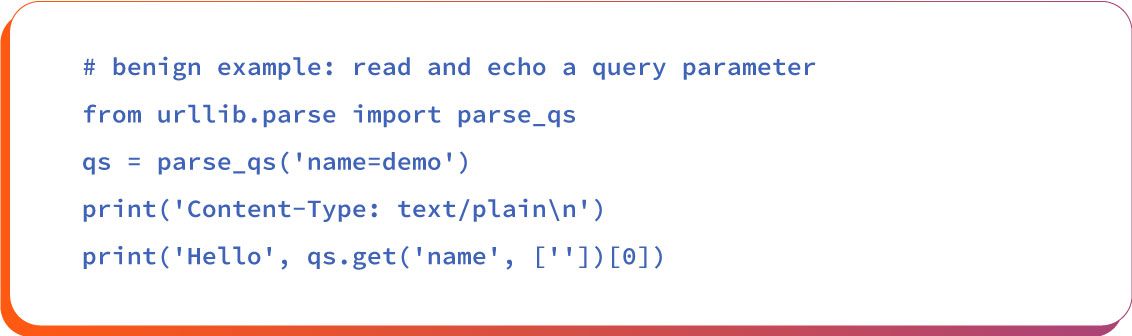
This Python/CGI script has a query parameter from the URL that is parsed using parse_qs. It demonstrates how web servers handle input data, how weak validation can be abused, and why sanitizing input is important.
Architecture/Complexity-Based Web Shells
Web shell attacks come in different forms, each designed for specific goals like quick access, long-term control, or stealthy operations.
Simple Web Shells
Simple web shells are basic scripts written in common web languages like PHP or ASPX. They work by calling system functions directly through a web browser. While these web shells are easy to deploy and execute, they are also easier to detect through standard monitoring tools.
However, skilled attackers often modify or obfuscate these scripts to evade detection, making even simple shells a serious threat if not addressed with timely patching and continuous server auditing.
Complex Web Shells
These are more advanced and loaded with extensive functionalities like file browsers, database access, and system info viewers. Some of them even have a full dashboard-like interface.
Notable examples are WSO, C99, and B374K. Complex web shells provide attackers full control over the server and are difficult to detect due to built-in encryption and obfuscation.
Persistent Web Shells
These web shells are designed to stay hidden for a long time. Attackers use tricks like auto-reinstalling the shell, hiding it in system files, or setting up backup copies. These are often used in long-term attacks where the server acts as a base for spying or launching further attacks.
These web shells are designed to stay hidden for a long time. Attackers use tricks like auto-reinstalling the shell, hiding it in system files, or setting up backup copies. These are often used in long-term attacks where the server acts as a base for spying or launching further attacks.
They often include backdoors, covert communication channels, and encrypted data exfiltration routines that allow attackers to carry out espionage activities, credential harvesting, and lateral movement across networks over extended periods.
Bind Shells
A bind shell opens a port on the hacked server and waits for the attacker to connect. Once connected, the attacker can send commands. But this method often fails because firewalls usually block incoming connections from outside.
The purpose of a bind shell is to open a port on the hacked server and wait for the attacker to connect. Once connected, the attacker can send commands. But the problem with this method is it often fails because firewalls usually block incoming connections from outside.
Network Address Translation, intrusion detection, and ISP filtering also commonly disrupt bind-shell connections, making them unreliable for sustained access.
Reverse Shells
Instead of waiting for a connection, the server reaches out to the attacker’s machine. This bypasses firewall rules that block incoming traffic. It’s a popular method because it uses normal-looking outbound connections, making it harder to catch.
Double Reverse Shells
This type splits the communication into two separate channels: one for sending commands and another for receiving results. It makes detection harder since the traffic doesn’t look like a typical shell session and can be disguised as regular web activity.
Real-World Examples of Web Shell Attack
The following real-world cases illustrate how web shell attacks can lead to data breaches and cause persistent threats:
Example # 1: China Chopper
In 2021, the Hafnium APT group used a JScript version of the China Chopper web shell to exploit four zero-day vulnerabilities in Microsoft Exchange Server.
This allowed them to gain global access to email systems. This occurred because an unpatched exchange server loophole allowed remote code execution and organizations failed to apply updates promptly, leaving systems exposed.
The China Chopper incident resulted in the widespread compromise of email data across thousands of organizations, resulting in massive theft of data.
Example # 2: Update Checker
In 2025, attackers used a web shell called UpdateChecker.aspx to compromise Microsoft IIS servers and gain full remote control. The campaign relied on weak input validation and heavy obfuscation to slip past detections; once placed, the script enabled command execution, data theft, and lateral movement.
It’s a sharp reminder that unpatched servers and sloppy input handling give attackers a foothold and that adversaries keep refining stealth and persistence techniques to evade traditional defenses.
How to Detect Web Shell Attacks
Detecting web shell attacks is not that easy as it works quietly. But still there are some ways to identify them during various phases.
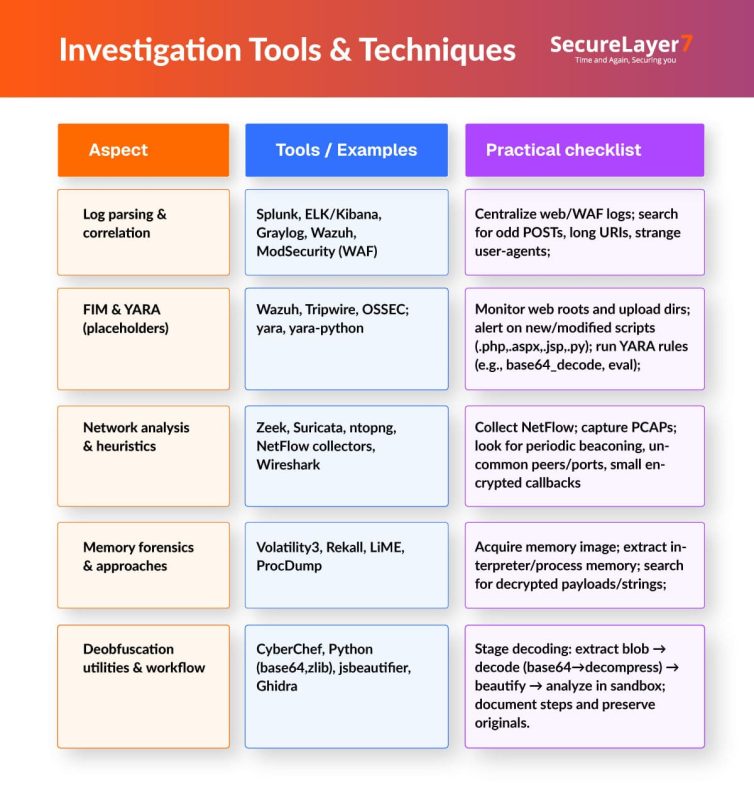
Phase 1: Log analysis (Web logs, WAF, SIEM)
Logs are the footprints of activities and it has to be taken and studied seriously.
- View long, encoded strings in URLs like base64, hex, or gzip, especially in GET or POST. Flag requests to static files (.txt, .jpg, .html) that suddenly accept parameters.
- Monitor and track user-agent activity. Set your WAF to record anomalies, not just block, and detect suspicious command patterns.
Phase 2: File system monitoring (FIM, YARA)
Files are the home of web shells. Therefore, treat them like a backyard. In this phase, security teams should look for any suspicious file activity, such as new scripts suddenly appearing, file permissions being changed, or existing files being edited at odd hours.
Using tools like File Integrity Monitoring (FIM) can help by alerting when a file is added, deleted, or modified. Once something looks strange, YARA rules are used to scan those files for known malicious patterns. .
Phase 3: Network traffic analysis (NetFlow, PCAP, beaconing)
It reveals the true extent of web shell compromise. Tools like NetFlow quickly surface unusual peer connections and suspicious outbound flows pointing to command and control (C2) activity.
PCAP (Packet Capture Analysis) can help identify encoded payloads, low-and-slow beaconing that often elude log-based detection. These can be identified by spotting patterns of regular callbacks at odd intervals, encrypted sessions to unknown destinations, or spikes in nonstandard ports.
Tools And Tactics for Detection
Here is a list of tools and best tactics for detection of web shell risks:
Best Practices For Web Shell Attack Prevention
Web shell attacks are difficult to identify and prevent, but there are ways to do this. Below, Here is a list of the best practices for prevention of web shell attacks:
Secure coding & upload handling
- Validate file content using MIME type (Multipurpose Internet Mail Extensions) and magic bytes to prevent spoofed malicious files.
- Store uploaded files outside the web root and serve them through secure handlers to prevent direct execution.
- Rename files with random identifiers and sanitize input to block path traversal and brute-force attempts.
PHP/Runtime hardening & configuration controls
- Disable dangerous functions like exec, shell_exec, system, and passthru in php.ini to limit code execution risks.
- Set strict resource limits for execution time, memory, and upload size to mitigate DoS and shell exploitation.
- Disable PHP execution in upload directories and turn off directory browsing to reduce attack surface.
WAF tuning & custom rules
- Create custom signatures to detect and block web shell patterns like eval, assert, base64_decode, and encoded payloads in requests.
- Implement rate limiting and IP reputation filtering to disrupt automated shell deployment and C2 beaconing.
- Regularly update WAF rules based on threat intelligence and log analysis to adapt to evolving attacker TTPs.
Anomaly detection & EDR
- Deploy behavioral analytics to detect anomalies in file access, command execution, and network traffic indicative of shell activity.
- Correlate web server logs with EDR ( Endpoint Detection And Response)alerts for process injection, suspicious PowerShell use, or lateral movement.
- Automate response workflows to isolate compromised hosts and trigger forensic collection upon detection.
Automated scanning & continuous validation
- Schedule regular DAST and SAST scans to detect upload vulnerabilities, misconfigurations, and known shell signatures.
- Use file integrity monitoring to detect unauthorized changes in web directories and trigger real-time alerts.
- Conduct red team exercises simulating web shell deployment to validate detection.
Conclusion
The complexity of web shells has increased significantly nowadays, with advanced obfuscation, modular design, and encrypted command-and-control channels making them harder to detect. These sophisticated shells enable attackers to maintain persistent access, escalate privileges, file manipulation, system command execution, database access, and ability to move laterally across networks, significantly increasing the severity of breaches.
Attackers use web shells frequently to launch ransomware campaigns, data exfiltration, and supply chain attacks. But the good news is they can be detected and prevented through a layered defense strategy that includes robust input validation, file integrity monitoring, network traffic analysis, and endpoint detection and response (EDR) solutions. But you need to hire a penetration testing partner with robust capability. Contact us today to know how our team can help you deal with the web shells security risks.
How SecureLayer7 helps
Frequently Asked Questions (FAQs)
They use obfuscated scripts and legitimate system tools, making them invisible to signature-based tools. Only behavior analysis or runtime monitoring can catch them.
Attackers exploit weak validation to upload malicious scripts disguised as images or documents, gaining direct server access if execution isn’t blocked.
Yes, attackers use it as a foothold to move laterally, steal credentials, and access databases, cloud workloads, or internal systems.
