
Password spraying is a credential attack in which an attacker tests a small number of common passwords against many user accounts. This differs from brute-force attacks, which repeatedly target one account; password spraying spreads login attempts across multiple users.
Password spraying is especially relevant to organizations with internet-facing login systems, cloud applications, VPNs, and older authentication protocols. If one password works, the attacker may gain access to email, business applications, internal resources, or other systems available to that account.
This blog explains how password spraying works, which systems it targets, what can happen after a successful login, how security teams can detect it, and how organizations can reduce the risk.
What Is Password Spraying?
Password spraying attacks are a mechanism in which an attacker uses a single common password against multiple accounts on the same application. Password spraying is particularly effective against businesses that share passwords.
Password spraying is easier to understand than brute-force attacks. The main difference is how the attacker distributes password attempts across accounts instead of repeatedly targeting one user.
The attacker does not need to compromise many accounts. One successful login may be enough to gain an initial foothold and access information or applications available to that user.
MITRE ATT&CK classifies password spraying under T1110.003, Brute Force: Password Spraying.
Why Password Spraying Is Effective
Password spraying exploits weaknesses in passwords, authentication controls, account management, and security monitoring. It does not necessarily require a software vulnerability.
It Avoids Account Lockouts
Many systems limit failed login attempts. Instead of repeatedly targeting one account, attackers may try one or two passwords against many accounts, keeping failures per account below the lockout threshold.
However, overly aggressive lockouts can be abused to prevent legitimate users from accessing their accounts.
It Can Blend Into Normal Login Activity
Failed logins are common in large organizations. A few failures against individual accounts may not attract attention. The pattern becomes more significant when authentication events across many accounts are correlated.
It Scales Across Large User Bases
Organizations with thousands of employees, contractors, service accounts, and external users provide a large pool of potential targets. Weak, exposed, or predictable passwords increase the risk.
It Can Be Automated
Scripts and security tools can automate password spraying across large numbers of accounts. Attackers may also spread activity across time or multiple network sources, making detection based only on login volume or source IP less effective.
How Password Spraying Works
A password spraying campaign usually follows a simple pattern. The attacker gathers usernames, selects a small number of likely passwords, and tests those passwords across multiple accounts.
The key difference from brute force is the distribution of attempts. Instead of generating many failures against one username, the attacker generates fewer failures across a larger group of users.
Attack Flow
The first step is usually finding potential usernames. Depending on the target, attackers may obtain them from public employee information, previously exposed data, directory information, or other sources.
The attacker then selects a small set of passwords, including common passwords, default credentials, seasonal patterns, or predictable variations based on information about the organization.
The passwords are tested across multiple accounts. The activity may be spread over hours or days rather than performed in a single burst.
A simplified attack flow looks like this:
- Find usernames: Gather potential usernames from public or exposed sources.
- Select passwords: Choose a small set of common or predictable passwords.
- Test accounts: Try those passwords across many accounts.
- Gain access: A successful login compromises an account.
- Use the access: Access applications, data, or systems available to that account.
Common Tools and Infrastructure
Password spraying can be automated with tools used for credential testing and Active Directory assessments. Examples include Kerbrute, MSOLSpray, and Go365spray.
These tools are not inherently malicious. Security teams and penetration testers may use them during authorized assessments.
Attackers can also distribute authentication attempts across different network sources. Cloud servers, VPNs, proxy services, and other infrastructure may appear in authentication logs during an attack.
For this reason, source IP should not be treated as the only detection signal. Usernames, timestamps, authentication protocols, applications, devices, and authentication results provide additional context.
Targeted Systems and Authentication Surfaces
Password spraying can affect any authentication service that accepts usernames and passwords and provides access to a useful resource. The risk is highest when the service is internet-facing or connects a single identity to multiple applications.
Common targets include:
- Cloud identity and SaaS platforms: Microsoft 365, Google Workspace, and other services that use centralized identity systems.
- VPN and remote-access services: A compromised account may provide access to corporate resources, depending on network configuration and access controls.
- SSO and federated identity services: One compromised identity can provide access to multiple connected applications.
- Webmail and application portals: Internet-facing login pages give attackers a way to test credentials without first gaining access to the internal network.
- Enterprise authentication services: Active Directory, Kerberos, LDAP, RDP, SSH, and other authentication services can also be targeted depending on how they are exposed.
Older authentication methods deserve particular attention because they may not support the same security controls available through newer authentication methods.
The actual exposure depends on the controls protecting each service. MFA, conditional access, rate limiting, account restrictions, network controls, and authentication monitoring can all reduce the usefulness of a compromised password.
The presence of a login page alone does not make a system vulnerable to password spraying. What matters is how credentials are accepted, how failed attempts are handled, whether additional authentication is required, and how the activity is monitored.
Exploited Weaknesses
Password spraying often succeeds because several smaller weaknesses exist at the same time.
Common examples include:
- Weak or predictable passwords
- Passwords exposed in previous breaches
- Missing or inconsistently enforced MFA
- Legacy authentication methods
- Poorly configured rate limiting
- Internet-facing authentication services
- Dormant or unnecessary accounts
- Weak controls around service and contractor accounts
- Limited authentication monitoring
Removing unnecessary authentication methods and accounts reduces the number of places where attackers can test credentials.
Low-and-Slow Spraying and MFA-Related Targeting
Some attackers spread login attempts over a longer period to stay below simple detection thresholds.
They may also examine how an identity system responds to authentication requests. Depending on the provider and configuration, those responses can reveal useful information about accounts or available authentication paths.
MFA reduces the value of a guessed password, but it does not remove the need to protect password resets, account recovery, MFA enrollment, and device registration.
Unusual changes to those areas should therefore be investigated alongside suspicious authentication activity.
Password Spraying in the Attack Lifecycle
A successful password spray does not necessarily end the attack. It can give an attacker an initial foothold from which they can explore the environment, access additional systems, or search for sensitive information. It often results in serious compromises, such as privilege escalation and data exfiltration.
What happens next depends on the permissions associated with the compromised account, the applications connected to it, and the controls protecting other systems.
Initial Access
The immediate objective of password spraying is to obtain valid credentials and authenticate successfully.
A successful login can give the attacker access to applications, data, or internal resources available to the compromised account. The actual impact depends on the account’s permissions and the controls protecting those resources.
A successful login should therefore be treated as a potential security event, particularly when it follows a pattern of failed authentication attempts against multiple accounts.
Accessing Email and Business Applications
A compromised account may provide access to corporate email, collaboration platforms, file storage, SaaS applications, and internal portals.
Email can be particularly valuable because it may contain customer information, financial discussions, invoices, credentials, business plans, and other information that can support further attacks.
The attacker may also use the compromised account to send messages that appear to come from a trusted employee.
Privilege Escalation
The compromised account may have limited privileges. Attackers can then look for exposed credentials, excessive permissions, misconfigured resources, or other weaknesses that could provide greater access.
Password spraying itself is not privilege escalation. It can simply provide the account from which later privilege-related activity begins.
Lateral Movement
If the compromised identity has access to other systems or applications, the attacker may attempt to use that access to reach additional targets.
The scope of this activity depends on network architecture, identity permissions, endpoint controls, administrative boundaries, and the resources available to the account.
Information discovered in email, internal documentation, configuration files, or other accessible systems may help the attacker identify additional accounts or systems.
Data Access
Once an attacker reaches useful systems or applications, the focus may shift toward collecting information.
Potential targets include:
- Customer information
- Financial records
- Intellectual property
- Authentication information
- Internal business documents
- Source code and technical documentation
A single compromised account can create significant risk if it provides access to sensitive information.
Persistence
Attackers may attempt to retain access after the original password is changed. Depending on the environment, this could involve adding an authentication method, modifying account settings, creating accounts, or abusing an existing session.
This is why resetting a compromised password should be accompanied by a review of recent account activity, active sessions, authentication methods, and account changes.
The sequence is not always linear. An attacker may move between these activities depending on what they discover. A successful password spray can therefore be the beginning of a broader intrusion rather than the end of the attack.
Password Spraying vs. Other Credential Attacks
Password spraying is often confused with other credential attacks. The distinction matters because each technique produces a different authentication pattern.
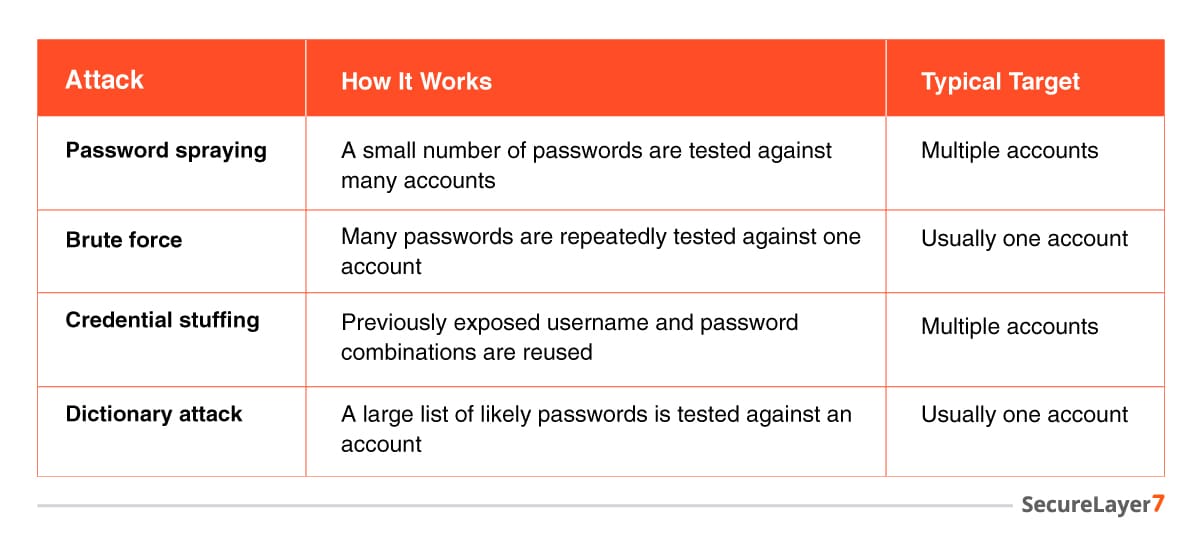
A high number of failures against one account may point toward brute force. A smaller number of failures spread across many users is more consistent with password spraying.
Credential stuffing is different because the attacker is typically using known username and password combinations obtained from previous breaches rather than guessing common passwords.
Real-World Password Spraying Attacks
Publicly documented incidents show how password spraying can affect enterprise and government environments. They also demonstrate why weak credentials, exposed authentication services, and gaps in identity management remain important security concerns.
Microsoft Exchange Online Password Spraying Campaigns
Microsoft and other security organizations have documented password spraying campaigns targeting cloud and enterprise identities.
Attackers may target large numbers of accounts using a limited number of common passwords. Some campaigns spread attempts over time or across infrastructure to reduce the chance of triggering simple thresholds.
The broader lesson is that protecting an account requires attention to both credentials and the authentication methods through which those credentials can be used.
Peach Sandstorm Password Spraying Campaign
Between February and July 2023, Microsoft observed the Iranian threat actor Peach Sandstorm conducting password-spray attacks against thousands of organizations. The group attempted to authenticate to many accounts using a small set of commonly used passwords, with activity often originating from TOR infrastructure.
In some successful compromises, the attackers used the compromised accounts for Microsoft Entra ID reconnaissance and established persistence in the affected environments. The campaign demonstrates how a single compromised account can become the starting point for broader intrusion activity.
How to Identify Password Spraying Attacks
Password spraying can be difficult to spot when every failed login is examined separately. The stronger clues often appear when authentication events from many accounts are analyzed together.
Security teams should look for:
- One source targeting multiple accounts: A single IP address, device, or identifiable source generating failures against many usernames can be suspicious.
- Failures distributed across many users: A small number of failures per account can still indicate an attack when many accounts are affected.
- Low-frequency failures over time: Activity spread across hours or days can evade rules designed only for short bursts.
- Attempts against dormant accounts: Authentication attempts involving inactive accounts can provide useful investigative context.
- Unexpected infrastructure: Unfamiliar cloud infrastructure, locations, or other unusual sources may warrant investigation.
- Legacy authentication: Older authentication methods deserve additional scrutiny when they do not support the same security controls as modern authentication.
- Activity outside normal patterns: Unusual authentication behavior can add context, although it is not proof of an attack by itself.
What Security Teams Should Correlate
The strongest detection comes from combining authentication data rather than examining each event in isolation.
Useful fields include:
- Username
- Source IP address
- Device information
- Authentication protocol
- Application
- Authentication result
- Timestamp
- Geographic information
- Available risk signals
A single source targeting multiple usernames with repeated authentication failures over a period of time deserves investigation.
That pattern does not prove password spraying. It becomes more significant when combined with other unusual activity.
Security teams should also avoid collecting password values for detection. Authentication systems should never log plaintext passwords.
SIEM Detection Patterns
A SIEM can correlate authentication events from multiple systems and identify patterns that may not be visible within an individual application.
A basic detection rule might look for multiple failed authentications against multiple usernames from a common source within a defined time window.
More advanced rules can consider:
- Number of unique accounts targeted
- Failures per account
- Source IP reuse across identities
- Authentication protocol
- Target application
- Device or user-agent information
- Dormant or privileged accounts
- Failed attempts followed by successful authentication
- MFA enrollment or authentication-method changes
Detection thresholds should reflect the environment. A rule suitable for a company with 500 employees may generate excessive noise in an organization with 100,000 users.
How to Prevent Password Spraying Attacks
Password spraying is best addressed by reducing the number of accounts that can be targeted, making stolen or guessed passwords less useful, limiting automated authentication attempts, and maintaining visibility across identity systems.
Strengthen Authentication
- Require MFA: Protect externally accessible applications, email, VPNs, administrative interfaces, and other high-value services with MFA where supported.
- Prefer phishing-resistant authentication: Use passkeys or FIDO2 security keys where practical. These reduce reliance on reusable passwords and provide stronger protection against credential theft.
- Remove unnecessary authentication paths: Disable legacy authentication methods and externally accessible services that are no longer required. Review older protocols carefully because they may not support the same controls available through modern authentication.
- Protect the identity lifecycle: Password resets, account recovery, MFA enrollment, and device registration should require appropriate verification and should be monitored for unexpected changes.
Strengthen Password and Account Controls
Organizations should make common and compromised passwords harder to use and reduce the number of unnecessary accounts exposed to authentication attempts.
Key measures include:
- Block commonly used and known compromised passwords.
- Remove default credentials.
- Use separate, protected credentials for administrative accounts.
- Review service and contractor accounts regularly.
- Disable dormant and unnecessary accounts.
- Address predictable organization-specific password patterns.
Frequent mandatory password changes are not a substitute for preventing weak or compromised passwords.
Limit Automated Authentication Attempts
Authentication systems should make large-scale automated login attempts harder without creating unnecessary disruption for legitimate users.
Useful controls include:
- Rate limiting
- Progressive delays after repeated failures
- Conditional access
- Device-based restrictions
- Additional verification for high-risk authentication
- Carefully designed account lockout policies
Account lockouts should be configured with care because an attacker can deliberately trigger them and disrupt legitimate users.
Monitor Identity Activity
Prevention also depends on being able to recognize suspicious authentication patterns.
Collect authentication logs from identity providers, VPNs, cloud applications, and other important access points where practical. A SIEM or identity monitoring platform can then correlate events across accounts, applications, sources, and authentication methods.
Particular attention should be given to:
- Multiple accounts receiving authentication failures from the same source
- Low-frequency failures spread over time
- Authentication involving dormant or privileged accounts
- Legacy authentication activity
- Successful authentication following repeated failures
- Unexpected MFA enrollment or account-recovery changes
Consider Passwordless Authentication
Passkeys and hardware security keys reduce exposure to traditional password attacks because authentication does not rely on a reusable password in the same way as conventional password-based authentication.
They do not eliminate every account-compromise risk. Account recovery, enrollment, endpoints, sessions, and other parts of the identity system still require protection.
What to Do After Detecting Password Spraying
Detection is only the first step. Once password spraying is suspected, the security team needs to determine whether any credentials were successfully used and whether the activity continued beyond the initial login attempts.
A. Identify the Accounts That Were Targeted
Determine which accounts received failed authentication attempts and establish the scope of the activity.
Review:
- Number of targeted accounts
- Failed attempts per account
- Sources used
- Authentication protocols involved
- Applications targeted
- Time range
- Privileged, dormant, contractor, and service accounts among the targets
B. Determine Whether Any Login Succeeded
A successful authentication following a series of failed attempts deserves investigation.
Review the login for:
- Source IP and location
- Device information
- Authentication method
- Application accessed
- MFA result
- Session creation
- Subsequent account activity
A successful login does not automatically mean the account was compromised, but it should be investigated in context.
C. Contain Compromised Accounts
For accounts with evidence of compromise, security teams may need to reset credentials, revoke active sessions, invalidate tokens where supported, and temporarily restrict access.
Review MFA enrollment and authentication-method changes as well. If an attacker added a device or modified recovery information, changing the password alone may not remove the attacker’s access.
D. Investigate Activity After Authentication
Review whether the account was used to:
- Access email
- Download sensitive files
- Reach internal applications
- Create or modify accounts
- Change permissions
- Register new authentication methods
- Access additional systems
- Send unusual messages
- Perform administrative actions
The objective is to determine whether the incident stopped at credential compromise or developed into a broader intrusion.
E. Remove the Underlying Weakness
Once the incident is contained, determine why the attack had a reasonable chance of succeeding.
Possible causes include:
- Weak or breached passwords
- Missing MFA
- Legacy authentication
- Excessive account privileges
- Unprotected service or contractor accounts
- Poor rate limiting
- Inadequate logging
- Dormant accounts that were never disabled
- Weak MFA enrollment or account recovery controls
Fixing those weaknesses reduces the chance of the same attack succeeding again.
Password Spraying Prevention Checklist
Use this checklist during an identity security review, penetration test, or password-spraying investigation.
Authentication Controls:
- MFA is enabled for externally accessible applications.
- Privileged accounts require MFA.
- Phishing-resistant authentication is used where practical.
- Unnecessary legacy authentication methods have been disabled.
- MFA enrollment and device registration require appropriate verification.
- Password-reset and account-recovery processes are protected.
- Risk-based authentication controls are configured where supported.
Password and Account Controls:
- Common and compromised passwords are blocked.
- Default credentials have been removed.
- Administrative accounts use separate, protected credentials.
- Service accounts are reviewed and protected.
- Dormant and unnecessary accounts are disabled or removed.
- Contractor and external-user accounts are included in identity reviews.
- Predictable organization-specific password patterns are addressed.
Authentication Attempt Controls:
- Authentication rate limiting is configured.
- Progressive delays or equivalent controls are used where appropriate.
- Conditional access policies restrict high-risk authentication.
- Account lockout policies have been reviewed for both security and denial-of-service risks.
- Authentication controls are applied consistently across internet-facing services.
Monitoring and Detection:
- Authentication logs are collected centrally where practical.
- Failed authentication attempts can be correlated across accounts.
- Detection rules look for one source targeting multiple accounts.
- Low-frequency authentication failures can be identified over time.
- Dormant and privileged accounts receive additional monitoring.
- Legacy authentication activity is visible to the security team.
- Successful authentication following repeated failures is investigated.
- MFA enrollment and authentication-method changes are monitored.
Incident Response:
- The security team can identify accounts targeted by a suspected spray.
- Successful authentications can be identified and investigated.
- Active sessions and tokens can be revoked where supported.
- Compromised credentials can be reset quickly.
- MFA and recovery settings can be reviewed and corrected.
- Post-authentication activity can be investigated.
- The underlying weakness can be identified and remediated.
Final Thoughts
Password spraying is effective because users often choose weak or predictable passwords that are easy to remember. In large enterprises, where thousands of accounts may follow predictable username patterns, attackers can target many accounts with a small set of commonly used passwords and eventually find one that works.
Public-facing login portals provide an accessible target for these attempts, while gaps in authentication logging and monitoring can make distributed, low-volume attacks difficult to detect before an account is compromised.
Looking to strengthen your security posture? SecureLayer7 helps organizations reduce risk, and defend against evolving cyber threats. Contact our experts to get started.
Frequently Asked Questions (FAQs)
Password entropy is a measure of how difficult a password is to guess or crack. Higher entropy generally means a stronger password. A long, randomly generated password such as vT7!qL9#zP2\@xK8 has much higher entropy than a short, predictable password such as Password123.
Smart lockout is an adaptive authentication control that monitors failed login attempts based on factors such as the username and source IP address. It is designed to block suspicious authentication activity without unnecessarily locking out legitimate users.
