
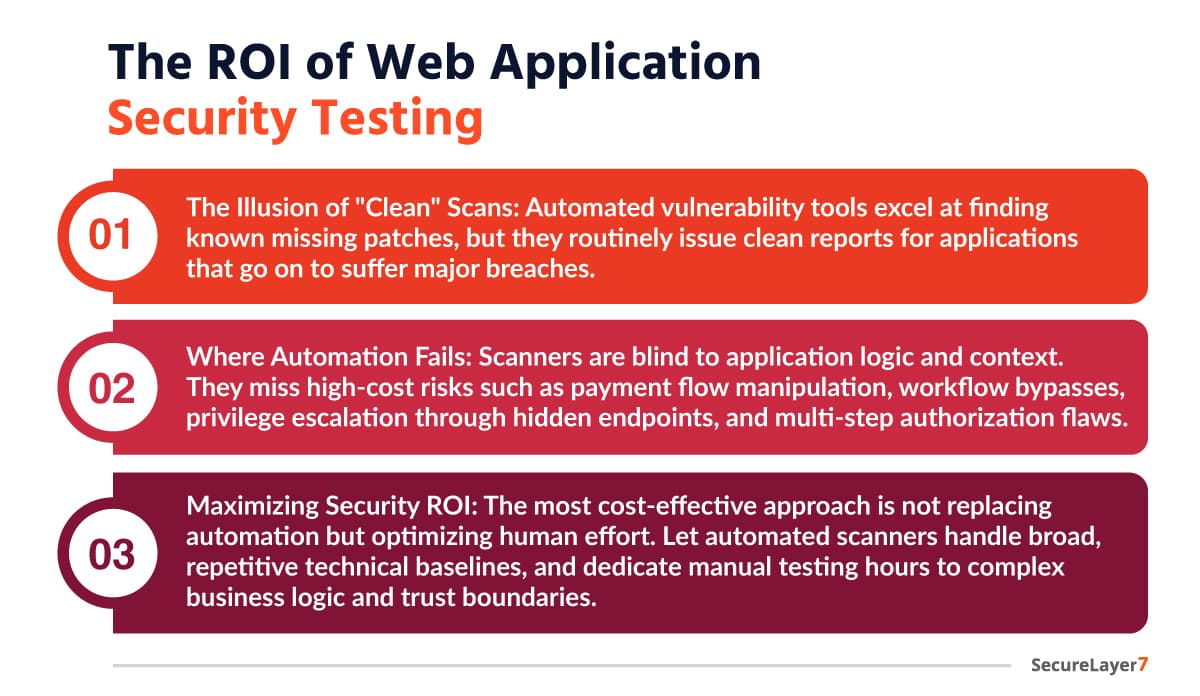
Automated vulnerability scanners love to report that an application is perfectly secure. Yet, every day, applications with “clean” scan reports suffer massive data breaches. I’m not saying scanners are worthless.
They are good at finding known, missing patches. However, they find it hard to identify the flawed logical choices, broken trust boundaries, and subtle authorization gaps that modern attackers exploit.
That is where the OWASP Web Security Testing Guide (WSTG) comes in.
This guide walks through the OWASP WSTG, how it differs from the famous OWASP Top 10, and how to execute its core testing frameworks.
What Is the OWASP Web Security Testing Guide?
The OWASP WSTG is an in-depth open-source framework designed to deliver repeatable, expert-level security assessments. It doesn’t just check software version numbers against a database of known bugs; it evaluates an application’s live behavior, workflows, and operational boundaries.
It’s more like an operational manual for penetration testing. It bridges the gap between theoretical risk and manual verification, giving engineers and security professionals a step-by-step roadmap to test every single corner of a web application.
The Scope of OWASP WSTG
The OWASP Web Security Testing Guide (WSTG) covers a wide range of web application security testing areas, including:
- Information Gathering: Identifies exposed technologies, server details, application architecture, and publicly accessible attack surfaces.
- Configuration & Deployment Testing: Reviews insecure network settings, HTTP misconfigurations, exposed cloud storage, subdomain takeovers, and deployment weaknesses.
- Identity Management Testing: Validates user registration flows, role definitions, account recovery mechanisms, and user enumeration risks.
- Authentication Testing: Detects weak credentials, insecure login mechanisms, poor password policies, and broken account lockout controls.
- Authorization Testing: Identifies privilege escalation, IDOR vulnerabilities, directory traversal, and unauthorized access paths.
- Session Management Testing: Tests session fixation, session hijacking, CSRF weaknesses, JWT security flaws, and insecure session handling.
- Input Validation Testing: Detects XSS, SQL Injection, SSTI, SSRF, file inclusion vulnerabilities, and unsafe input handling.
- Error Handling Testing: Reviews verbose error messages, stack traces, and information disclosure issues.
- Cryptography Testing: Evaluates weak TLS configurations, insecure encryption practices, and flawed cryptographic implementations.
- Business Logic Testing: Analyzes workflow abuse, logic bypasses, race conditions, and trust boundary violations within application processes.
- Client-Side Testing: Tests DOM-based XSS, HTML injection, CORS misconfigurations, clickjacking, and browser-side security flaws.
- API Testing: Validates REST and GraphQL APIs for authentication, authorization, injection, and data exposure vulnerabilities.
Types of Web Application Security Testing
Web application security testing covers multiple domains, each addressing distinct attack surfaces. OWASP WSTG organizes these into specific testing categories, allowing security teams to apply targeted methodologies based on the technology stack in use.
A. Cloud Storage Testing
Cloud storage services such as Amazon S3 are frequently exposed through insecure configurations.
WSTG recommends validating the following:
Unauthorized Data Access
Checks whether cloud objects can be accessed without authentication.

Arbitrary File Uploads
Tests whether attackers can upload unauthorized objects into storage buckets.

Bucket Discovery Techniques
Bucket names can often be identified through:
- Page source code
- JavaScript files
- HTTP responses
- Public documentation
- Mobile application traffic
B. JSON Web Token (JWT) Testing
JWTs are commonly used for authentication and session management in modern applications.
A JWT contains three components:
- Header: It defines token type and signing algorithm.
- Payload: It contains claims and application data.
- Signature: It verifies token integrity and authenticity.
C. WSTG JWT Security Tests
Signature Validation Testing
Detects insecure implementations using jwt.decode() instead of proper signature verification.
None Algorithm Testing
Checks whether tokens signed with “alg”: “none” are incorrectly accepted.
{
 "alg": "none",
 "typ": "JWT"
}
D. Weak HMAC Secret Testing
Attempts offline cracking of poorly secured JWT signing keys using tools like:
- John the Ripper
- hashcat
- crackjwt.py
E. Algorithm Confusion Testing
Identifies failures where applications incorrectly trust modified signing algorithms or public keys.
OWASP WSTG vs. OWASP Top 10: Key Differences
Many teams confuse these two documents, but mixing them up can derail your security strategy.
- The OWASP Top 10 Risks is an awareness document. It lists the ten most critical web application security risks based on industry data. It tells you what threats to care about.
Related Article: OWASP Top 10 Security Risks: All 10 Risks With Example
- The OWASP WSTG is an action methodology. It details the exact technical procedures required to test, exploit, and validate those risks. It tells you how to find them.
For example, if the Top 10 says “Broken Object Level Authorization is a massive risk,” the WSTG gives you the explicit test cases to prove whether your specific APIs are vulnerable to it.
WSTG Checklist
The OWASP Web Security Testing Guide (WSTG) is more than just a list of security tests. It provides a structured way to examine how an application handles users, data, configurations, and business processes.
By working through these checks, security teams can find weaknesses that might otherwise go unnoticed and gain a clearer understanding of how an attacker could target the application.
A. Information Gathering (WSTG-INFO)
A1. Search Engine Discovery and Reconnaissance: Search public sources, archives, and search engines for exposed information attackers could use during reconnaissance.
A2. Web Server Fingerprinting: Identify the web server, technologies, and versions running behind the application to uncover known weaknesses.
A3. Webserver Metafiles Review: Examine robots.txt, sitemap.xml, and other metadata files for sensitive paths and hidden resources.
A4. Application Enumeration: Discover applications, sub-applications, directories, and services hosted within the target environment.
A5. Webpage Content Review: Analyze source code, comments, documents, and scripts for accidentally exposed internal information.
A6. Application Entry Point Identification: Identify every location where users can interact with the application or submit data.
A7. Execution Path Mapping: Trace user workflows and application processes to understand how requests move through systems.
A8. Framework Fingerprinting: Determine which frameworks and libraries power the application and assess associated security risks.
A9. Web Application Fingerprinting: Identify application technologies and versions that may have publicly documented vulnerabilities.
A10. Architecture Mapping: Document components, integrations, trust boundaries, and data flows across the application ecosystem.
B. Configuration and Deployment Management Testing (WSTG-CONF)
B1. Network Infrastructure Configuration Testing: Review network architecture, exposed services, and firewall configurations for unnecessary exposure.
B2. Application Platform Configuration Testing: Verify operating systems, middleware, databases, and servers follow secure configuration practices.
B3. File Extension Handling Testing: Ensure sensitive files remain inaccessible regardless of extension manipulation attempts.
B4. Backup and Unreferenced File Review: Search for forgotten backups, archives, and unused files containing sensitive information.
B5. Administrative Interface Enumeration: Identify exposed administrative consoles and management interfaces accessible from untrusted networks.
B6. HTTP Methods Testing: Verify unsupported HTTP methods cannot be abused to bypass security restrictions.
B7. HTTP Strict Transport Security Testing: Confirm HSTS is implemented correctly to enforce encrypted browser communication.
B8. Cross-Domain Policy Testing: Assess cross-domain configurations for permissions that expose sensitive application resources.
B9. File Permission Testing: Verify files and directories enforce least-privilege access and prevent unauthorized modifications.
B10. Subdomain Takeover Testing: Identify abandoned subdomains that attackers could claim and exploit.
B11. Cloud Storage Testing: Review cloud storage configurations for exposed buckets, containers, or publicly accessible data.
B12. Content Security Policy Testing: Assess CSP rules for effectiveness against script injection and content-based attacks.
B13. Path Confusion Testing: Test URL normalization issues that may bypass security controls or access restrictions.
B14. HTTP Security Header Testing: Verify important security headers are present and configured according to best practices.
C. Identity Management Testing (WSTG-IDNT)
C1. Role Definition Testing: Verify user roles are properly defined and aligned with intended business responsibilities.
C2. User Registration Process Testing: Assess registration workflows for weaknesses that allow abuse or unauthorized account creation.
C3. Account Provisioning Process Testing: Ensure account creation, modification, and removal processes follow secure access management practices.
C4. Account Enumeration Testing: Determine whether application responses reveal valid usernames or existing accounts.
C5. Username Policy Testing: Evaluate username requirements for predictability, uniqueness, and resistance to guessing attacks.
D. Authentication Testing (WSTG-ATHN)
D1. Encrypted Credential Transmission Testing: Verify usernames, passwords, and authentication tokens are always transmitted through encrypted channels.
D2. Default Credential Testing: Check whether default accounts or vendor-supplied credentials remain active within the environment.
D3. Weak Lockout Mechanism Testing: Assess protections against brute-force attacks and repeated authentication attempts.
D4. Authentication Bypass Testing: Determine whether authentication controls can be circumvented through alternative application workflows.
D5. Remember Password Testing: Review persistent login functionality for insecure credential storage or session handling.
D6. Browser Cache Weakness Testing: Ensure browsers do not store sensitive authentication information after sessions end.
D7. Weak Password Policy Testing: Evaluate password requirements for complexity, length, reuse restrictions, and effectiveness.
D8. Weak Security Question Testing: Assess whether recovery questions can be guessed, researched, or socially engineered.
D9. Password Change and Reset Testing: Verify password recovery processes cannot be abused to compromise accounts.
D10. Alternative Channel Authentication Testing: Ensure authentication security remains consistent across mobile apps, APIs, and other channels.
D11. Multi-Factor Authentication Testing: Confirm MFA is enforced correctly and cannot be bypassed through application flaws.
E. Authorization Testing (WSTG-ATHZ)
E1. Directory Traversal and File Inclusion Testing: Verify attackers cannot access restricted files or system resources through manipulated file paths.
E2. Authorization Bypass Testing: Ensure users cannot circumvent access controls to reach unauthorized functionality or sensitive resources.
E3. Privilege Escalation Testing: Determine whether users can gain higher privileges than those assigned to their accounts.
E4. Insecure Direct Object Reference Testing: Check whether modifying identifiers exposes another user’s records, files, or resources.
E5. OAuth Weakness Testing: Assess OAuth implementations for token misuse, excessive permissions, and insecure authorization flows.
F. Session Management Testing (WSTG-SESS)
F1. Session Management Schema Testing: Evaluate how sessions are created, maintained, validated, and securely terminated.
F2. Cookie Attribute Testing: Verify cookies use appropriate security attributes such as Secure, HttpOnly, and SameSite.
F3. Session Fixation Testing: Ensure attackers cannot force users to authenticate with attacker-controlled session identifiers.
F4. Exposed Session Variables Testing: Check whether session identifiers are exposed through URLs, logs, or application responses.
F5. Cross-Site Request Forgery Testing: Verify protections prevent unauthorized actions performed through forged requests from authenticated users.
F6. Logout Functionality Testing: Confirm logout actions properly invalidate active sessions and authentication tokens.
F7. Session Timeout Testing: Ensure inactive sessions automatically expire after a reasonable period of inactivity.
F8. Session Puzzling Testing: Assess whether session variables can be manipulated to gain unintended access or functionality.
F9. Session Hijacking Testing: Determine whether attackers can steal, reuse, or impersonate active user sessions.
F10. JSON Web Token Testing: Evaluate JWT implementation, validation mechanisms, token integrity, and signature verification processes.
F11. Concurrent Session Testing: Verify controls governing simultaneous sessions from multiple devices or locations.
G. Input Validation Testing (WSTG-INPV)
G1. Reflected Cross-Site Scripting Testing: Check whether malicious input is immediately reflected and executed within users’ browsers.
G2. Stored Cross-Site Scripting Testing: Verify user-supplied scripts cannot be permanently stored and executed later.
G3. HTTP Verb Tampering Testing: Assess whether alternative HTTP methods bypass security controls or authorization checks.
G4. HTTP Parameter Pollution Testing: Determine whether duplicate parameters alter application behavior or bypass validation logic.
G5. SQL Injection Testing: Verify user input cannot manipulate database queries or access unauthorized data.
G6. LDAP Injection Testing: Ensure attackers cannot alter LDAP queries through crafted user input.
G7. XML Injection Testing: Assess whether XML-based inputs can modify application behavior or backend processing.
G8. SSI Injection Testing: Verify server-side include directives cannot be abused to execute unauthorized commands.
G9. XPath Injection Testing: Determine whether user input can manipulate XPath queries and expose data.
G10. IMAP/SMTP Injection Testing: Check whether email processing functions can be manipulated through malicious input.
G11. Code Injection Testing: Verify applications prevent execution of attacker-controlled code on backend systems.
G12. Command Injection Testing: Ensure operating system commands cannot be executed through user-controlled inputs.
G13. Format String Injection Testing: Assess whether format string flaws expose memory contents or enable code execution.
G14. Incubated Vulnerability Testing: Identify weaknesses emerging from complex interactions between multiple application components.
G15. HTTP Splitting and Smuggling Testing: Verify request parsing inconsistencies cannot manipulate server communication flows.
G16. HTTP Incoming Request Testing: Assess how incoming requests are validated, sanitized, and securely processed.
G17. Host Header Injection Testing: Check whether manipulated host headers influence application logic or security decisions.
G18. Server-Side Template Injection Testing: Determine whether template engines execute malicious user-supplied expressions.
G19. Server-Side Request Forgery Testing: Verify attackers cannot force servers to make unauthorized internal requests.
G20. Mass Assignment Testing: Ensure users cannot modify protected object properties through crafted requests.
H. Error Handling Testing (WSTG-ERRH)
H1. Improper Error Handling Testing: Verify error messages do not reveal sensitive information about systems or application internals.
H2. Stack Trace Testing: Ensure stack traces are hidden from users and unavailable during failures.
I. Cryptography Testing (WSTG-CRYP)
I1. Weak Transport Layer Security Testing: Assess TLS configurations for outdated protocols, weak ciphers, and insecure settings.
I2. Padding Oracle Testing: Determine whether cryptographic error responses expose information useful for decryption attacks.
I3. Unencrypted Sensitive Information Testing: Verify sensitive data is never transmitted through unencrypted communication channels.
I4. Weak Cryptographic Primitive Testing: Assess encryption algorithms for outdated, weak, or insecure cryptographic implementations.
J. Business Logic Testing (WSTG-BUSL)
J1. Business Logic Data Validation Testing: Verify business rules properly validate data before processing transactions or requests.
J2. Request Forgery Testing: Assess whether attackers can manipulate or forge requests to alter application behavior.
J3. Integrity Check Testing: Ensure critical processes include controls preventing unauthorized modification of data.
J4. Process Timing Testing: Determine whether timing variations reveal sensitive information or workflow weaknesses.
J5. Function Usage Limit Testing: Verify restrictions prevent excessive use of sensitive or high-risk functionality.
J6. Workflow Circumvention Testing: Assess whether users can skip required steps within business processes.
J7. Application Misuse Defense Testing: Evaluate protections against automated abuse, fraud, and unintended application usage.
J8. Unexpected File Upload Testing: Verify upload controls block unsupported file types and formats.
J9. Malicious File Upload Testing: Ensure uploaded files cannot execute code or compromise application security.
J10. Payment Functionality Testing: Assess payment workflows for manipulation, bypasses, pricing issues, and transaction fraud.
K. Client-Side Testing (WSTG-CLNT)
K1. DOM-Based Cross-Site Scripting Testing: Check whether client-side scripts process untrusted input without proper sanitization.
K2. JavaScript Execution Testing: Analyze JavaScript functionality for insecure logic, exposure, or misuse opportunities.
K3. HTML Injection Testing: Verify user input cannot inject unauthorized HTML content into webpages.
K4. Client-Side URL Redirect Testing: Ensure redirects cannot be manipulated to send users to malicious destinations.
K5. CSS Injection Testing: Assess whether attackers can inject styles that alter content or user interactions.
K6. Client-Side Resource Manipulation Testing: Verify client-side resources cannot be modified to bypass security controls.
K7. Cross-Origin Resource Sharing Testing: Evaluate CORS configurations for overly permissive cross-origin access permissions.
K8. Cross-Site Flashing Testing: Assess Flash-based interactions for cross-domain and unauthorized access vulnerabilities.
K9. Clickjacking Testing: Verify applications prevent attackers from tricking users into unintended actions.
K10. WebSocket Testing: Assess WebSocket implementations for authentication, authorization, and message handling weaknesses.
K11. Web Messaging Testing: Verify browser messaging mechanisms securely validate message origin and content.
K12. Browser Storage Testing: Check local storage and session storage for exposed sensitive information.
K13. Cross-Site Script Inclusion Testing: Assess risks associated with loading untrusted third-party scripts.
K14. Reverse Tabnabbing Testing: Verify external links cannot manipulate the originating browser tab.
L. API Testing (WSTG-APIT)
L1. API Reconnaissance Testing: Identify available endpoints, parameters, authentication mechanisms, and exposed API functionality.
L2. Broken Object Level Authorization Testing: Verify APIs enforce authorization checks for every object and resource request.
L3. GraphQL Testing: Assess GraphQL implementations for excessive data exposure, authorization issues, and query abuse.
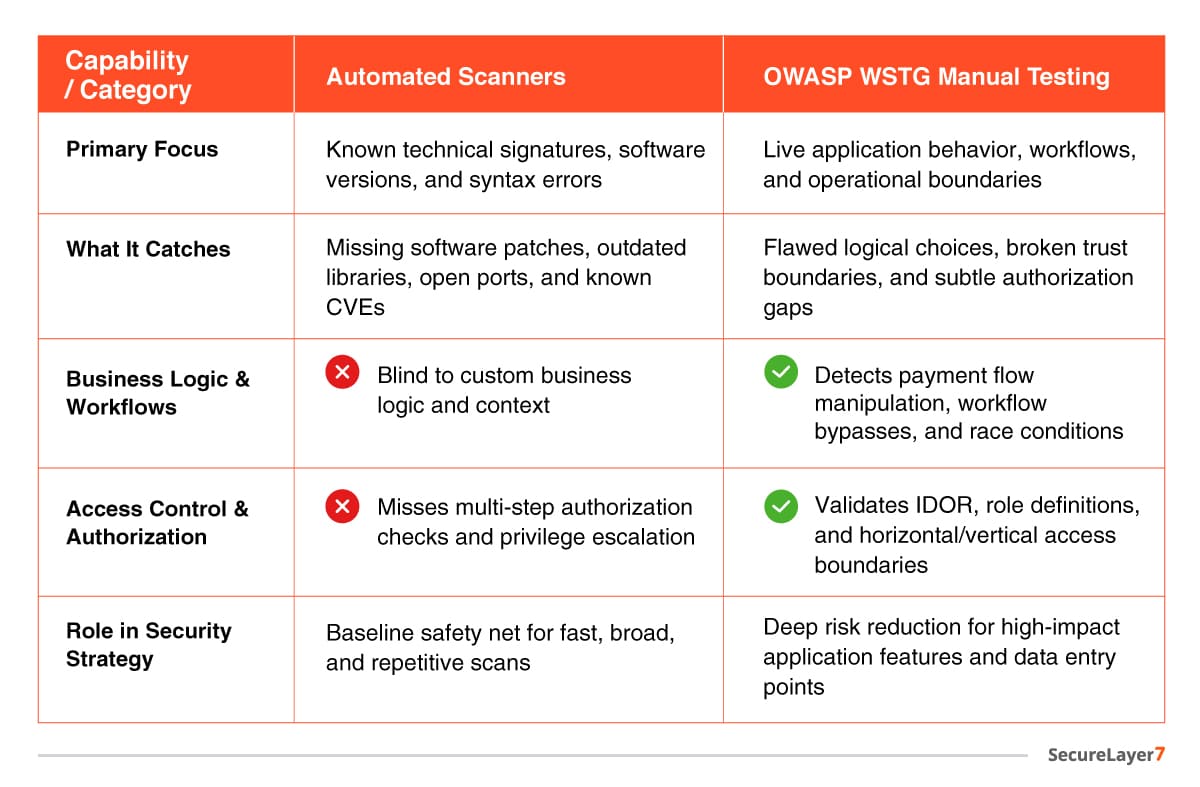
Automated Vulnerability Scanners vs. OWASP WSTG Manual Testing
How to Effectively Implement WSTG in DevSecOps
Treating the WSTG as a once-a-year compliance checklist is a recipe for failure. It must be woven directly into your development lifecycle.
A. Map Tests to User Stories: When designing a feature (e.g., “Allow users to reset passwords via SMS”), pull the corresponding WSTG test cases (WSTG-ATHN-01 through 06) directly into the engineering requirements before a single line of code is written.
B. Automate the Baseline, Save Humans for the Logic: Use automated tooling to handle broad, repetitive checks (like searching for outdated libraries or open ports). This frees up your security team’s manual testing hours to focus entirely on complex business logic and authorization boundaries.
C. Build a Threat Model First: You cannot test every single WSTG case on every minor deployment. Prioritize your testing matrix based on high-impact areas: data ingress points, payment gateways, and identity boundaries.
The Business Case for OWASP WSTG
From an ROI perspective, OWASP WSTG delivers clear value. It reduces costly post-deployment fixes by catching vulnerabilities early.
It lowers breach and compliance risk. It saves audit time through a standardized methodology. Ultimately, it protects revenue, reputation, and customer trust.
Bottomline
It’s easy to trust the green lights from automated vulnerability scanners. But those reassuring reports often miss what matters most: the custom logic, chained authorization steps, and subtle trust boundaries where real attackers slip through. Privilege escalation, payment flow abuse, and business logic flaws rarely show up in a scanner’s checklist.
That’s where the OWASP Web Security Testing Guide comes in. The framework covers a dozen domains, but its real value is in surfacing the risks that automation can’t see.
Looking to strengthen your security posture? SecureLayer7 helps organizations identify vulnerabilities, reduce risk, and defend against evolving cyber threats. Contact our experts to get started.
Frequently Asked Questions (FAQs)
Yes, the OWASP WSTG is completely free, open-source, and maintained by a global community of application security professionals. You can download it or read it directly from the official OWASP website.
The guide undergoes continuous updates via its active GitHub repository. Major official version releases occur every few years to keep pace with new web technologies, shifting deployment architectures, and novel exploitation styles.
No. While some initial phases—like structural information gathering or basic input scanning—can be accelerated via automated tools, the core segments of the WSTG (such as business logic flow, horizontal authorization boundaries, and complex multi-step workflows) strictly require human contextual analysis to validate.
Automated scanners are effective for detecting known vulnerabilities, but many modern attacks involve application behavior rather than obvious technical flaws — including workflow bypass vulnerabilities, broken approval mechanisms, payment flow manipulation, privilege escalation through hidden endpoints, multi-step authorization flaws, business logic abuse, and trust boundary violations.
