
Cybercriminals increasingly target Web applications from banking portals to SaaS platforms. In 2025, attacks exploiting website vulnerabilities surged 56% year over year, reaching 6.29 billion. Meanwhile, 131 new CVEs were disclosed daily, with many exploited in under 5 days, leaving organizations little time to respond. The financial impact is equally significant, with the average global data breach costing $4.44 million.
A web application penetration testing methodology provides a structured approach for identifying and validating vulnerabilities before attackers exploit them. By combining automated scanning, manual testing, and business logic analysis, it uncovers both common and complex security flaws. This guide walks through the complete methodology, key testing phases, essential tools, and best practices to strengthen your web application security.
What is Web Application Penetration Testing Methodology?
A web application penetration testing methodology is a structured, step-by-step process for evaluating a web application’s security. Rather than testing randomly, penetration testers follow a defined approach to systematically identify, validate, and assess vulnerabilities across the application’s entire attack surface.
The methodology typically covers every stage of a penetration testing engagement, including planning and scoping, reconnaissance, attack surface mapping, vulnerability identification, exploitation, post-exploitation, and reporting. Following a consistent methodology helps ensure comprehensive test coverage, repeatable results, and actionable recommendations that enable organizations to strengthen their overall security posture.
Why Does Structured Methodology Matter?
Ad hoc testing leaves gaps. A structured penetration testing methodology ensures complete coverage of the application’s attack surface, reduces false positives through manual validation, and surfaces complex business logic vulnerabilities that automated scanners miss on their own. Just as importantly, it produces consistent, repeatable assessments that support compliance requirements such as PCI DSS, ISO 27001, HIPAA, and SOC 2, and helps development teams prioritize remediation based on business risk rather than technical severity alone.
To get this consistency, professional penetration testers align their assessments with recognized industry frameworks:
OWASP Web Security Testing Guide (WSTG) – The most widely adopted web-specific framework, offering detailed test cases for every major vulnerability category.
Penetration Testing Execution Standard (PTES) – Defines the full engagement lifecycle, from pre-engagement through reporting, giving testers a repeatable operational structure.
NIST SP 800-115 – A U.S. government standard outlining technical guidelines for planning, executing, and documenting security assessments.
OSSTMM (Open Source Security Testing Methodology Manual) – A rigorous, metrics-driven framework focused on measuring security with quantifiable, scientifically reproducible results.
Types of Web Application Penetration Testing
Before testing begins, organizations typically choose one of three assessment approaches.
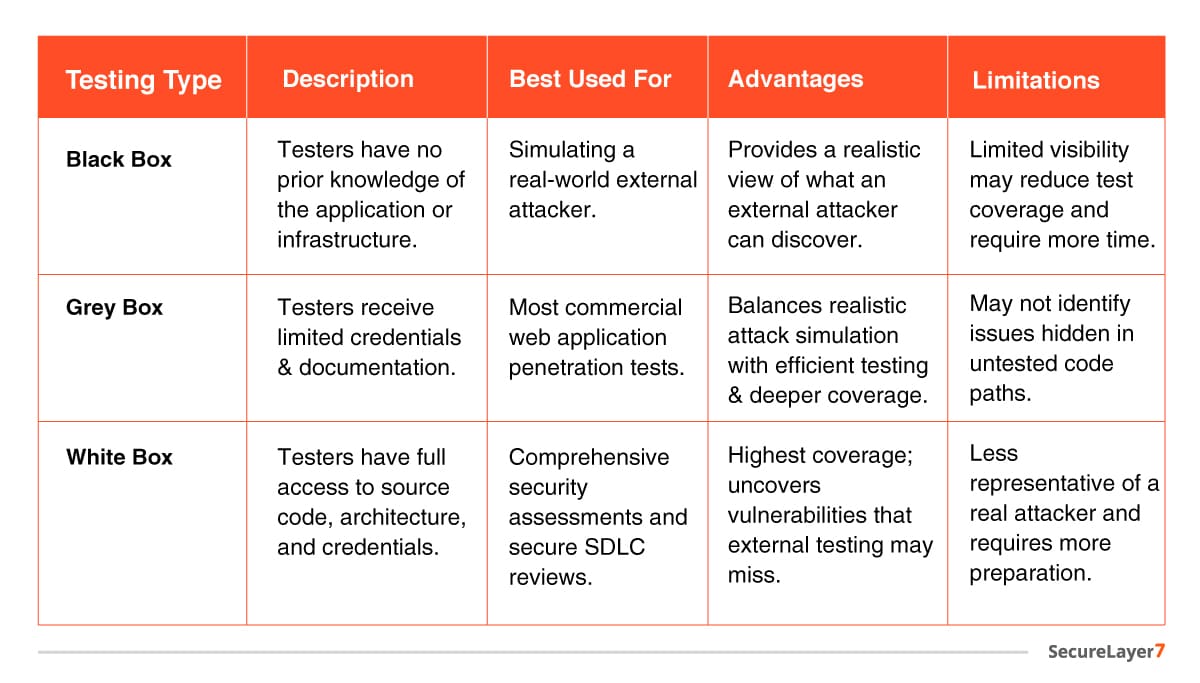
Grey-box testing is the most commonly used approach because it balances realism with testing efficiency.
The Complete Web Application Penetration Testing Process
Step 1: Planning and Scope Definition
Before any testing begins, stakeholders and the testing team agree on exactly what will be tested and how.
This means deciding upfront which parts of the application are included. During this phase, testers work with stakeholders to identify:
- Target applications
- Domains and subdomains
- APIs
- Authentication mechanisms
- User roles
- Third-party integrations
- Cloud resources
- Mobile application backends
- Testing timelines
- Rules of engagement
- Out-of-scope assets
They will also set a testing timeline and ground rules: when testing can happen, how testers can behave, and which systems are strictly off-limits.
Getting this right matters. A clearly defined scope protects your live systems from accidental disruption and ensures nothing critical gets missed.
Proper scoping prevents accidental disruption of production systems while ensuring all critical assets are assessed.
Step 2: Reconnaissance
Reconnaissance is the information-gathering phase — before testers attempt to find or exploit any vulnerabilities, they first learn as much as possible about your application and infrastructure. Think of it as the research a burglar does before targeting a building: understanding the layout, entry points, and security measures in place.
Passive Reconnaissance
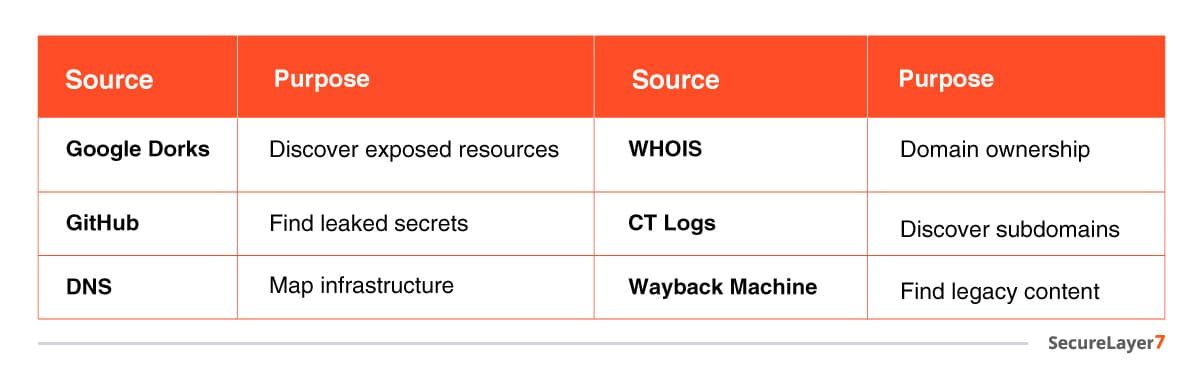
Passive reconnaissance involves collecting information about your application without directly interacting with it. Testers use publicly available sources, which is the kind of information anyone on the internet could find to build a picture of your environment.
Common sources include:
Active Reconnaissance
Active reconnaissance involves direct interaction with your application. Testers probe the following:
- APIs and exposed endpoints
- Web pages, directories, and hidden content
- Input fields, parameters, and HTTP methods
- Authentication mechanisms and user roles
- Technologies, frameworks, web servers, and application versions
- Client-side JavaScript files and exposed resources
- Network services and application infrastructure
The information gathered during active reconnaissance provides the foundation for subsequent vulnerability discovery and exploitation.
Step 3: Vulnerability Assessment
Once reconnaissance and automated scanning are complete, testers shift from information gathering to structured analysis. This phase is about making sense of everything collected so far — separating genuine risks from noise, and building a prioritized plan before any exploitation begins.
Every potential finding is examined and classified by:
- Vulnerability type: SQL injection, broken access control, misconfiguration, and so on, mapped against the OWASP Top 10 and known CVE disclosures
- Severity: Rated using the CVSS (Common Vulnerability Scoring System) scale across critical, high, medium, and low categories
- Exploitability: Whether the vulnerability can be realistically exploited given the application’s environment, configuration, and defenses
- Business context – whether the affected component handles sensitive data, processes payments, or sits behind authentication, which directly influences how urgently a finding needs to be addressed
This analysis phase prevents testers from wasting time chasing low-impact issues while genuinely critical vulnerabilities go unexamined. It also ensures the exploitation phase that follows is targeted and controlled rather than exploratory and disruptive.
A finding that scores high on technical severity but sits on a low-traffic, isolated component carries different urgency than a medium-severity flaw on your primary authentication flow. Vulnerability analysis is where those distinctions get made.
Step 4: Exploitation and Validation
Once a potential weakness is identified, testers go a step further and carefully attempt to exploit it in a controlled way to confirm whether it’s genuinely dangerous or just a theoretical risk. This is what separates professional penetration testing from a simple vulnerability scan.
What Testers Validate and Why It Matters
Each exploitation attempt is performed safely, with the sole goal of demonstrating real-world impact — never causing damage or disrupting your operations:
- SQL Injection Exploitation: Testers confirm whether a vulnerability actually allows them to extract data from your database, such as customer records, credentials, or payment information. This transforms a theoretical flag into concrete evidence of data breach risk.
- Cross-Site Scripting (XSS) Proof-of-Concept: Rather than just flagging that an input field is vulnerable, testers demonstrate that a malicious script can actually execute in a browser — showing how an attacker could steal session cookies, redirect users, or deface your application.
- Insecure Direct Object Reference (IDOR) Testing: Testers check whether changing a simple value in a URL or request — like swapping your account ID for another allows access to someone else’s data. A confirmed IDOR means one customer can view or modify another’s records, a serious privacy and compliance issue.
- File Upload Exploitation: Validates whether a malicious file uploaded through your application can actually be executed on your server, potentially giving an attacker remote control over your system.
- Authentication Bypass: Testers attempt to access protected areas of your application admin panels, dashboards, restricted pages without valid credentials, confirming whether your access controls actually hold up under pressure.
- Server-Side Request Forgery (SSRF): Confirms whether an attacker can trick your server into making requests to internal systems or cloud infrastructure that should never be publicly accessible, potentially exposing sensitive backend services.
- Cross-Site Request Forgery (CSRF): Validates whether an attacker can craft a malicious link that causes a logged-in user to unknowingly perform actions on your application like changing an email address or initiating a transfer without their knowledge.
- Privilege Escalation: Tests whether a regular user account can be manipulated to gain administrator-level access, or whether one user type can access functionality reserved for another.
- Session Hijacking: Confirms whether session tokens the credentials your application uses to keep users logged in can be stolen or forged, allowing an attacker to impersonate a legitimate user.
Step 5: Manual Testing
Automated tools can scan fast and wide but they test inputs, not intent. They don’t understand your business, your users, or how your application is supposed to work. This means they routinely miss some of the most damaging vulnerability classes: business logic flaws, privilege escalation issues, and complex authentication weaknesses that only surface when a human tester actively probes the application the way a real attacker would.
Business Logic Testing: Testers walk through every critical user flow checkout processes, approval workflows, subscription upgrades, coupon or discount mechanisms and attempt to manipulate them in ways the application’s designers didn’t anticipate. A scanner cannot flag a checkout flow that lets users apply a discount code multiple times, because the application is technically functioning as built. Only a human tester who understands the intended behavior can identify where the logic breaks down.
Authorization and Access Control Testing: Testers systematically probe whether users can access resources or perform actions they shouldn’t. This includes horizontal privilege escalation where one standard user accesses another user’s data and vertical privilege escalation, where a standard user gains access to admin-level functionality. These tests are performed manually across every user role defined in scope.
Authentication and Session Management Testing: Testers examine login flows, password reset mechanisms, multi-factor authentication implementations, and session token behavior in detail. Subtle weaknesses such as predictable token patterns, insecure session expiry, or flawed account recovery logic only surface when a human tester walks through the full process and probes edge cases that automated tools skip entirely.
API and Parameter Manipulation: Testers manually intercept and modify requests, altering parameters, headers, and API payloads to observe how the application responds. Hidden parameters, undocumented API endpoints, and mass assignment vulnerabilities are commonly uncovered this way none of which appear in automated scan results.
Manual testing is where the most impactful vulnerabilities in modern web applications are found. It is not a supplement to automated scanning it is the phase that determines whether your application is genuinely secure or merely passing a checklist.
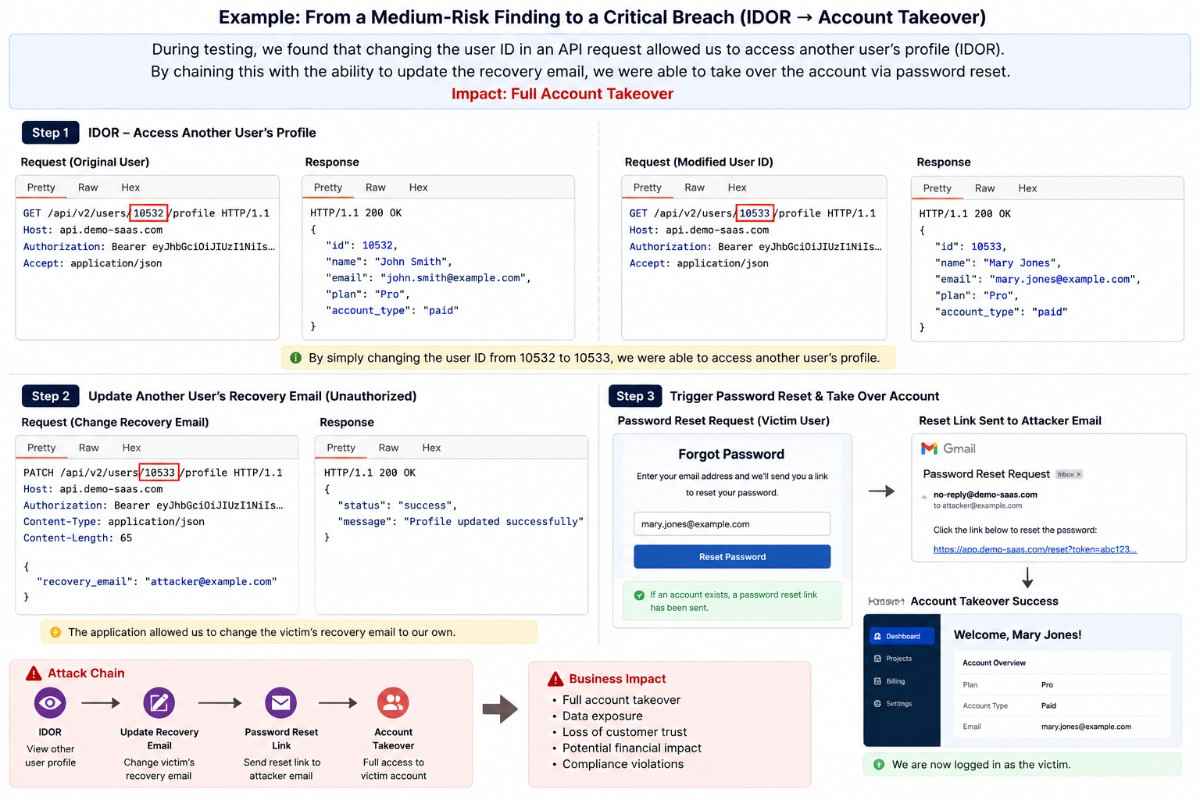
Example: From a Medium-Risk Finding to a Critical Breach
During a penetration test of a SaaS application, testers discovered that changing a user ID in an API request allowed them to view another customer’s profile a classic Insecure Direct Object Reference (IDOR) vulnerability. On its own, this appeared to be a medium-severity information disclosure issue.
Rather than stopping there, the testers explored whether the same weakness affected other functions. They found they could also modify another user’s recovery email address. By triggering the standard password reset process, they were then able to take over the account without knowing the user’s password.
This demonstrates why manual penetration testing is essential. An automated scanner might report the IDOR as a medium-risk issue, but only a human tester can identify how multiple weaknesses combine to create a critical account takeover scenario.
The below image describes each step involved in the manual testing process:
Step 6: Post-Exploitation
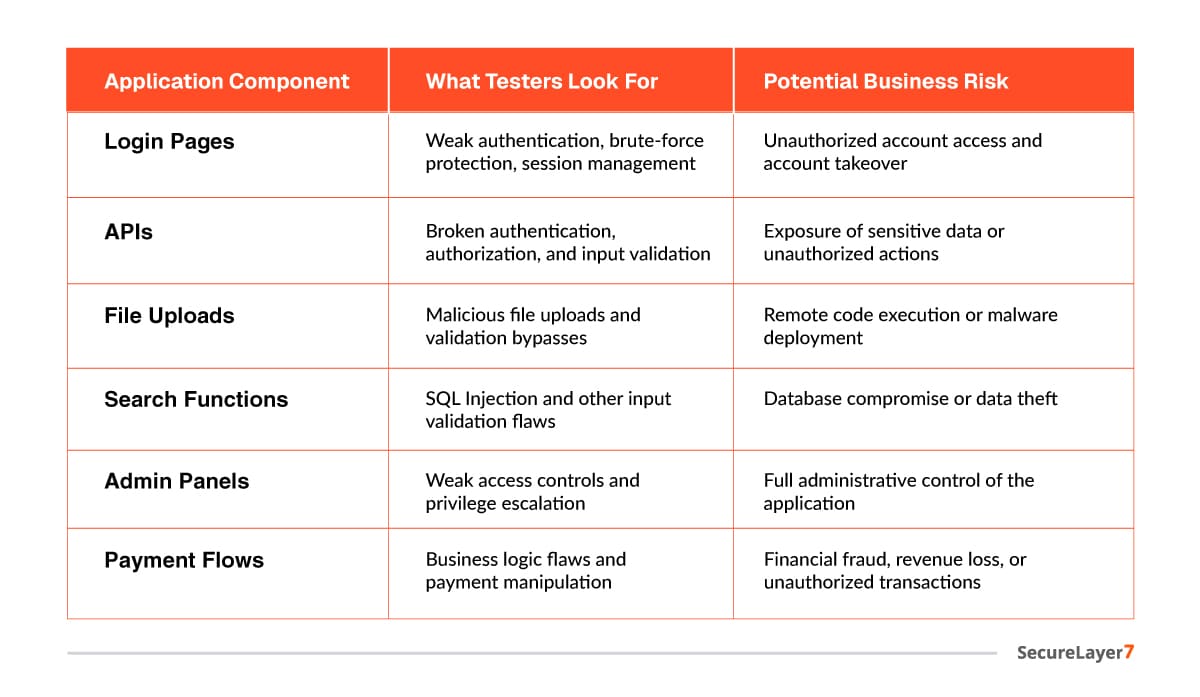
Post-exploitation is where testers think and act like a real attacker who has just broken in. This phase is what transforms a technical finding into a genuine business risk assessment.
Testers determine how far an attacker can move after initial compromise, whether privileges can be escalated, sensitive data accessed, or additional systems reached.
The below image gives a detailed view of what testers evaluate and what are the associated business risk with the same:
Why This Phase Changes Everything
Most vulnerability reports tell you what is broken; post-exploitation tells you what losing actually looks like. A medium-severity finding takes on different urgency once it’s clear that an attacker could reach every customer record and escalate to full admin control. That’s what makes this phase actionable for executives it turns technical jargon into concrete terms: what’s at risk, and how urgently to respond.
Step 7: Reporting
The penetration testing report is the primary deliverable of the entire engagement. A well-written report serves two audiences at once: your technical team, who need precise details to implement fixes, and your leadership team, who need to understand the business risk without wading through technical jargon.
What does a good report include?
A professional penetration testing report should provide a clear, actionable record of the assessment, enabling both technical and business stakeholders to understand the findings and prioritize remediation.
While the exact format may vary by organization, a comprehensive report includes the following components:
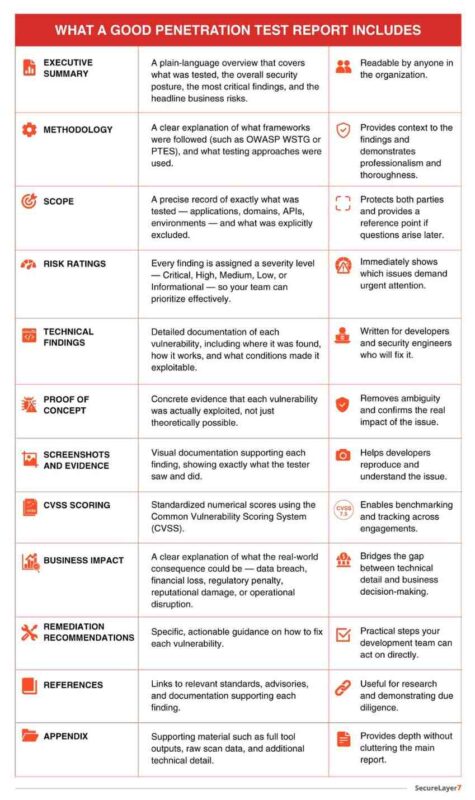
A high-quality penetration test report should prioritize findings based on business risk, provide reproducible proof of concept, include clear remediation guidance, and help stakeholders understand the potential impact on confidentiality, integrity, and availability.
Common Tools Used During Web Application Penetration Testing
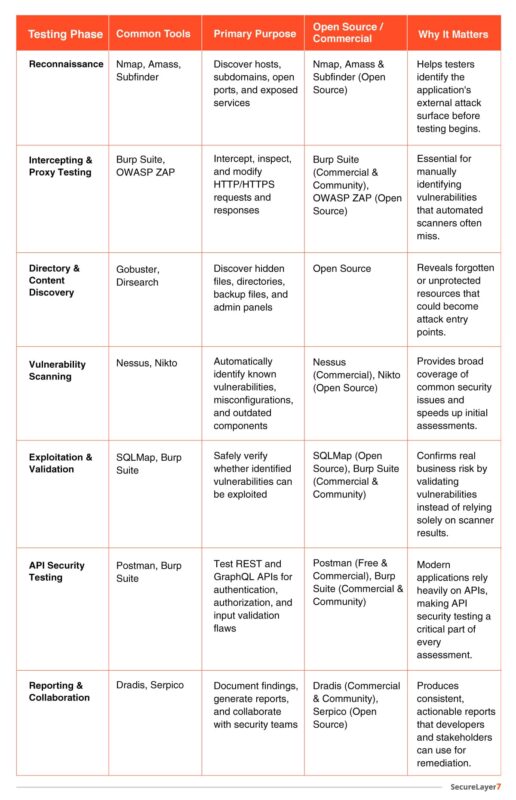
No single tool can perform a complete penetration test. Professional testers combine multiple specialized tools across every phase of the engagement — each chosen for what it does best at that specific stage.
Some tools like Burp Suite and OWASP ZAP are used broadly across multiple phases for traffic interception, scanning, and manual testing. Others are purpose-built Nmap for reconnaissance and service discovery, Nikto for web server scanning, and Metasploit for controlled exploitation and validation of confirmed vulnerabilities.
The table below maps each tool to its phase and purpose:
Modern Web Application Testing Considerations
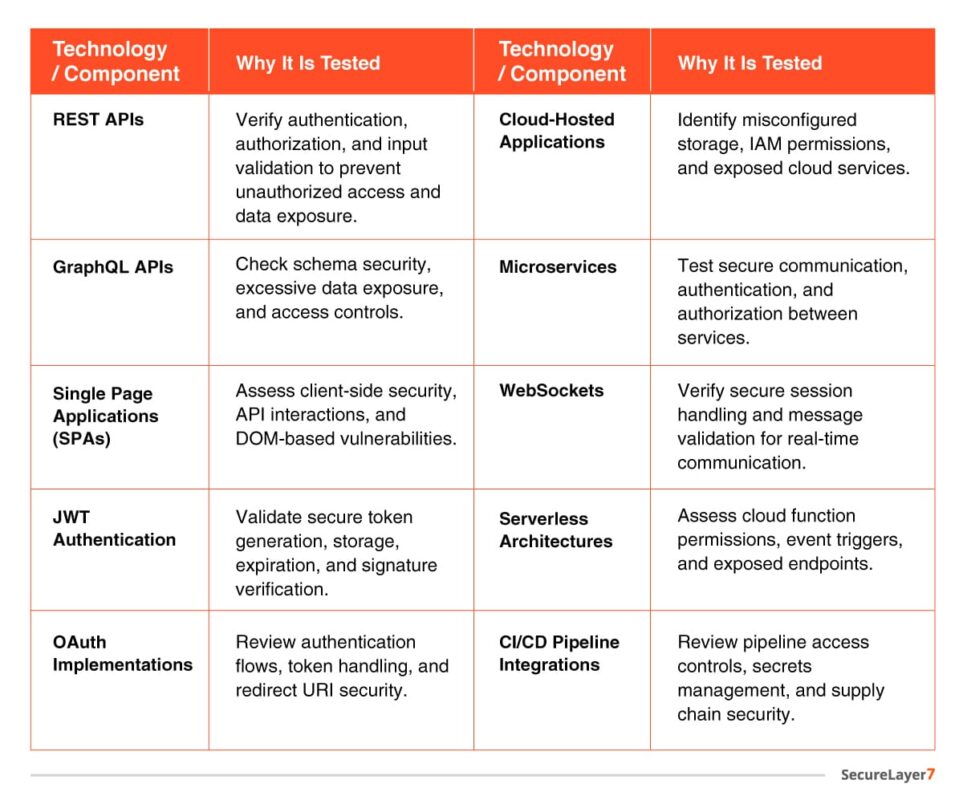
Today’s applications extend far beyond traditional web pages.
Modern web applications rely on APIs, cloud-native architectures, and JavaScript frameworks, which introduce security risks beyond those of traditional web pages. A comprehensive penetration test should assess these components to identify vulnerabilities across the entire application ecosystem that are:
Best Practices for Effective Web Application Penetration Testing
- Define a clear testing scope.
- Combine automated and manual testing.
- Validate every high-risk finding.
- Test business logic in addition to technical vulnerabilities.
- Align assessments with OWASP WSTG and PTES.
- Perform penetration testing after significant application changes.
- Integrate security testing into the software development lifecycle.
- Conduct periodic retesting to verify remediation.
Conclusion
Web application penetration testing is far more than running automated scans and producing a list of findings. A structured methodology ensures every layer of your application is examined systematically — from surface-level misconfigurations to complex business logic flaws that no scanner will ever flag on its own.
The seven-phase process covered in this guide — planning and scoping, reconnaissance, vulnerability assessment, exploitation, manual testing, post-exploitation, and reporting — gives organizations a repeatable, defensible approach to understanding their real security posture. Not just what vulnerabilities exist, but whether they can be exploited, how far an attacker could go, and what it would actually cost the business if they did.
Security is not a one-time checkbox. Applications change, new vulnerabilities emerge daily, and attackers continuously refine their techniques. Regular penetration testing, aligned with recognized frameworks like OWASP WSTG and PTES, is what keeps your defenses ahead of the threat.
If you’re ready to put your web application security to the test, SecureLayer7’s team of experienced penetration testers is here to help.
Frequently Asked Questions (FAQs)
It is a structured process used to identify, validate, and report security vulnerabilities in web applications through a combination of automated tools and manual testing techniques.
Organizations should conduct penetration testing at least annually and after major application updates, infrastructure changes, or the introduction of new features.
No. Automated scanners are valuable for identifying known issues, but they cannot reliably detect business logic flaws, authorization issues, or complex attack chains. Manual testing remains essential.
A vulnerability assessment identifies potential weaknesses, whereas penetration testing validates whether those weaknesses can be exploited and assesses their real-world impact.

