


The OWASP Top 10 Security Risks for 2025 is out, and it reflects how much the security landscape has changed in just a few years. The focus has shifted from isolated flaws to systemic weaknesses across pipelines, dependencies, and interconnected infrastructure, highlighting the rise of more complex, multi-layered attacks.
In this blog, we’ll walk through the OWASP Top 10 for 2025, explain what each risk looks like in practice, and share practical ways teams can reduce exposure without slowing everything down.
What are the OWASP Top 10 Risks?
The Open Web Application Security Project, also known as OWASP, is a non-profit organization that ranks the most critical security risks facing web applications.
OWASP Top 10 security risks, updated usually every four years, are based on the severity of vulnerabilities, compiled with the inputs received from thousands of real security professionals around the world. It covers roughly 80% of web application security risks, making it an effective starting point for prioritizing protection efforts.
OWASP list carries a lot of significance in the cybersecurity world because developers, security teams, and decision-makers need to understand where cyber risks actually originate.
It shows you the vulnerabilities that attackers exploit daily. The list is based on real data. All major companies, government agencies, and security professions take it very seriously as it reflects actual breach data.
- Payment card standards require it.
- Security certifications test on it.
- Auditors evaluate web security.
OWASP Top 10 2025: What’s Changed
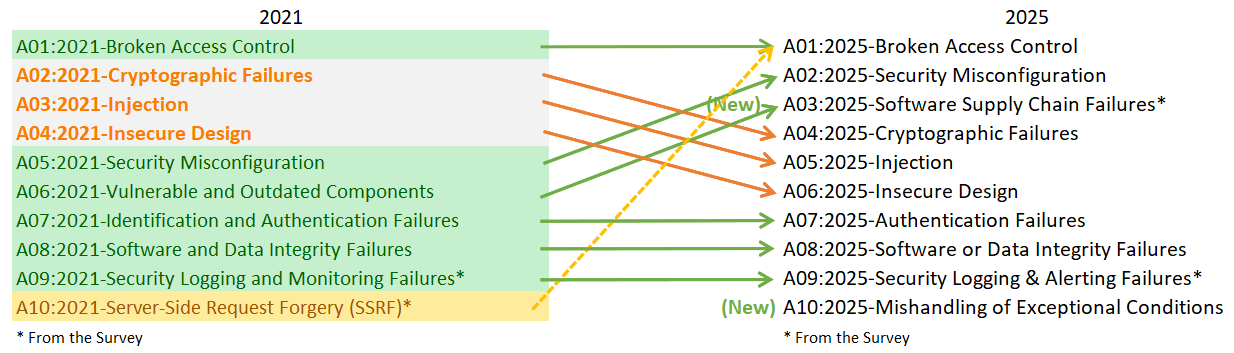
The latest list reflects how application security risks have evolved beyond code-level bugs into system-wide failures. Compared to 2021, the new OWASP list highlights several new security risks. This update reshapes priorities for developers, security teams, and organizations building modern software.
What’s New:
- Software Supply Chain Failures (A03): This new risk explains risks across the entire software lifecycle, including dependencies, build systems, CI/CD pipelines, and third-party platforms, not just known vulnerable libraries.
- Mishandling of Exceptional Conditions (A10): Added as a completely new category, focusing on poor error handling, unsafe failure states, and unhandled exceptions that can lead to security breakdowns or system instability.
What Changed:
- Security Misconfiguration moved up significantly, rising from #5 (2021) to #2 (2025), indicating how cloud misconfigurations and weak defaults continue to drive real-world breaches.
- Cryptographic Failures, Injection, and Insecure Design moved down the list, not because they are less dangerous, but because new systemic risks now dominate modern IT environments.
- Software Supply Chain Failures moved up to #3, which highlights the growing impact of compromised dependencies, build pipelines, and third-party platforms.
What’s Removed:
- Vulnerable and Outdated Components has been removed as a standalone category and expanded into Software Supply Chain Failures with a much broader scope.
- Server-Side Request Forgery (SSRF) is no longer part of the list as a standalone item and merged into Broken Access Control due to overlapping attack patterns.
The OWASP Top 10 Web Application Security Risks 2025
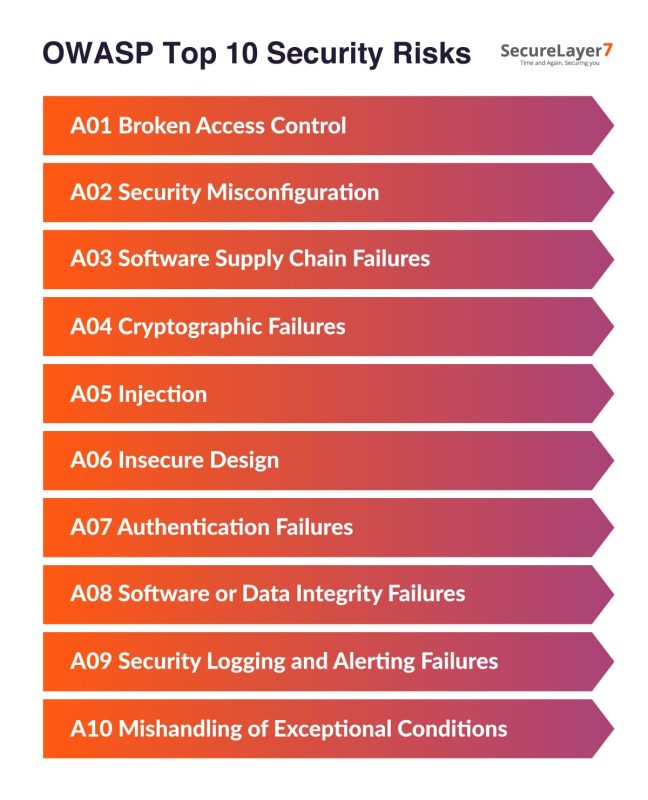
The updated list of OWASP 10 security vulnerabilities is as follow:
A01:2025 Broken Access Control
Broken Access Control still sits at the top of the latest list. Access control mechanism decides who can access an organization’s systems and environment and to what extent. When it fails, unauthorized users access data and functions they shouldn’t access at any cost.
The Broken Access Control vulnerability allows users to bypass restrictions by changing URLs, manipulating parameters, or exploiting weak permission checks to view other people’s accounts or gain other admin privileges.
40 CWEs (Common Weakness Enumerations) have been mapped with this broken access control risk with maximum incidence rate of 20.15 percent.
Common examples of broken access control risks:
- Modify account numbers in browser URLs to access someone else’s data.
- Browse directly to admin pages without logging in as an admin.
- Manipulate API requests to access restricted functions.
- Tamper with JWT tokens to escalate privileges.
Mitigation:
- Rate limit API calls to slow automated attacks.
- Build access controls into your server-side code.
- Block access by default except public pages.
- Check permissions for every request.
- Log failed access attempts and alert admins when attacks happen.
- Use short-lived tokens, invalidate sessions when users log out.
- Test your permission logic regularly.
Deep dive into A01: Broken Access Control
A02: 2025 Security Misconfiguration
Security misconfiguration refers to improper security settings, permissions, and controls that attackers can exploit. This can be caused by using default passwords or credentials, failing to apply software patches, and unnecessary permissions etc.
Security misconfiguration moved up to the #2 spot in the new list because cloud environments have made misconfigurations one of the most common causes of real-world breaches. Small mistakes like open storage, weak defaults, and exposed services can have a massive impact.
16 CWEs have been mapped so far with the Security Misconfiguration and the maximum incidence rate is 27.70 percent.
Common examples of security misconfiguration risks:
Misconfigurations such as enabling directory listing, exposing detailed error messages, or using open cloud sharing settings may open gates to security configurations. Threat actors can easily exploit these security gaps to gain admin access, reverse-engineer code, and identify other hidden vulnerabilities in the system.
Mitigation:
- Automate hardening process. For that, configure development, QA, and production environments identically. It will minimize the effort in setting up a new environment.
- Remove unnecessary components by uninstalling unused features and frameworks.
- Regularly audit and update the configurations. Review security notes, updates, and patches, cloud storage permissions (S3 bucket permissions).
- Maintain a secure and appropriate separation between components, or cloud security groups (ACLs).
Deep dive into A02: Understanding Security Misconfigurations
A03:2025 Software Supply Chain Failures
Software supply chain failures occur when weaknesses in third-party components, APIs, or delivery pipelines compromise an application. What began as a focus on vulnerable libraries has expanded to include compromised dependencies, CI/CD pipelines, developer tools, and update mechanisms.
These risks are hard to detect, often trusted by default, and can impact thousands of downstream users. Despite relatively few mapped CVEs, supply chain attacks remain high-impact due to their scale and stealth.
6 CWEs have been mapped with A03:2025 and the maximum incidence rate is 9.6 percent.
Common examples of software supply chain risks:
- Outdated or vulnerable open-source libraries.
- Unmaintained or abandoned dependencies that no longer receive patches.
- Hidden or transitive dependencies without visibility or review.
- Weak access controls over repositories, build systems, or artifact storage.
- Third-party packages or updates without integrity verification.
Mitigation:
- Maintain a clear inventory and track all dependencies.
- Monitor vulnerability advisories and patch high-risk components quickly.
- Use trusted, signed packages and secure artifact repositories.
- Lock CI/CD pipelines with strong access controls and separation of duties.
- Roll out updates gradually to reduce blast radius if compromise occurs.
Deep dive into A03: Software Supply Chain Failures
A04:2025 Cryptographic Failures
Cryptographic failure risks are created if a web app skips encryption for things like passwords or payment details. This can allow attackers to intercept networks or steal data for malicious purposes.
32 CWEs are mapped to the cryptographic failure risk and the maximum incidence rate is 13.77 percent.
Common examples of cryptographic risk failures:
- Hardcoded API keys
- Plain HTTP for sensitive data
- MD5 password hashing
- Storing encryption keys with data
- Default SSL certificates
Mitigation:
- Classify all data your application handles and flag anything sensitive under privacy laws or business needs.
- Avoid storing sensitive data unless absolutely necessary. If stored, use PCI DSS-compliant tokenization or truncation.
- Encrypt all sensitive data at rest using strong, current algorithms and proper key management.
- Ensure all data in transit is encrypted using secure protocols like TLS. Enforce this with headers like HTTP Strict Transport Security (HSTS).
Deep dive into A04: Cryptographic Failures Risk Explained
A05:2025 Injection
Injection falls two spots from #3 to #5 in the new list. It happens when applications accept user inputs without properly checking or sanitizing them. The attacker exploits this by sending malicious commands instead of normal data.
37 CWEs have been mapped to the injection attacks so far with the maximum incidence rate of 13.77 percent.
Common examples of injection risks:
Common examples include SQL injection and cross-site scripting (XSS), which allow attackers to perform unrequired actions to steal session tokens, manipulate the user’s actions, or trick the browser into doing things it shouldn’t.
Mitigation:
- Always check what users are sending. If something looks suspicious, block it.
- Clean the input before using it. Don’t assume the data is safe just because it came through a form.
- Before sending anything to a browser or a database, make sure it can’t be misread as code.
- Use tools, but don’t rely on them alone. You still need to follow secure coding habits.
- Limit what the database can do. Set strict access controls.
Deep dive into A05: Injection Risks & Its Exploitation Guide
A06:2025 Insecure Design
Insecure design has come down two spots from #4 to #6 in the new ranking.Insecure Design vulnerabilities are related to weaknesses that creep in the system when it’s in the development phase.
Common examples of insecure design risks:
Equifax’s 2017 data breach was a textbook case of insecure design. A known vulnerability in Apache Struts wasn’t patched, which gave attackers their way in. But the deeper problem was how the systems were structured.
The network lacked internal boundaries, and when attackers were inside the system, they had access to everything. Logging was insufficient and alerts failed to trigger.
It wasn’t just a patch that failed, it was the entire design that wasn’t built to catch or contain an attack.
Mitigation:
- Avoid treating security as a patch job. Build it into your architecture, wireframes, and user flows from the start.
- Use threat modeling in early stages. Identify trust boundaries, entry points, and abuse cases before the first line of code is written.
- Skip workflows that rely on shared secrets, such as security questions, or assume users behave as expected.
- Document and enforce security requirements. Every feature should include its security controls.
Deep dive into A06: Understanding Insecure Design Vulnerabilities
A07:2025 Authentication Failures
Authentication Failures maintains its position at #7, with a slight change in name (earlier it was called “Identification and Authentication Failures”).
Authentication failures occur due to the inability to properly verify user identities, weak passwords, lack of multi-factor authentication, or poorly implemented login logic. This can lead to session hijacking and control bypass.
A total of 36 CWEs have been mapped to A07, with a maximum incidence rate of 15.80 percent.
Common examples of authentication failures:
- Permits brute-force or credential stuffing attacks
- Exposed session identifier
- Insecure password recovery processes
- Hard-coded credentials
- Ineffective rate limiting on logins
Mitigation:
- Implement mfa to protect from automated credential stuffing, brute force attack.
- Remove default credentials if any, especially for admin users.
- Review weak password checks regularly. Align password length, complexity, and rotation policies as per strong password policy.
Deep dive into A07: Understanding Identification and Authentication Failures
A08:2025 Software or Data Integrity Failures
Software or Data Integrity Failures stays at #8 with a minor naming tweak (A08:2021: Software and Data Integrity Failures) that clarifies its scope compared to the previous version.
This category deals with software updates and critical data. 14 CWEs have been mapped to the Software or Data Integrity Failures risk.
Common examples of software or data integrity failures:
- Plugins, libraries, or modules from untrusted sources can quietly introduce hidden backdoors or vulnerabilities long before anyone notices something is wrong.
- CI/CD pipelines without proper integrity checks make it easy for malicious code to slip into builds and reach production unnoticed.
- Code or artifacts pulled from unverified sources without signature or checksum validation leave systems open to tampered dependencies that appear legitimate.
- Auto-update mechanisms that skip integrity verification can install compromised updates, spreading malicious changes through systems users already trust.
- When attackers poison a shared update or dependency, the damage scales quickly, allowing a single breach to impact thousands of downstream users at once.
Mitigation:
- Use digital signatures or similar checks to ensure software and data truly come from trusted sources and haven’t been altered along the way.
- Verify the data before using it. Use digital signatures or similar mechanisms.
- Always use credible repositories like npm or Maven.
- Ensure supply-chain security. Use tools like OWASP CycloneDX, to verify whether the components come from the vetted sources.
- Establish a secure code review process. It minimizes the chances of slipping malicious code or configuration in the development pipeline.
Deep dive into A03: Software And Data Integrity Failures
A09:2025 Security Logging and Alerting Failures
Security Logging and Alerting Failures stays at the spot #9 in the 2025 list as well. This category has retained its position in both OWASP list in 2021 and 2025.
Security logging and monitoring failures refer to poor visibility within your system. Without logs, alerts, and real-time detection, a breach can go undetected for months. And once it’s missed, there is no audit trail to investigate what went wrong.
5 CWEs have been mapped to the insecure design vulnerability with the maximum incidence rate of 11.33 percent.
Common examples of logging and monitoring failures:
- Missing or incomplete logs (e.g., logins, failed logins, privilege changes)
- Logs not reviewed or monitored for suspicious activity
- Insecure log storage, allowing tampering or unauthorized access
- Logs containing sensitive data (e.g., passwords, PII)
Mitigation:
- Make sure login attempts, access checks, and server-side validations are logged with enough user context to spot suspicious behavior and investigate it later if needed.
- Log every security-relevant action in the application, whether it succeeds or fails, so nothing important slips through unnoticed.
- Store logs in formats that your logging and monitoring tools can easily read, search, and analyze.
- Encode log data safely to prevent attackers from abusing logging systems or injecting malicious content into them.
- Maintain a reliable audit trail for all transactions, using integrity protections like append-only logs or tamper-resistant storage to prevent data from being altered or erased.
Deep dive into A10: Security Logging And Monitoring Failures Explained
A10:2025 Mishandling of Exceptional Conditions
Mishandling of Exceptional Conditions is a new entry in the OWASP Top 10 Security Risks, 2025 list. With 24 mapped CWEs, this category highlights failures caused by improper error handling, flawed business logic, and unsafe behavior when systems face abnormal conditions.
Mishandling exceptional conditions occurs when software fails to properly anticipate, detect, or respond to unexpected situations, leading to crashes, unstable behavior, or security gaps.
These weaknesses often stem from poor error handling, missing validation, or inconsistent exception management. Attackers exploit such gaps to trigger denial of service, bypass security controls, or manipulate application logic. .
Common examples of mishandling of exceptional conditions:
- When errors happen while performing certain actions like file uploads, the system is not cleaned up properly. .
- If error messages show too much detail, attackers can learn how the system works and use that information to plan more serious attacks, like database injections.
- If a transaction breaks halfway and the system doesn’t roll back properly, attackers may exploit it to duplicate payments, drain accounts, or cause inconsistent data.
Mitigation:
- Handle errors close to where they occur; fail safely and predictably.
- Use centralized exception handling and consistent error responses.
- Log securely and alert on repeated or abnormal failures.
- Validate inputs and enforce strict limits and quotas.
- Roll back transactions fully when errors occur.
- Monitor patterns to detect abuse or automation attempts.
How to Apply OWASP in Real Projects
Using OWASP Top 10 in your SDLC
Design Stage: Threat Modeling
Threat modeling helps teams identify, document, and prioritize potential security threats early in the design phase, enabling proactive mitigation strategies and ensuring security is built into the architecture from the start.
Coding: Secure-by-Default Practices
Developers should use secure coding standards and frameworks that enforce best practices, such as input validation and proper authentication, ensuring that new code is secure by default and reduces vulnerabilities.
Testing: Use of SAST, DAST, IAST, Manual Pen Tests
Automated tools like SAST, DAST, and IAST, combined with manual penetration testing, detect both common and complex vulnerabilities, ensuring comprehensive security coverage throughout the development and deployment process.
Mapping tools and automation
CI/CD Tools to Support OWASP Alignment
Integrate security tools into CI/CD pipelines to automate vulnerability detection, enforce security checks side by side while coding, and ensure the code is continuously evaluated for OWASP Top 10 compliance before it is live.
Choose tools
Select tools whether open source or paid ones based on your security needs, budget, and the complexity of the project. Open-source tools like OWASP ZAP and Dependency-Check offer accessible and effective scanning options.
For organizations with larger scale or compliance needs, commercial tools like Burp Suite, Snyk, and Veracode provide advanced reporting, policy enforcement, and team-wide integrations.
Manual Intervention Still Matters
Not all vulnerabilities can be caught easily. The importance of manual code review, threat modeling, and penetration testing still matter as it can help identify many subtle vulnerabilities that may be overlooked by automated tools.
Practical Steps for Developers and Organizations
- Embed OWASP Top 10 security requirements into project planning, design, and code reviews.
- Integrate automated security tools (SAST/DAST) into CI/CD pipelines for continuous vulnerability detection.
- Appoint security champions in each team to promote best practices and act as security liaisons.
- Provide ongoing, practical training and foster a culture of security awareness through workshops and recognition.
Common Pitfalls When Using the OWASP Top 10 Security Risks
Treating it as comprehensive security coverage
Many organizations don’t go beyond owasp vulnerabilities, ignoring other vulnerabilities. That’s a dangerous mistake, leaving them exposed to numerous other attack vectors that are not part of the list.
Checkbox mentality over understanding
Fixing vulnerabilities is not just about ticking a checkbox after a superficial fixing of the weakness. Such an approach leads to inadequate protection.
One-size-fits-all implementation
Different devices, systems, apps face different risk profiles. That demands a thorough understanding of the risk environment and apply mitigation strategies accordingly.
Neglecting continuous monitoring
Building a security culture is an ongoing activity as dependencies change, and new vulnerabilities emerge. It doesn’t end with implementing OWASP Top 10 controls during the development and deployment stage.
Ignoring system-specific risks
Every IT system faces unique risk owing to its unique architecture, tech stack, or workflows. It may create blind spots that OWASP categories don’t directly address.
Conclusion
OWASP Top 10 vulnerabilities remain among the most commonly exploited risks by attackers. Preventing them requires consistent effort, including proper input validation, strong authentication protocols, and secure coding practices.
This is no one-off activity. It demands continuous effort through regular security assessments, thorough code reviews, and team-wide training. You need to integrate threat models early in the software development life cycle (SDLC) and treat security as a foundational part of development workflows. .
If you’re not testing against OWASP Top 10, you’re not testing against real-world threats. Our experts at SecureLayer7 can do this for you. Contact us now to learn more.
Reference resources:
OWASP Top Ten | OWASP Foundation
Frequently Asked Questions (FAQs)
It’s a list of the most critical security flaws found in web applications. Teams use it to spot, fix, and prevent common vulnerabilities during development.
The 2025 list reflects how security problems have shifted from isolated bugs to system-wide failures. New categories like Software Supply Chain Failures and Mishandling of Exceptional Conditions highlight risks that come from how software is built, deployed, and operated—not just how it’s coded.
It focuses on what happens when systems fail badly owing to unhandled errors, unsafe fallbacks, or situations where applications behave unpredictably. These issues can leak data, break security controls, or enable attackers to take advantage of chaos.
No. These risks moved down the list because newer, more systemic issues are showing up more often in real-world incidents.
Developers must now think beyond writing secure code. They’re responsible for understanding dependencies, securing pipelines, validating third-party components, and designing systems that fail safely.
OWASP isn’t just for coders. It helps developers, auditors, architects, and security teams build, test, and review applications with better security awareness at every stage.
Start by scanning your application for OWASP Top 10 risks. Then follow OWASP’s guides to fix what’s exposed-through better input validation, access control, and secure configurations.