
Networks form the foundation of your business. Everything and everyone connected to your business goes through this same network. Your network makes the system that drives your business. That’s exactly why hackers target it first.
Network vulnerability assessment helps you detect these vulnerabilities before anyone else. This isn’t just some kind of checklist process. It all begins with the discovery process in order to understand what’s actually present on your network.
The next step involves active testing, during which actual attacks are conducted against your systems in order to reveal any vulnerabilities.
Based on the results obtained, vulnerabilities are prioritized by danger level. Finally, the solution is developed specifically for you, not just taken from some random template.
The end result is an accurate depiction of your network, from the hardware to the software to the protocols and even to the user habits, all in comparison to the techniques used by attackers.
An Introduction to Network Vulnerability Assessment ( NVA)
Network Vulnerability Assessment (NVA) is the practice of identifying, evaluating, and prioritizing security threats within an organization’s network infrastructure, including routers, switches, and firewalls.
It is important to note that NVA is not simply a listing of problems. Rather, it is a process in which the risks associated with vulnerabilities are ranked to allocate resources.
Ranking the risks is precisely the goal of NVA and the place where NVA and scanning differ from each other. Scanning is automated.
The scanner runs checks for known vulnerabilities within the system, the NIST National Vulnerability Database, and the CISA Known Exploited Vulnerabilities. It is fast, automatic, effective, and insufficient on its own.
Assessment starts where the scan stops. It asks the harder question: which flagged issues could actually hurt this organization, given exposure, exploitability, and fallout. That is the CTEM mindset: vulnerability scanning finds what might be a problem. Assessment decides which ones are worth losing sleep over.
Why It Matters
Skip the assessment, and a few things tend to happen. An unpatched firewall or a misconfigured VLAN sits there quietly until someone finds it. Cybercriminals are not being creative most of the time; they are running scanners looking for exactly this.
Then there are compliance-related risks. GDPR, HIPAA, and PCI-DSS are not suggestions. Break GDPR and HIPAA, and you can face the wrath of authorities. For example, GDPR violations can lead to fines of up to 20 million euros or 4% of annual global turnover, whichever is higher.
HIPAA penalties can range from thousands to millions of dollars depending on the severity and whether the violation is due to willful neglect. The penalties can be very high in some cases, further raising the stakes.
PCI-DSS will not find a business directly, but the bank will, and the bank can pull card processing entirely. An assessment keeps that conversation from happening and leaves a clear paper trail.
Related Article: What is PCI DSS Compliance?
Fixing something after a breach always costs more than fixing it before one. Nobody has a clean, agreed-upon number for exactly how much more, and any vendor who hands over a precise multiplier is probably rounding in their own favor.
Types of Common Network Vulnerabilities
Because organizations keep leaving the same doors open, the same categories of vulnerability show up year after year.
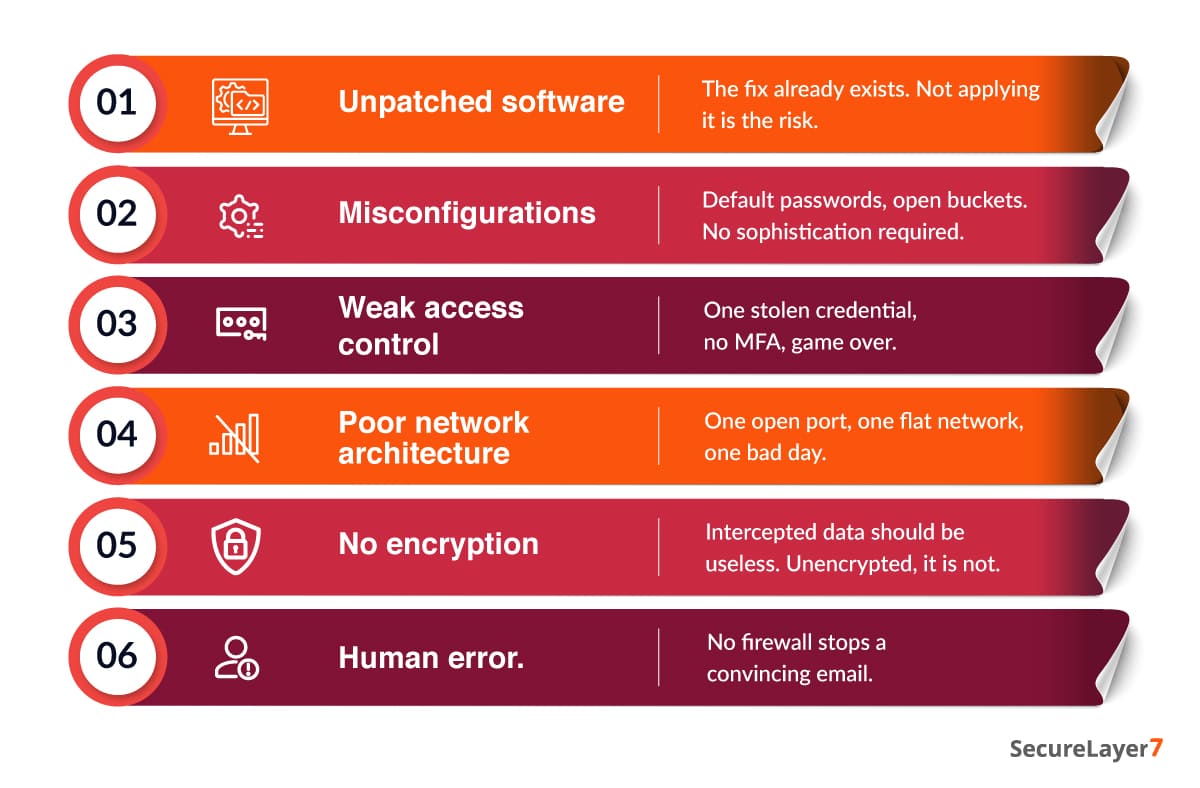
- Unpatched software: When a vendor releases a patch, the release notes describe the gap it closes. Attackers read those notes too. Whether it is an outdated browser or a legacy server, the fix already exists. Not applying it is the actual risk, not the vulnerability itself.
- Misconfigurations: Most misconfigurations are not complex. They can be as simple as a default admin/admin password left in place. These may slip through during fast deployments, when nobody stops to check the settings, and automated tools find them at scale without needing anything clever.
- Weak access control: Weak passwords crack fast. Without multi-factor authentication, one stolen credential is the whole game. It gets worse when people carry more access than their role requires, because once someone is in, they move freely. Limiting who gets in and what they can touch once they are in contains the damage before it spreads.
- Poor network architecture: A single open port can be all an attacker needs to get in. Guest Wi-Fi sitting on the same network as critical servers means one infected laptop can turn into a company-wide ransomware event in minutes. Internal segmentation exists for exactly this reason: to stop a small breach from becoming a total one.
- No encryption: Unencrypted data, whether moving across the network or sitting in storage, can be read by anyone who intercepts it. Credentials, financial records, proprietary files can be exposed in a man-in-the-middle attack. AES-256 or TLS 1.3 standards won’t stop the interception.
- Human error: The best firewall in the world does not stop someone from clicking a convincing link in an email. Attackers know this, which is why they impersonate executives, IT support, and vendors instead of bothering with the technical defenses at all.
Types of Assessments
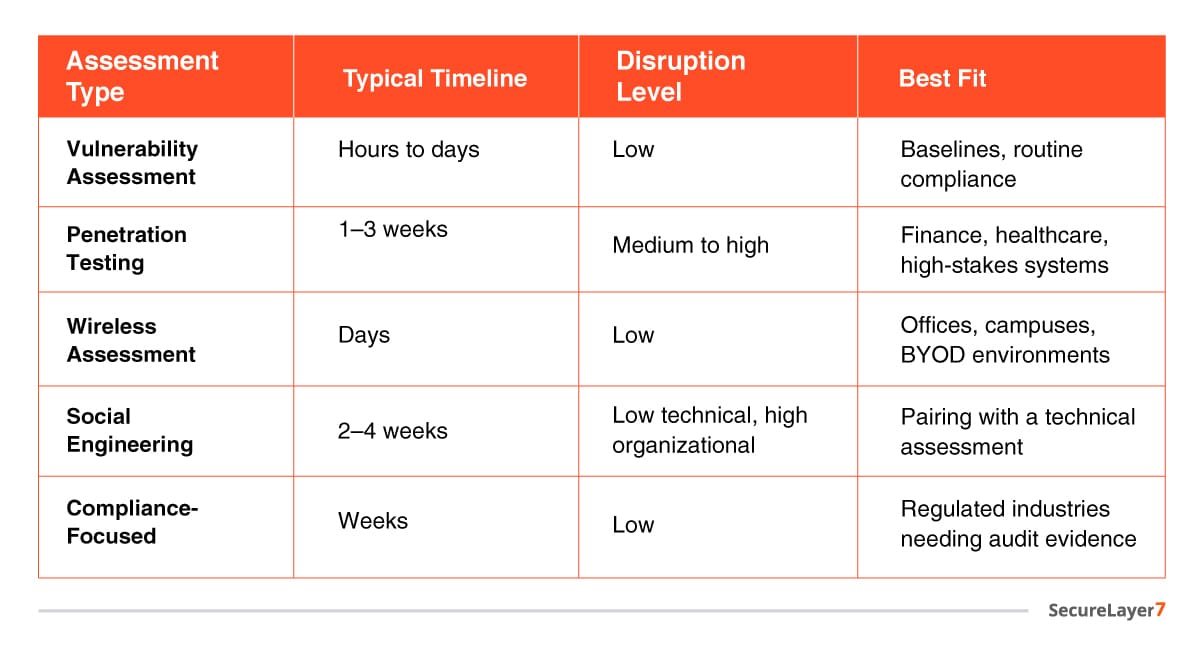
Not all assessments are equal, and the right one depends on the goal. Below, we have presented a list of vulnerability assessments for network security assessment:
- Vulnerability assessments: Automated scans flag known CVEs, misconfigurations, and outdated protocols like SMBv1. They’re fast, hours to days, and won’t disrupt anything.
- Penetration testing: Here, ethical hackers actually attack the system the way a real hacker would: they break in, exploit what they find, and try to move deeper into the network.
- Wireless assessments: These look for unauthorized access points, weak Wi-Fi encryption, and fake networks set up to trick users into connecting (evil twins).
- Social engineering assessments: Phishing simulations, vishing calls, and physical tailgating attempts are all designed to see how employees actually behave under pressure.
- Compliance-focused assessments: These check whether the specific controls required by standards like PCI DSS, HIPAA, or ISO 27001 are actually in place and working. They won’t catch every vulnerability, but auditors demand them, and skipping one can mean fines or failed audits, regardless of actual security.
How It Actually Works
This is a structured technical audit, and rushing any phase, especially discovery, leaves exactly the misconfigurations attackers exploit.
Inventory comes first: In theory, every organization has a clean, up-to-date list of all devices, servers, and cloud assets on the network. In practice, that list is usually an outdated spreadsheet.
- Asset discovery tools pull from multiple sources- DNS records, cloud provider APIs, network scans themselves- to stitch together something closer to reality.
- This step alone tends to surface devices nobody remembers deploying.
Then comes scoping. Not every device gets scanned with the same frequency or depth, and that is a constraint, not laziness.
- Bandwidth, staff time, and business risk tolerance all limit how much can run at once.
- Decide explicitly what gets scanned daily, what gets scanned monthly, and what gets skipped for now.
- Skipping something should be a documented decision, never a default.
Next in the list is scan itself. The scanner sends probes out to each device in range.
- What comes back gets matched against a database of known vulnerabilities, missing patches, weak configurations, and exposed services.
- This part is largely automated at this point; the judgment happens after
Then the report. Raw output gets aggregated into something a human can use, but two different audiences read it for different reasons:
- Security teams need the technical detail, exact CVEs, exact hosts, exact fix.
- Leadership needs the translated version: what this means for the business, what it costs to ignore, what it costs to fix.
- A report that only speaks to one of those audiences has done half its job.
What This Actually Costs
Numbers here vary by region, vendor, and how large the environment is, so treat these as a starting point for a conversation, not a quote.
An automated vulnerability assessment, tooling plus internal staff time, tends to run in the low thousands per year for a small environment, scaling into the tens of thousands annually once cloud assets and multiple sites enter the picture.
Licensing costs can run from a few thousand dollars a year up, before anyone’s time is counted.
External penetration testing is priced by scope, not by the day, though day rates for a senior tester commonly fall somewhere in the low thousands.
A full-scope test across a mid-size enterprise network, with social engineering and wireless included, moves into six figures.
Compliance-driven testing, PCI-DSS ASV scans for instance, is usually cheaper and more standardized, often a few hundred to a few thousand dollars depending on the number of external IPs in scope.
The build-versus-buy decision usually comes down to frequency. An organization running continuous scanning is often better off building internal capability, since the licensing cost amortizes fast.
An organization that needs one deep, adversarial test a year is almost always better off buying it externally, since keeping a red team on staff for one annual engagement rarely pencils out.
Whatever the number ends up being, get three quotes for anything above a basic vulnerability scan. Pentest pricing varies more than most CISOs expect, and scope creep during negotiation is common.
What to Actually Report Upward
A stack of CVEs does not mean much to a board. A handful of numbers, tracked over time, does:
- Mean time to remediate (MTTR): This tracks not just whether a problem got fixed, but how long it took, based on how severe it was. If a critical issue sits unresolved for ninety days, that says more about how well the security program works than about the issue itself.
- Percentage of Tier 0 assets assessed in the last twelve months: Tier 0 assets are the most critical systems a business has. If this number isn’t 100%, that’s a real gap, and it’s better to point it out directly than to discover it during an actual attack.
- SLA adherence on critical findings: Every organization sets internal deadlines, for example, thirty days to fix a critical issue, ninety for a high-severity one. This metric tracks how often those deadlines are actually met. It’s often the number that most influences budget decisions, because it’s concrete and easy to track over time.
- Time to detect (TTD): This is usually measured during purple team exercises (where attack and defense teams work together). It’s worth tracking on its own because it answers a different question than remediation speed does: would the organization even notice an attack in time?
- Repeat findings: When the same misconfiguration shows up in assessment after assessment, that’s a sign of a process problem, not just a technical one. Tracking this separately often reveals gaps in training or unclear ownership that a simple vulnerability count wouldn’t show.
None of these numbers need to be perfect on day one. What matters is picking a small set and reporting the same ones every cycle, so trend lines mean something by the third or fourth report.
How SecureLayer7 Can Help
Our network penetration testing service takes you from scope and threat-modeling through recon, configuration review, identity exploitation, workload testing, remediation guidance, and patch verification, eight phases built around your actual environment, never a copy-paste template.
One engagement lead owns your account from kickoff to final retest, so nothing gets lost between analysts.
Every finding ships with working proof-of-exploit and code-level fix guidance your engineers can act on immediately. Re-testing is included at no extra cost.
Our reports map directly to CREST, SOC 2 Type II, and ISO/IEC 27001, the evidence your auditors actually want to see. Teams at Ericsson, Mozilla, Panasonic, and UKG already trust us with this.
The Bottom Line
A network security assessment is not a technical formality. It is the frontline defense. Start with a self-assessment using open-source tools this week, before anyone else finds the gap first.
Looking to strengthen your cloud security posture? SecureLayer7 helps organizations identify vulnerabilities, reduce risk, and defend against evolving cyber threats. Contact our experts to get started.
Frequently Asked Questions (FAQs)
Most organizations run automated scans monthly or quarterly, with a full assessment at least annually. High-risk environments, finance, healthcare, or anywhere handling sensitive data, often need continuous scanning plus a deeper assessment every six months to keep pace with new threats.
A scan is automated and mechanical, matching systems against known vulnerability databases. An assessment goes further, ranking those findings by actual risk, exposure, and exploitability to the specific business, then building a remediation roadmap instead of just a list of flagged issues.
Yes. Automated tooling for a small environment typically runs in the low thousands per year, and open-source scanners offer a free starting point. The bigger risk is skipping assessment entirely, since remediation after a breach almost always costs more than prevention would have.
