
Container vulnerability scanning delivers security value to DevOps, SecOps, SREs, and platform teams. In practice, that means images are scanned both before deployment to production and continuously throughout their lifetime to address emerging risks, with policies that prevent high-risk workloads from being deployed.
It requires scanning to be built into the development lifecycle and registry as a means of accelerating feedback and response. For engineering leaders, it means reduced context switching between Dev and SecOps, less rework, and clearer guardrails about what can and cannot be deployed.
It provides leadership with a security-backed prioritization and acceleration of risk, while enabling faster time-to-market. To security teams, it offers policy-as-code auditing and controls that replace manual processes.
What Are Container Vulnerabilities?
Container vulnerabilities are not just software flaws. They are security conditions that allow unintended access, execution, or disruption across cloud-native environments.
In practice, this means weaknesses that attackers can exploit inside container images or running containers, often without triggering immediate failures or alerts. The risk builds quietly, long before an incident becomes visible.
These vulnerabilities typically come from three sources:
- Some of the vulnerabilities exist inside the container image itself, such as outdated operating system packages, vulnerable language libraries, or unused dependencies that were never removed.
- Other vulnerabilities appear at runtime through configuration choices such as containers running with excessive privileges, exposed debug ports, or secrets embedded directly into images.
- The third category is inherited risk. Containers are layered by design. When a base image contains a vulnerability, every image built on top of it inherits that same weakness. This makes base-image review essential: how often do teams review what their base images actually contain?
What makes container vulnerabilities especially dangerous is how they spread. Container images are reused across environments by default. A single flawed image can move from development to staging to production, then into multiple services. That reuse turns one flaw into a broader exposure.
Because containers are immutable, vulnerabilities do not fade with time. If an image is not rebuilt, the risk remains exactly where it is.
At the enterprise level, this dramatically increases blast radius. One vulnerable image can expose dozens of workloads before security teams are even aware it exists.
For leaders, that means wider exposure, slower containment, and more pressure to answer one urgent question: Where is this image running right now?
Common Sources of Container Vulnerabilities
Container vulnerabilities rarely originate from a single source. They can enter your environment through insecure base images, outdated software packages, misconfigured settings, exposed secrets, or flaws introduced during the build and deployment process.
Understanding where these risks come from is the first step toward reducing your attack surface and securing containerized applications effectively.
A. Vulnerable Base Images
Container vulnerabilities typically originate from four primary sources. The first is vulnerable base images.
Every container starts with a base image, such as Ubuntu, Alpine, Debian, or Red Hat UBI. These images include the operating system packages and libraries applications depend on.
If a base image includes outdated software or unpatched vulnerabilities, every image built on it inherits those security weaknesses.
B. Outdated Dependencies and Packages
Modern applications depend heavily on open-source libraries installed through package managers such as npm, pip, Maven, NuGet, and Go modules. A single container image may contain hundreds of third-party dependencies.
Over time, researchers discover new Common Vulnerabilities and Exposures (CVEs) in these libraries. Without continuous vulnerability scanning, organizations may continue deploying images containing publicly known flaws long after patches are available.
C. Runtime Misconfigurations
Not every container vulnerability stems from vulnerable software. Insecure runtime configurations can significantly expand an application’s attack surface.
Examples include running containers as root, granting excessive Linux capabilities, exposing debugging ports, embedding secrets inside images, or assigning overly permissive Kubernetes RBAC permissions.
Related Article: Role-Based Access Control (RBAC): Models, Examples, and Setup
D. Software Supply Chain Risks
Organizations increasingly rely on public container registries, third-party images, and open-source packages to accelerate software development.
While these components improve productivity, they also introduce software supply chain risks outside the organization’s direct control.
Related Article: OWASP A03: Software Supply Chain Failures Explained
Compromised dependencies, malicious container images, abandoned projects, or tampered software artifacts can introduce vulnerabilities into production environments.
How Container Vulnerability Scanning Works
At its core, container vulnerability scanning compares what’s inside an image or container against known vulnerability databases. But modern scanners go beyond simple matching.
Static scanning analyzes container images without running them. It inspects layers, enumerates installed packages, and maps dependencies. This is the most common approach and works well in CI/CD pipelines.
Dynamic scanning focuses on running containers. It evaluates runtime behavior, loaded libraries, open network connections, and active processes. This helps catch drift and post-deployment risk.
Scanners typically examine:
- OS-level packages like glibc or bash
- Language dependencies such as npm, pip, Maven, or Go modules
- Configuration files and exposed ports
- Image metadata and user permissions
Timing matters. Build-time scanning catches issues early, before images are promoted. Runtime scanning detects vulnerabilities introduced by delayed disclosures or environment changes.
Detection relies on CVE feeds, vendor advisories, and increasingly, exploit intelligence. Strong scanners don’t just ask “Is this vulnerable?” They ask “Is this exploitable here?”
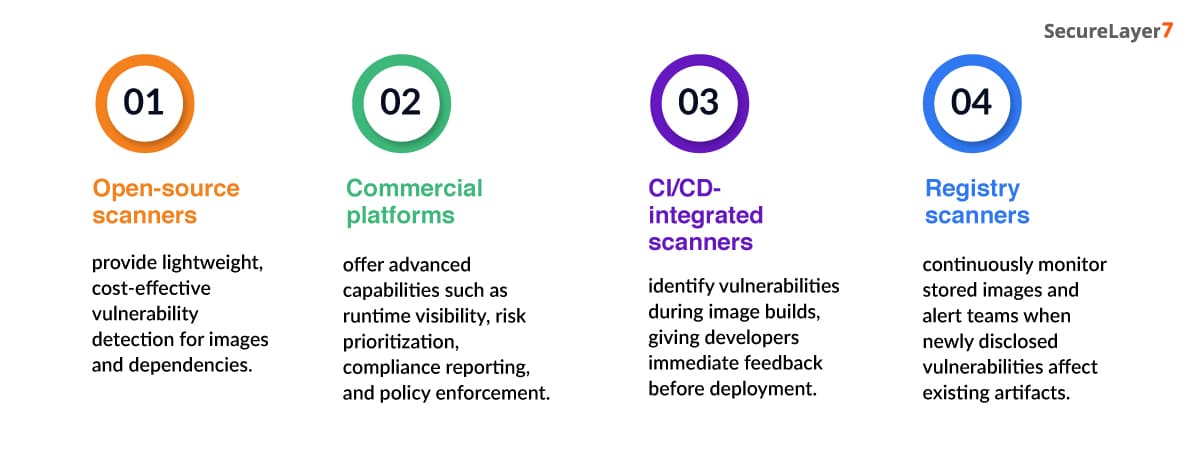
That distinction is what separates noise from signal.No single container vulnerability scanner addresses every security challenge. Some focus on identifying vulnerabilities during development, while others continuously monitor images stored in registries or workloads running in production.
Most organizations combine multiple tools to secure the entire container lifecycle.
Container scanning tools generally fall into four categories:
Best Container Vulnerability Scanning Tools
Container vulnerability scanning tools vary significantly in their approaches, target use cases, and underlying capabilities. While some vendors specialize in scanning container images at build time or in providing runtime protection and Kubernetes security, others take a software supply chain-centric approach. Below are ten best open-source and enterprise-level tools for scanning container vulnerabilities in 2026.
1. Trivy
Trivy is one of the most popular open-source tools for scanning container images, operating systems, language-specific packages, infrastructure-as-code, and Kubernetes manifests.
It is easy to install and works out of the box with Docker, GitHub Actions, GitLab CI, and other leading DevOps tools. Developers use Trivy to ensure the security of container images during the CI/CD process.
2. Sysdig
Sysdig is a full-fledged platform that covers all aspects of cloud-native security. It goes beyond standard container image vulnerability scanning by tying vulnerabilities to running microservices and providing actionable insights into which issues to prioritize based on business context.
Sysdig’s deep runtime security, forensics, and Kubernetes-native visibility provide the critical security insights large enterprises need.
3. Snyk
Snyk represents a developer-focused tool for finding and fixing application vulnerabilities and insecure dependencies. It helps individual developers, DevOps teams, and enterprises integrate security into the SDLC.
Snyk’s intuitive UI and extensive coding tooling ecosystem enable rapid triage and resolution of issues detected during scanning. It works with GitHub, Bitbucket, GitLab, and major cloud providers.
4. Anchore
Anchore is a comprehensive software supply chain security platform that includes robust container image vulnerability scanning and policy enforcement features.
It helps enforce regulatory compliance and software bill of materials (SBOM) requirements through automated image scanning and policy-as-code features.
Anchore’s API-first approach helps enterprises easily adopt it within their existing software development toolchains.
5. Qualys
Qualys is an established enterprise-level vulnerability management vendor that provides extensive protection for container images, Kubernetes clusters, and cloud workloads.
It offers native integrations for popular CI/CD tools while providing detailed compliance reporting across frameworks like ISO 27001, HIPAA, SOC 2, and PCI-DSS. Enterprises already using Qualys for vulnerability management can extend the same capabilities to containers.
6. Kubescape
Kubescape is an open-source project focused on Kubernetes-native security postures to secure Kubernetes clusters and the applications running on them.
It performs vulnerability scanning of container images alongside Kubernetes manifests, Helm charts, and workloads.
It follows a security-as-code approach and has extensive built-in security policy libraries such as NSA-CISA and CIS. Enterprises adopt Kubescape for its minimalistic security scanning interface that works natively with Kubernetes.
7. Jit
Jit is an innovative security orchestration platform that automates various security operations, including application and container scanning, using third-party tools.
It does not aim to be a vulnerability scanner itself but rather helps operations teams prioritize issues found by other security tools. It provides native integrations with GitHub, Atlassian tools, and CI/CD tools, and allows developers to create automated remediation tickets during code reviews.
Best Practices for Effective Container Vulnerability Scanning
With the help of automated scanning, continuous monitoring, and risk-based remediation, organizations can identify weaknesses as early as possible and avoid cybersecurity risks by avoiding the use of vulnerable container images in production.
- Shift left scanning by embedding vulnerability scanning within CI/CD pipelines so each container image undergoes scanning during build. If vulnerabilities are detected at an earlier stage, it’s possible to fix them at a lower cost and to prevent vulnerabilities from moving through the pipeline.
- Perform runtime scanning to scan workloads in operation. Vulnerabilities emerge every now and then, and runtime scanning helps detect newly discovered CVEs and configuration drift.
- Use small, reliable base images while developing containers. In addition, remove unused packages, fix dependency versions, and perform periodic container rebuilds to minimize the risk of vulnerabilities inherited from the base image.
- Automate policy enforcement by defining allowable thresholds for risks and utilizing policy automation tools so as to stop deployments in case a serious vulnerability is detected, or the image is not signed, or the policy is not fulfilled.
Conclusion
Container vulnerability scanning isn’t about perfection. It’s about control. Teams that scan early, prioritize intelligently, and integrate security into delivery move faster and safer. The tools matter—but the operating model matters more.
Looking to strengthen your security posture? SecureLayer7 helps organizations identify vulnerabilities, reduce risk, and defend against evolving cyber threats. Contact our experts to get started.
Container images should be scanned throughout their lifecycle—during development, after every build, before deployment, and continuously at runtime. Since new vulnerabilities are regularly disclosed, continuous scanning ensures that previously secure images don’t become hidden security risks.
Docker and several cloud container registries offer native vulnerability scanning capabilities. While these provide a good starting point, enterprise environments often require dedicated scanning tools that offer deeper analysis, runtime visibility, policy enforcement, and risk-based prioritization.
Yes. Runtime vulnerability scanning monitors containers after deployment to detect newly disclosed vulnerabilities, configuration drift, privilege escalation, suspicious processes, and other risks that static image scanning cannot identify. It provides valuable context for prioritizing remediation efforts.
The right choice depends on your organization’s size, security requirements, and operational maturity. Open-source scanners work well for basic image scanning, while commercial platforms provide advanced features such as runtime protection, compliance reporting, policy enforcement, and centralized vulnerability management.
Reduce false positives by using scanners that prioritize vulnerabilities based on exploitability, runtime exposure, workload criticality, and business context rather than relying solely on CVSS scores. Regularly updating vulnerability databases and rescanning images also improves the accuracy of results.
