
What is Pretexting?
Pretexting is a social engineering technique in which an attacker invents a believable story to gain someone’s trust to persuade them to reveal sensitive information, transfer money, grant system access, or take another action that benefits the attacker.
The story might involve a supposed IT support employee investigating a security incident, a senior executive requesting an urgent payment, or a bank representative warning about suspicious account activity. In each case, the attacker gives the victim a plausible reason to cooperate.
Unlike attacks that primarily exploit software vulnerabilities, pretexting targets human judgment. Attackers use familiarity, authority, urgency, and information they’ve gathered about victims to make fraudulent requests seem legitimate.
Pretexting is commonly associated with targeted phishing, business email compromise (BEC), identity theft, and other social engineering attacks. It can also occur through phone calls, text messages, social media, video conferences, and face-to-face interactions.
How pretexting works
A pretexting attack typically involves two elements: a character and a situation. Together, they establish who the attacker claims to be and why the victim should respond.
The character
The character is the identity the attacker assumes. Criminals often impersonate people who have authority over the victim or whose requests would normally be considered legitimate.
Common impersonation targets include:
- Company executives and senior managers
- IT support staff and system administrators
- Bank representatives and financial advisers
- Suppliers, contractors and business partners
- Government officials and law enforcement officers
- Friends, relatives and romantic partners
Attackers may use a fabricated identity or impersonate a real person. In some cases, they compromise a legitimate email account or messaging profile, making the deception harder to recognize.
The situation
Attackers often create a situation that makes their request seem urgent or legitimate. This gives them a believable reason to ask your team for information, money, or access.
For example, an attacker posing as an IT support employee might claim that an employee’s account has been compromised and needs immediate verification. A criminal impersonating a supplier might report that the company’s bank details have changed and request that an upcoming payment be sent to a different account.
The most convincing pretexts are tailored to the victim’s role or daily tasks. For example, your finance team might get a fake payment request, while your IT administrator could be asked to reset an account or share details to fix a supposed technical issue.
How attackers make a pretext believable
Attackers often research their targets before initiating contact. Company websites, professional networking platforms, social media posts, public documents, and other online sources can reveal job titles, reporting relationships, business partners, and ongoing activities.
This information helps criminals construct scenarios that resemble normal business interactions. An attacker who knows a manager’s name, an employee’s role, and the company’s supplier relationships can create a more credible request than someone sending a generic message.
Several techniques can strengthen the deception:
- Authority: The attacker claims to be someone whose instructions the victim is expected to follow.
- Urgency: The request includes a deadline, a threatened penalty or an apparent emergency.
- Familiarity: The attacker uses names, projects or details associated with the victim’s work or personal life.
- Secrecy: The victim is told not to discuss the request with colleagues or other family members.
- Technical credibility: The attacker uses convincing terminology, documents, email signatures or account notifications.
Attackers may also use email spoofing, caller ID manipulation, or AI-generated audio and video to impersonate trusted individuals. These techniques can make a pretext more convincing, but they aren’t necessary for an attack to succeed.
A familiar name, a plausible explanation or a recognizable voice should not replace independent verification.
Pretexting techniques and related social engineering attacks
Pretexting frequently overlaps with phishing, baiting and tailgating. These techniques can be combined, but they describe different aspects of an attack.
Phishing
Attackers use phishing ato trick victims into clicking malicious links, downloading harmful files, disclosing credentials, or taking unauthorized actions.
Pretexting can supply the story behind a phishing attempt. For example, a message might claim that an employee must sign in again to review a security alert. The link leads to a fraudulent login page designed to collect the employee’s credentials.
Spear phishing targets a specific individual or organization, often using information gathered during reconnaissance. Whaling is a form of targeted phishing that targets senior executives and other high-value individuals.
Pretexting can also support voice phishing (vishing) and SMS phishing (smishing), where attackers use phone calls or text messages rather than email.
Baiting
Baiting exploits a victim’s interest in something attractive or useful. The bait might be a free download, a promised reward or a physical device containing malicious code.
An attacker might leave a USB drive in a public area with a label suggesting that it contains confidential company documents. An employee who connects the device to a workstation may expose the system to malware.
The pretext makes the bait more credible. A label referring to a specific department, project or company can encourage the person who finds the device to investigate its contents.
Tailgating
Tailgating, also known as piggybacking, occurs when an unauthorized person follows an authorized person into a restricted physical location.
An attacker might pose as a delivery worker carrying packages or a contractor who has forgotten an access badge. By asking an employee to hold a secured door open, the attacker tries to bypass the normal access control process.
In this situation, pretexting provides the explanation used to persuade the employee to grant physical access.
Pretexting examples
Pretexting can enable financial fraud, identity theft, account compromise, and physical security breaches. The following examples illustrate common scenarios.
1. Business email compromise
Business email compromise is a type of fraud in which criminals impersonate executives, employees, suppliers or other trusted business contacts to obtain money or sensitive information.
An attacker might pose as a senior executive and ask the finance department to process an urgent payment. Alternatively, the criminal might impersonate a supplier and request a change to the bank account used for future invoices.
The pretext often relies on business authority, a plausible transaction, and pressure to act quickly.
The financial consequences can be substantial. According to the FBI’s 2024 Internet Crime Report, victims reported approximately USD 2.77 billion in BEC-related losses in 2024. This figure represents reported losses, not the total cost of all pretexting attacks. Source: FBI Internet Crime Complaint Center, 2024 Internet Crime Report.
2. IT help-desk impersonation
In an IT support pretext, the attacker claims to be investigating an account problem, security incident, or technical issue.
The supposed technician might ask the employee to disclose a password, approve an unexpected authentication request, install remote-access software or provide a verification code.
The request may sound reasonable because employees routinely contact IT teams for assistance. However, legitimate support procedures should not require employees to disclose passwords or bypass established identity-verification controls.
Organizations should establish clear procedures for help-desk requests involving account recovery, authentication changes, and privileged access.
3. Account update scams
An attacker impersonating a bank, retailer, or online service provider claims the victim’s account needs immediate attention.
The message might mention an unfamiliar transaction, expired billing information, or a suspicious login. A link directs the victim to a fraudulent website that imitates the legitimate service and collects login credentials or payment information.
The attacker may then use the stolen information to access accounts, commit financial fraud, or try to compromise other services.
People should verify account alerts by opening the official application or website independently rather than following links in unsolicited messages.
4. Invoice and supplier payment fraud
In an invoice scam, an attacker sends a fraudulent bill or manipulates a legitimate payment process.
The criminal may impersonate a supplier, register a lookalike email domain or compromise an existing email account. The victim receives an invoice or a request to update banking information and is encouraged to pay the attacker’s account.
A convincing invoice can contain genuine company names, project details, and correspondence copied from previous business communications.
Organizations should verify changes to supplier payment details using a previously established contact method. The verification process should not rely exclusively on the telephone number or email address provided in the new request.
5. Cryptocurrency and investment scams
Investment scams often begin with an attacker posing as an experienced investor, financial adviser or representative of a trading platform.
The criminal promises attractive returns and directs the victim to a fraudulent website or application. The platform may display fake profits to encourage the victim to deposit more.
A related scheme, known as pig butchering, involves building a relationship with the victim over time before introducing an investment opportunity. The relationship may develop through social media, messaging applications or dating platforms.
When the victim attempts to withdraw the money, the attacker may block the transaction or demand additional payments.
The underlying pretext is that the attacker is offering access to a legitimate investment opportunity. Victims should independently verify the organization and be wary of guaranteed returns, pressure to invest quickly or demands for additional payments to release funds.
6. Grandparent and family emergency scams
In a family emergency scam, the attacker impersonates a relative or someone claiming to represent that relative.
The supposed family member might claim they were arrested, involved in an accident, or stranded while traveling. The attacker asks for money and may insist that the victim keep the matter confidential.
The combination of emotional pressure and urgency is intended to discourage independent verification.
A safer response is to contact the relative directly using a known phone number or verify the situation with another trusted family member before sending money.
7. Government impersonation scams
An attacker may pose as a tax official, police officer, or other government representative and claim the victim faces an investigation, unpaid tax liability, or arrest.
The criminal then demands payment or sensitive information to resolve the supposed problem.
These scams exploit the perceived authority of government institutions and the victim’s fear of legal consequences. The attacker may use official-looking documents, fabricated case numbers or threats to make the request appear legitimate.
Individuals should verify such claims using independently obtained contact details for the relevant agency rather than following the caller’s instructions.
8. Job offer scams
Job seekers routinely provide personal information during recruitment, making fraudulent hiring processes useful for identity theft.
An attacker might advertise a fake vacancy, impersonate a recruiter or conduct a fabricated interview. The applicant is then asked to provide identity documents, banking information or other sensitive details.
Some scams also demand payment for training, equipment or background checks.
Applicants should verify the employer, recruiter and vacancy through independent channels before providing sensitive information or paying recruitment-related fees.
9. Romance and social scams
Romance scams exploit relationships built through dating platforms, social networks or messaging applications.
After gaining the victim’s trust, the attacker introduces a financial problem, such as medical expenses, travel costs, or an urgent legal obligation. The attacker asks the victim to send money to resolve the situation.
The request may become increasingly urgent or involve repeated emergencies. In some cases, the attacker also encourages the victim to invest in a fraudulent cryptocurrency platform.
Treat requests for money cautiously when you can’t independently verify the person’s identity or circumstances.
10. Scareware and technical support scams
Scareware uses alarming messages to persuade victims that their devices are infected, compromised, or linked to illegal activity.
A pop-up might claim that a computer contains a virus and instruct the user to call a technical support number. The person answering may request payment, remote access or sensitive account information.
Other messages direct victims to install supposed security software that is actually malicious or ineffective.
Users should close suspicious pages without following instructions and check their devices with trusted security tools or through established support channels.
A pretexting attack walkthrough: How a fraudulent payment request succeeds
Consider a fictional company in which a finance employee receives an email that appears to come from the chief financial officer (CFO).
The message references a confidential business transaction and asks the employee to transfer funds to a new supplier account by the end of the day.
The request appears credible because it uses the CFO’s name, references a real business project, and arrives during a period of increased workload.
The attack could unfold in four stages.
Stage 1: Reconnaissance. The attacker gathers publicly available information about the company, its employees, and its business relationships. This information helps the criminal construct a plausible scenario.
Stage 2: Establishing the pretext. The attacker impersonates the CFO and describes a supposed payment requirement. Referencing a real project makes the request seem consistent with normal business activity.
Stage 3: Exploiting urgency. The attacker insists that the payment must be completed quickly and discourages the employee from discussing the transaction with colleagues.
Stage 4: Attempting the fraudulent transfer. If the employee follows the instructions without verifying the request, the company may send funds to an account controlled by the attacker.
The attack does not necessarily require malware or exploitation of a software vulnerability. Its success depends on persuading the employee to trust the request and bypass the normal payment process.
A mandatory callback to the CFO using a previously verified phone number could expose the deception. Dual approval for changes to supplier bank details and payment instructions could provide another opportunity to stop the transfer.
This scenario is illustrative, but it demonstrates an important principle: security controls should make verification part of the process rather than leaving it entirely to an employee’s judgment.
How to recognize a pretexting attack
Pretexting attempts can resemble legitimate business or personal interactions. No single warning sign proves that a message is fraudulent, but several indicators warrant closer examination.
Look for the following:
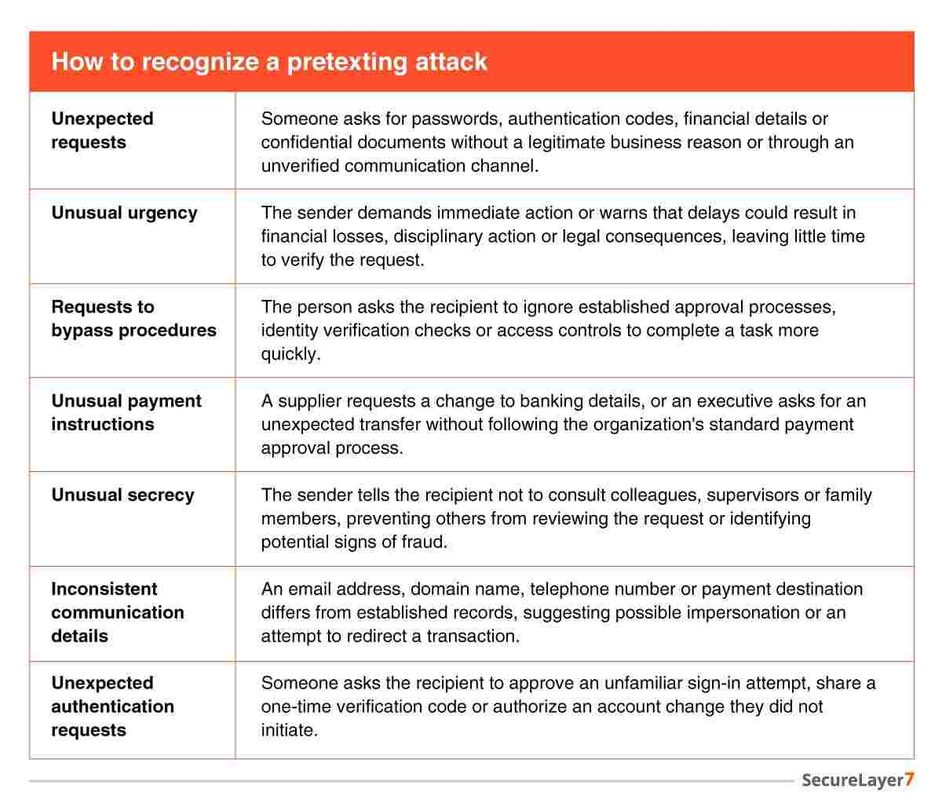
Attackers may use correct grammar, professional language and accurate personal details. Conversely, legitimate messages can contain mistakes. Employees should therefore verify the identity and purpose of a request instead of relying only on how the message looks.
How to prevent pretexting attacks
Preventing pretexting requires a combination of technical controls, clear procedures and employee awareness. Organizations should assume that some deceptive messages will reach employees and design their processes to limit the damage when someone encounters one.
1. Establish independent identity verification
Employees should verify unexpected requests involving sensitive information, account recovery, access privileges or financial transactions.
Verification should use a communication channel that is independent of the original request. For example, an employee who receives an urgent payment instruction by email should call the supposed sender using a number already recorded in the company’s directory.
Do not use the telephone number, link or alternative contact details supplied in a suspicious message as the sole means of verification.
The same principle applies to IT support. Help-desk staff should follow established identity verification procedures before resetting credentials, changing authentication settings or granting access to sensitive systems.
2. Strengthen payment approval procedures
Organizations should establish clear approval requirements for financial transfers, supplier onboarding and changes to payment details.
Useful controls include:
- Requiring independent approval for high-value transactions.
- Verifying supplier bank account changes through a previously established contact.
- Separating the responsibilities for requesting and approving payments.
- Applying additional checks to unusual or out-of-pattern transactions.
- Prohibiting exceptions based solely on claims of urgency or seniority.
These controls reduce the risk that one employee can authorize a fraudulent transaction without another opportunity for detection.
3. Deploy email authentication controls
Domain-based Message Authentication, Reporting and Conformance (DMARC) is an email authentication protocol that helps protect a domain against certain types of email spoofing.
DMARC works with Sender Policy Framework (SPF) and DomainKeys Identified Mail (DKIM) to help receiving systems assess whether messages meet the sending domain’s authentication requirements. Depending on the configured policy, receiving systems can monitor, quarantine, or reject messages that fail authentication checks.
Organizations should configure and monitor these controls for their own domains and assess whether their email providers support appropriate enforcement policies.
However, DMARC has limitations. It does not stop every pretexting attack, particularly messages sent from compromised legitimate accounts, lookalike domains, or telephone numbers. Email authentication should therefore complement, rather than replace, identity verification and payment controls.
4. Use multifactor authentication and stronger account recovery controls
Multifactor authentication (MFA) requires users to provide additional evidence of identity when signing in. It can reduce the risk associated with stolen passwords, but it does not eliminate social engineering.
Attackers may try to persuade users to approve fraudulent authentication requests, disclose verification codes, or authorize account recovery.
Organizations should consider phishing-resistant authentication methods where appropriate, especially for administrators, finance teams, and users with access to sensitive systems.
Account recovery procedures also need careful attention. Help-desk employees should verify identities before resetting credentials, enrolling new authentication devices, or changing account security settings.
5. Train employees to recognize realistic pretexts
Security awareness training should cover the scenarios employees are most likely to encounter in their roles.
Finance teams should recognize fraudulent payment instructions and changes to supplier accounts. IT support teams need to identify suspicious account recovery requests. Executives and their assistants should understand the risks of impersonation and requests for confidential transactions.
Training can include simulated phishing exercises, role-specific scenarios, and clear instructions for reporting suspicious activity. Organizations should use the results to identify procedural gaps and improve training, rather than treating every mistake as an individual failure.
The National Institute of Standards and Technology’s Phish Scale User Guide provides a method for assessing how difficult simulated phishing messages may be for employees to recognize.
6. Establish clear reporting procedures
Employees should know how to report suspicious emails, calls, text messages, and in-person requests.
Reporting procedures should be easy to follow and should not require employees to conclusively determine whether an attack occurred. A quick report gives the security team time to investigate, identify similar messages, and warn other employees.
Organizations should also encourage prompt reporting when someone has already clicked a link, disclosed information, approved an authentication request or transferred funds.
Early reporting can help contain an incident before the attacker causes further damage.
7. Limit access to sensitive information
Pretexting becomes more damaging when a successful deception gives an attacker access to valuable data or critical systems.
Organizations should apply least-privilege access, restrict administrative permissions, and regularly review access to sensitive information. Employees should receive only the access required to perform their responsibilities.
Monitoring unusual account activity, implementing appropriate endpoint protections, and reviewing changes to authentication settings can also help identify suspicious behavior after an attacker obtains credentials.
These controls do not prevent every pretexting attempt, but they can reduce the potential impact of a successful attack.
8. Respond quickly when an attack succeeds
If an employee suspects that a pretexting attack has succeeded, the organization should activate its incident response procedures.
Depending on the incident, the response may include:
- Contacting the security team and relevant business owners.
- Revoking compromised sessions and resetting affected credentials.
- Reviewing authentication logs and account activity.
- Contact financial institutions immediately if money has been transferred.
- Preserving relevant emails, messages, transaction records and other evidence.
- Assessing whether sensitive information was disclosed and whether additional notifications are required.
For suspected fraudulent transfers, speed matters. The FBI advises victims of BEC to contact their financial institution immediately and request that it contact the receiving institution. Organizations should also follow applicable law enforcement and regulatory reporting requirements.
Final Thoughts
Pretexting succeeds when trust replaces verification. As attackers become more convincing, organizations must look beyond employee awareness and strengthen the processes that govern payments, access, and sensitive information. A culture where employees can question unusual requests without hesitation is a powerful defense against deception.
Looking to strengthen your security posture? SecureLayer7 helps organizations identify
vulnerabilities, reduce risk, and defend against evolving cyber threats. Contact our experts to get started.
Frequently Asked Questions (FAQs)
The main purpose of pretexting is to gain a victim’s trust through a fabricated or misleading scenario and persuade the victim to take an action that benefits the attacker. This may involve disclosing sensitive information, transferring money, granting access or installing malicious software.
An attacker might impersonate a company’s CFO and ask a finance employee to transfer money to a new supplier account. The attacker invents a business reason for the payment and pressures the employee to complete it quickly. Independent verification of the request can expose the deception.
Pretexting is the use of a fabricated scenario or identity to influence someone’s behavior. Phishing is a technique that uses deceptive communications to trick victims into taking an action, such as clicking a malicious link or disclosing credentials. The two often overlap. A phishing email may use a pretext to make the request appear legitimate.
Yes. Pretexting is a social engineering technique because it manipulates trust, authority, fear or urgency to influence a person’s decisions. It can be used on its own or as part of phishing, BEC and other attacks.
Yes. An attacker may impersonate a bank representative, IT support employee, government official or business executive during a phone call. Caller ID can also be manipulated, so a familiar number should not be treated as proof of identity.
