


Data is the core digital assets of organizations and it’s critical for growth and business continuity. But if this data goes in the hands of unwanted hands, there can be dire consequences. Threat actors are always on prowl to gain access to sensitive business and users’ data.
Let’s understand this with the latest incident that occurred while writing this article, a US-listed ecommerce giant Coupang, a prominent South Korea’s online retailer, has disclosed a five-month-long data breach resulting in the exposing personal information of 33.7 million customers in Korea. That’s not an isolated instance; everyday such incidents are reported worldwide.
Attackers use this to disrupt routine business operations. They can sell this precious data in the dark web or black market, resulting in the loss of customer trust and financial damages.
At the same time, organizations can invite the wrath of regulatory agencies owing to compliance failure. They can lose their trade secrets. That’s why data exfiltration threats cannot be ignored by security teams.
In this blog, we’ll walk through the data exfiltration threat, how it works, methodologies, real world examples, and how to prevent such threats.
Data Exfiltration meaning
It is also known as data extrusion or data exportation, is a kind of data theft carried out by attackers intentionally and secretly through a device or data. Data exfiltration can be conducted manually and automated tools. These attacks impact enterprises, startups, SMEs and even individuals.
2024 MOVEit data breach incident is a classic example of how attackers can monetize the stolen data through underground markets, identity fraud, or ransomware extortion. For cybercriminals, sensitive information like PII, financial records, or proprietary datasets are a high demand commodity.
Here are some key risks associated with data exfiltration:
- Business disruption: they can halt crucial systems and services, resulting in unwanted downtime, customer dissatisfaction, and revenue loss.
- Regulatory exposure: such breaches can violate privacy mandates of GDPR, HIPAA, or PCI DSS, resulting in regulatory fines.
- Intellectual property theft: cybercriminals can steal confidential data, R&D assets, or trade secrets or they can copy it or sell it to gain a competitive edge.
Data Exfiltration vs Data Leakage vs Data Breach
Although interrelated, data leakage, data breach, and data exfiltration are distinct concepts and should not be confused.
A Data leakage occurs when sensitive information is unintentionally exposed, often due to a technical vulnerability or procedural lapse.
B. Data breach is any security incident where unauthorized individuals gain access to restricted information, resulting in the loss of exclusive control over that data.
C. Data exfiltration, on the other hand, is the deliberate and covert theft of data. While every instance of data exfiltration begins with a leak or a breach, not every leak or breach leads to exfiltration.
How Data Exfiltration Works
Data exfiltration is the unauthorized transfer of sensitive information from a target system to an attacker controlled external location. It usually occurs after a successful breach. Security teams can prevent such attacks only if they understand the lifecycle.
1. Reconnaissance and target selection
Reconnaissance is the first phase in which attackers start with studying their target. They do so by scanning public websites, social media, and technical assets to detect weaknesses. It’s a long and arduous process involving mapping network architecture, identifying outdated software, or profiling employees with privileged access.
Their objective is to spot a weak link before launching the attack. This phase can last weeks or even months. Attackers use tools like Shodan, Maltego, and OSINT frameworks helping attackers stay invisible.
2. Initial intrusion and exploitation
Once they identify a potential vulnerability, they launch an attack campaign using phishing emails, unpatched software exploits, and brute-force attacks on credentials. For instance, they can use a weaponized attachment to deploy malware that opens a backdoor. This process differs from passive observation to active compromise. Attackers use persistence using Remote Access Tools (RATs) or custom scripts that enable them to execute commands and retain control.
3. Data collection and exfiltration execution
Once they infiltrate the system, attackers escalate privilege levels and move laterally through the network to locate valuable assets, such as customer databases, intellectual property, or financial data to extract credentials and access restricted systems.
Strong privileged controls can significantly reduce this escalation risk and you can explore this in the Privileged Access Management blog.
After locating the high-value data, they compress, encrypt, or encode to blend in with normal traffic. They carry out the data exfiltration process through covert channels such as DNS tunneling, HTTPS traffic, cloud uploads, or even removable media. It’s done in a way that appears routine and cybercriminals use this to break the defense.
4. Evading detection
The success of data exfiltration depends on how long attackers stay hidden in the networks without detection. Therefore, to remove their digital footprints, they delete system logs, disable monitoring agents, and sometimes install rootkits to hide ongoing activity. They can even conduct diversionary attacks to distract analysts while exfiltration continues in the background.
In many cases, they leave behind backdoors or scheduled tasks for future re-entry, ensuring long-term access even after detection efforts begin. Let’s understand the lifecycle through an example:
Suppose cybercriminals attackers exploited weak security at a third-party HVAC vendor to breach Target’s network. They gain credentials through phishing, move laterally, and deploy point-of-sale malware that captures payment data.
Over several weeks, they exfiltrated information of millions of credit card users. They do it slowly in small, encrypted packets to avoid triggering alerts. By deleting logs and masking their traces, they delayed detection and magnified the damage.
Common Data Exfiltration Methods
1. Inbound Email
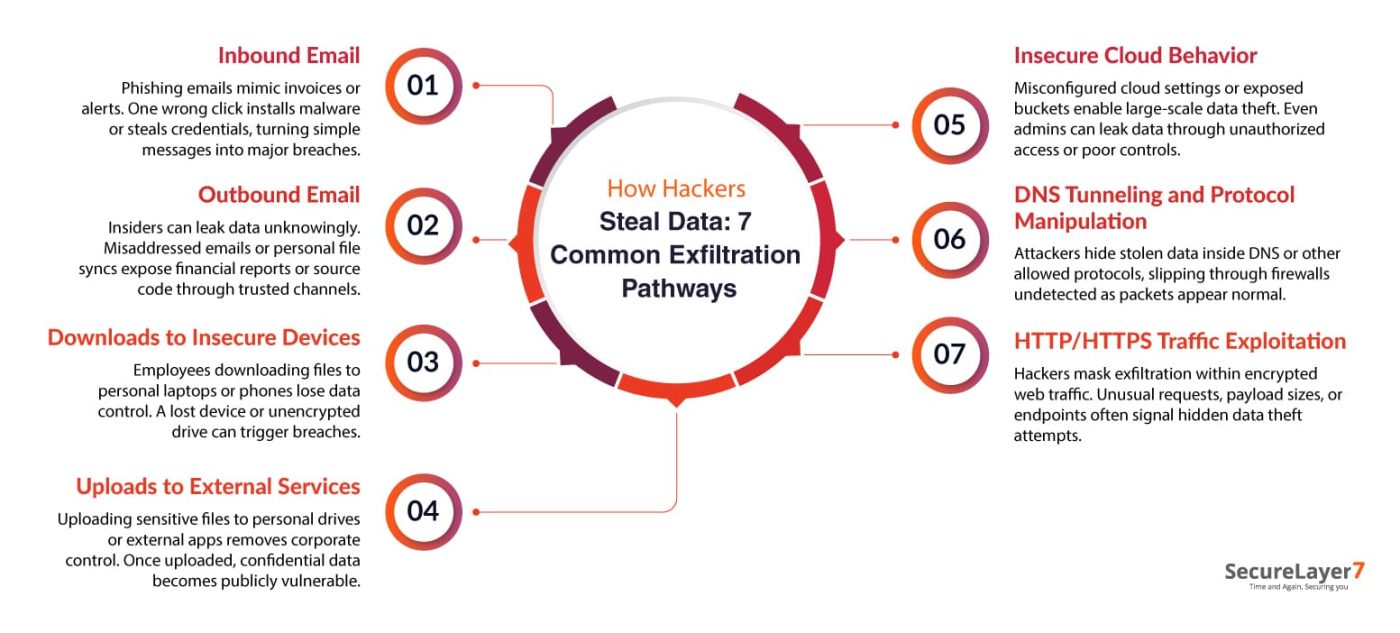
According to Verizon’s Data Breach Investigation Report, phishing contributes to more than a third of all breaches. Attackers disguise messages to look like invoices, delivery alerts, or executive requests. Once someone clicks a link or downloads an attachment, malware takes over or credentials get stolen. What begins as a single email often ends as a full-scale data breach.
Pro Tip: Sandbox suspicious attachments automatically. Users shouldn’t decide what’s safe.
2. Outbound Email
Not all data theft starts outside, many leaks begin within the organization itself. An employee forwarding a report to the wrong address, a contractor syncing files to personal storage, or a disgruntled insider moving trade secrets, all of these actions can invite data exfiltration attacks.
Outbound emails are especially risky because they use legitimate channels. Source code, financial forecasts, or internal conversations often go unnoticed until the damage is done.
3. Downloads to insecure devices
Data doesn’t always leave the networks, it can fall directly in someone’s pocket. Employees may download files to laptops, USB drives, or phones simply to finish work faster. But once business data may land on an unsecured personal device, control is lost.
A misplaced phone, an unencrypted drive, or a shared home computer can all become easy targets. This risk has amplified with hybrid work culture gaining momentum.
Pro Tip: Disable USB ports unless explicitly approved.
4. Uploads to external services
Just taking a wrong upload may prove detrimental for cybersecurity. For example, an employee uploading a sensitive file into a personal Dropbox folder or pasting confidential text into a social media message by mistake. Sometimes, employees intentionally move data off-network for convenience without thinking it can be risky. The problem is that once the information lands on an external platform, it’s out of corporate reach.
5. Insecure cloud behavior
Cloud environments make collaboration easier, but they also open quiet backdoors for exfiltration. A single misconfigured permission or exposed storage bucket can let attackers copy massive datasets in minutes. Even legitimate admins can cause leaks by deploying code or modifying virtual machines without proper controls. Threat actors with the right access can move data between secure and insecure containers or spin up rogue services that mimic official infrastructure.
Caution: Allowlist DNS resolvers and monitor unusual subdomain entropy or frequent, short queries.
6. DNS Tunneling and Protocol Manipulation
Not all exfiltration looks like a file transfer. DNS tunneling hides data inside DNS queries and responses. The payload is split into tiny chunks and smuggled through subdomains, then reassembled by an attacker-controlled server. However, protocol manipulation goes beyond DNS.
Threat actors may abuse legitimate protocols, such as SMTP, ICMP, or even LDAP, to hide data transfers inside normal-looking packets as these channels are often allowed through firewalls.
7. HTTP/HTTPS traffic exploitation
Malicious actors hide exfiltration inside seemingly harmless HTTP or HTTPS requests, piggybacking on application traffic or encrypted sessions. HTTPS makes detection harder, traffic is encrypted and often assumed safe.
Attackers may tunnel data through web forms, API calls, or return values from compromised web applications. Monitoring for unusual request patterns, anomalous payload sizes, or unexpected endpoints can reveal these schemes.
Pro Tip: Monitor HTTPS traffic patterns as encryption doesn’t mean safety.
Real-World Examples of Data Exfiltration
Here are recent real-world data exfiltration cases:
Example #1 Snowflake Breach
In May 2024, Snowflake, a leading cloud data platform, suffered a breach affecting over 100 customers, including AT&T, Ticketmaster, and Santander Bank. The breach resulted from compromised credentials, leading to vast data exfiltration. Attackers used the stolen data to extort ransoms, exposing serious lapses in credential management for many organizations.
Example #2 Qantas Salesforce Data Leak
In October 2025, Qantas experienced a data leak after hackers accessed its Salesforce-based customer service platform. The breach exposed 5.7 million customer records, including names, emails, and frequent flyer data.
The hackers, believed to be part of the Scattered Lapsus$ Hunters group, did not obtain payment data, but targeted third-party apps to gain access. The incident highlights the risks of vendor integrations in cloud systems.
Example #3 Red Hat GitHub/GitLab Data Exfiltration
Crimson Collective, a cyber extortion group, claimed a breach of Red Hat’s internal GitHub and GitLab systems in September 2025. The attackers stole around 570GB of compressed data from more than 28,000 repositories, exposing infrastructure details and client credentials.
The breach targeted Red Hat’s consulting team and was attributed to unauthorized access, stressing the need for strong internal controls and third-party risk management.
Best Practices for Prevention of Data Exfiltration
Data exfiltration incidents can be prevented using the following best practices:
- Block unauthorized file transfers and limit where users can save data. Use alerts to catch suspicious activity before sensitive files leave the network.
- Set up DLP tools to watch for sensitive data leaving your network. They detect and block risky transfers automatically.
- Give users only the access they need. Fewer privileges mean attackers can’t steal as much if they get in.
- Install security software on all devices and block risky apps. This stops insiders or malware from copying files out.
- Train staff to spot suspicious emails and risky requests. Regular tests help them avoid scams and protect sensitive data.
- Divide your network and watch for unusual data flows. This stops attackers from moving data freely if they breach a segment.
- Use MFA for all accounts. Even if passwords are stolen, it’s harder to steal data without extra verification.
- Monitor how cloud apps are used. Spot unusual activity fast, so you can block data leaks in real time.
- Decrypt and check encrypted traffic leaving your network. This reveals hidden data theft attempts.
- Have a clear plan for data breach responses. Practice it so everyone acts quickly and reduces damage if exfiltration happens.
- Regularly test your security to find weak spots. Fix them before attackers can steal data.
Data Exfiltration Prevention Solutions
Modern threat detection and response technologies empower organizations to identify, analyze, and neutralize cyberattacks swiftly. These tools continuously monitor network traffic, user behavior, and endpoint activity to help security teams detect threats in near-real time with minimal manual intervention.
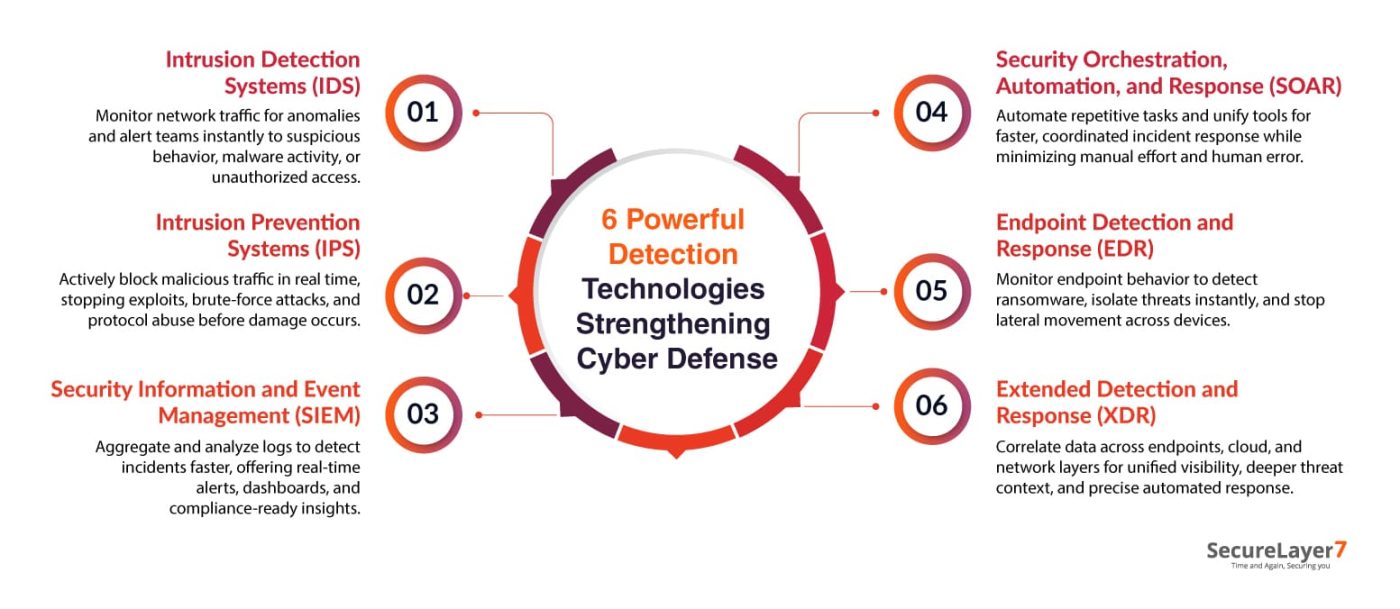
1. Intrusion Detection Systems (IDSs) monitor network traffic for suspicious patterns or policy violations. They alert security teams to possible intrusions, helping identify unauthorized access, malware activity, or unusual behavior in real time.
2. Intrusion Prevention Systems (IPSs) not only detect but actively block malicious traffic. Positioned inline, they analyze network packets, automatically stopping attacks, such as exploits, brute-force attempts, and protocol violations before damage occurs.
3. Security Information and Event Management (SIEM) platforms collect and correlate logs from diverse systems to uncover security incidents. They provide real-time alerts, dashboards, and forensic insights, enabling faster incident detection and compliance reporting.
4. Security Orchestration, Automation, and Response (SOAR) Software tools automate repetitive security tasks, integrate multiple systems, and streamline workflows. They enable faster, coordinated responses to alerts, reducing human error and improving overall security efficiency and resilience.
5. Endpoint Detection and Response (EDR) continuously monitors endpoint activities to identify threats like ransomware or fileless attacks.It provides visibility, forensic data, and automated containment to prevent lateral movement across systems.
6. Extended Detection and Response (XDR) Solutions unifies detection across endpoints, networks, email, and cloud assets. It correlates data from multiple layers, improving visibility, threat context, and automated response accuracy across the entire environment.
Conclusion
Because data exfiltration usually starts at the endpoints where files are stored, transferred, or copied; attackers view them as easy entry doors. That’s why organizations need strong endpoint detection and response tools as their first layer of defense.
At first glance, stopping data theft might seem simple. But modern attacks are far more advanced and persistent. Real protection means watching every endpoint closely, spotting unusual behavior early, and responding fast before data slips away.
Data exfiltration can be risky for businesses. Our experts at SecureLayer7 can help proactively detect the problem. Contact us today to know how we can help.
Frequently Asked Questions (FAQs)
Endpoints store and handle critical business data. Weak configurations, outdated software, or poor monitoring make them easy targets for attackers seeking to steal or copy confidential information.
EDR continuously monitors endpoint activities, detects suspicious behavior, isolates compromised systems, and alerts security teams—helping stop data theft before attackers can transfer or misuse information.
Unusual network traffic, unauthorized data transfers, repeated access to sensitive files, and unknown external connections are strong indicators of an ongoing or attempted data exfiltration attack.
Real-time monitoring enables instant detection of abnormal activity, allowing security teams to respond quickly, block malicious transfers, and minimize the potential damage of a successful data breach.