
A widely used Python package, litellm, was compromised through malicious PyPI versions 1.82.7 and 1.82.8. This incident has raised serious concerns among security professionals worldwide.
Initially, it was viewed as a typical dependency compromise, but further investigation revealed it to be a targeted campaign. It is now believed that attackers used it to distribute malicious code within the AI stack. The choice of component and attack method caught the security community off guard.
Why litellm Became a Target
The question is why did litellm become a target in the first place? The answer lies in its strategic position within the AI stack. It sits at a critical junction in modern AI applications, connecting multiple LLM providers like OpenAI, Anthropic, and Google.
This position gives it access to sensitive data, including API keys, environment variables, and configuration details. .
Also, the malicious package didn’t attack systems directly. Instead, it allowed threat actors to intercept data flowing through it.
What the Latest Findings Revealed
Earlier investigations focused primarily on the payload and its impact. However, deeper analysis provided more clarity on how the attacker gained access.
Security experts now believe the attacker did not exploit a code vulnerability. Instead, they likely bypassed the release workflow and uploaded malicious versions directly to PyPI using compromised access.
This shifts the issue from a code-level problem to a pipeline and identity security failure, which is something far challenging to detect with traditional scanning methods.
The team has since paused new releases while reviewing the entire supply chain.
Affected Versions
Affected versions include:
- V1.82.7: It contained the malicious payload embedded in proxy_server.py
- V1.82.8: It contained the persistence via litellm_init.pth + payload
If either of these versions were installed or executed, it should be considered as a compromise.
Why AI Stack Risks Now Matter
Most teams frequently use tools like this to quickly build and ship AI features using open-source resources.Attackers have become smarter and have started following the same path. They now prefer targeting these components rather than attacking an application directly. These layers matter because they connect everything, where data and credentials already pass through.
Now, attackers don’t focus on a single system or setup. Though Kubernetes environments are especially targeted by the malware, particularly to access cluster secrets, this approach makes the attack more risky.
In modern cloud environments, where local machines, CI/CD pipelines, and infrastructure are tightly connected, even a single compromised dependency can expose credentials across multiple systems.
How the Attack Works
The payload behaves like a professional-grade infostealer with persistence:
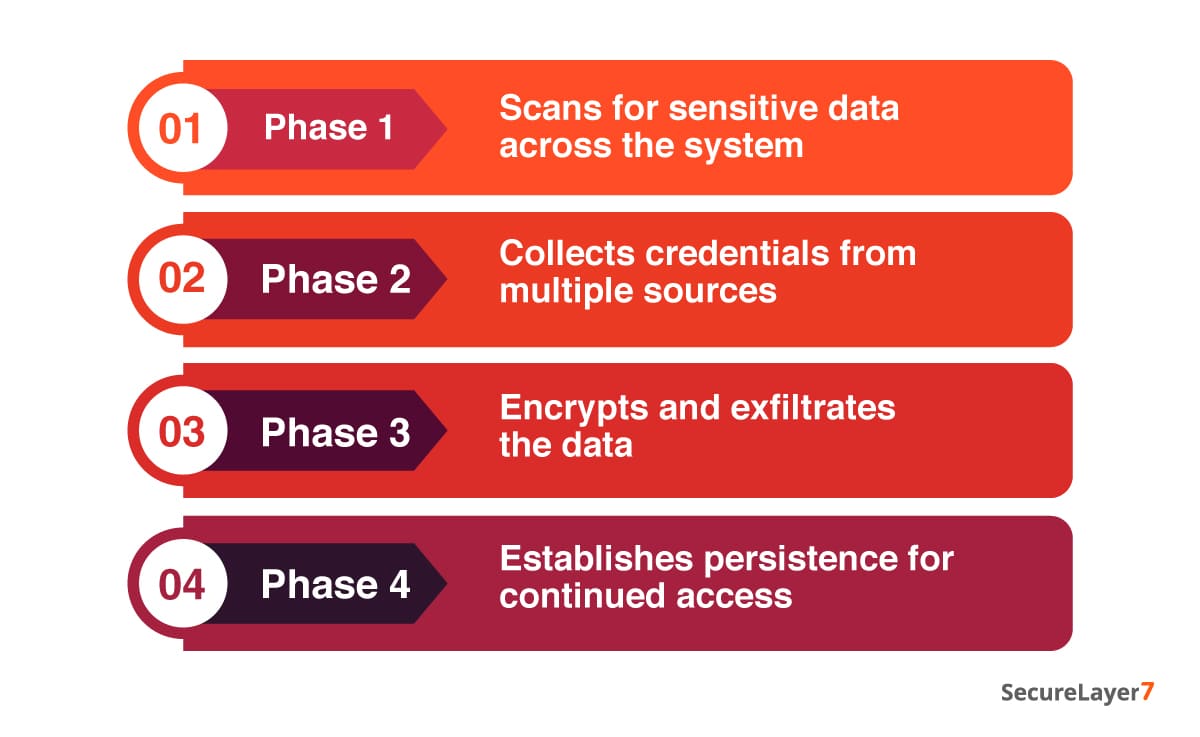
Phase 1: Attackers deploy the initial code, which then pulls in a second payload to run.
This payload encrypts everything using AES-256. It then locks that encryption key behind an embedded RSA key. The encrypted data and key are bundled into a file (tpcp.tar.gz) and sent to an attacker-controlled server.
Phase 2: The malicious code extracts system-level details.It scans the system and extracts sensitive data, including SSH keys, Git credentials, cloud access (AWS, GCP, Azure), Kubernetes tokens, CI/CD configurations, API keys, and more.
In some cases, it even attempts to use those credentials to access services directly.
Phase 3: It installs a Python script (sysmon.py) and ensures it keeps running in the background as a system service.
This entire mechanism has been designed in a way that allows the malware to avoid detection during analysis. The server keeps returning harmless content,while still enabling attackers to push new payloads.
This specifically targets:
- Environment variables
- SSH keys
- Cloud credentials (AWS, GCP, Azure)
- Kubernetes tokens
- Database credentials
It is essential to understand that the exfiltration endpoint (models.litellm[.]cloud) is not an official litellm domain, which is a key red flag. Later updates also confirmed the presence of another suspicious domain: checkmarx[.]zone.
Who Is Actually at Risk
This is a bit confusing. You are most likely affected if:
- You have installed or upgraded litellm via pip during the exposure window (March 24, ~10:39-16:00 UTC).
- If you run an unpinned install (pip install litellm).
- If your Docker builds or CI pipelines pulled the package during that window.
- A dependency indirectly installed litellm without version pinning
However, you need not worry if: :
- You have used the official litellm Proxy Docker image in which dependencies are pinned.
- You have installed from GitHub source.
- You were using a version 1.82.6 or earlier and did not upgrade.
- You use LiteLLM Cloud.
You need to understand that not every litellum user is impacted, except these two specific versions during that window.
Indicators of Compromise
You need to look for the following signs in your environment:
- Presence of litellm_init.pth in site-packages
- Outbound traffic to:
- models.litellm[.]cloud
- checkmarx[.]zone
- Suspicious files or persistence mechanisms tied to Python services
These are strong indicators that the malicious package has executed successfully.
Best Practices for Prevention
1. Rotate all secrets immediately
- Revoke and regenerate all API keys immediately. These keys often provide direct access to services and data.
- Rotate credentials for AWS, GCP, Azure, or any cloud provider. Attackers can use these credentials to access storage or move laterally across your cloud environment.
- Change all database credentials, including those used by applications and internal services.
- Replace SSH keys and remove any unauthorized entries from authorized_keys. You should also restrict open SSH access in security groups.
- Invalidate and reissue Kubernetes service account tokens. These can grant access to cluster resources, secrets, and workloads, potentially allowing attackers to control deployments.
- Rotate any sensitive data stored in .env files, config files, or runtime variables, as these are commonly targeted by attackers.
2. Audit your environment
Check for litellm_init.pth:
find /usr/lib/python3.13/site-packages/ -name “litellm_init.pth”
If you find any of the following:
- Remove it immediately.
- Carryout further system investigation.
- Preserve evidence if doing forensics.
3. Audit your pipeline and builds
Conduct security audit of your CI/CD pipeline, including:
- Local machines
- CI/CD systems
- Docker images
- Deployment logs
Confirm whether those versions were ever installed.
4. Pin to a safe version
You are highly recommended to use v1.82.6 or earlier, or wait for a verified safe release.In high-risk environments, rebuilding from a clean state is the safer option.
Key Takeaways from the PyPI Supply Chain Attack
This incident underscores a grim reality: as organizations adopt AI technologies, the surrounding software supply chain has become an increasingly attractive attack surface for threat actors.
Here are some key takeaways from the PyPl supply chain attack :
- Trust in maintainers can be bypassed through credential compromise.
- CI/CD pipelines are now prime attack surfaces.
- AI infrastructure packages are high-value targets.
This is a big shift: attackers are going after trusted, widely used components that sit at the center of everything. They will try to exploit that trust.
Securing modern applications is no longer just about code. It’s also about:
- Who can publish?
- How releases are signed and verified.
- Whether dependencies are pinned and monitored.
Because in today’s stack, a single compromised package is enough to provide a foothold.
How SecureLayer7 Can Help
SecureLayer7 helps find the kind of risks such attacks expose. Our offensive security team can help identify before they turn into incidents. With our AI and LLM pentesting services can you help assess AI security risk. It can scan code, it looks at how your AI setup actually behaves in the real world. Contact us now to learn more.
Timeline:
Status: Active investigation
Last updated: March 26, 2026
March 26 Update:
The domain checkmarx[.]zone has been added to the list of indicators of compromise.
March 25 Update:
Community-contributed scripts have been added to help scan GitHub Actions and GitLab CI pipelines for the compromised versions.
How SecureLayer7 helps
Frequently Asked Questions
Only versions 1.82.7 and 1.82.8 on PyPI carried malicious code. 1.82.7 embedded the payload in proxy_server.py, and 1.82.8 added persistence through litellm_init.pth. Version 1.82.6 and earlier are clean.
You are exposed if you ran an unpinned pip install of litellm during the window on March 24 (around 10:39 to 16:00 UTC), or if your Docker builds, CI pipelines, or an indirect dependency pulled the package then. The official litellm Proxy Docker image, GitHub source installs, and LiteLLM Cloud were not affected because dependencies are pinned.
The payload acts as an infostealer that targets environment variables, SSH keys, Git credentials, cloud access for AWS, GCP, and Azure, Kubernetes tokens, CI/CD configs, database credentials, and API keys. It encrypts the collected data with AES-256, locks the key behind an embedded RSA key, and sends it to an attacker server. In some cases it tries to use the stolen credentials to reach services directly.
Watch for the exfiltration domain models.litellm[.]cloud, which is not an official litellm domain, and the suspicious domain checkmarx[.]zone. On disk, look for the persistence file litellm_init.pth, the sysmon.py background service, and the staged archive tpcp.tar.gz. Presence of any of these on a host running 1.82.7 or 1.82.8 means assume compromise.
They did not exploit a code vulnerability. Analysis points to the attacker bypassing the release workflow and uploading the malicious versions straight to PyPI using compromised publishing access. That makes it a pipeline and identity failure, which signature and code scanning tools tend to miss.
